Mantis licenses grant access to particular features, such as Continuous Flow chips and the User Account Management System. These licenses are assigned to one Mantis instrument and synced with the maintenance and support coverage.
Read the following sections to understand more about the Mantis licensing and activation.
Mantis provides the following licensed features:
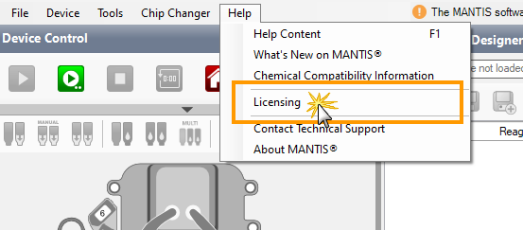
The Licensing window is available under the Help menu and contains the following options.
The Licensing Option under the Help Menu
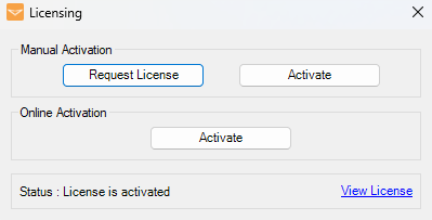
Options in the Licensing Window
Important: The Request License option requires the Mantis instrument serial number.
| Option | Description |
|---|---|
| Manual Activation |
Manual Activation requires an XML license file from FORMULATRIX. Use this option to activate a license when you do not have internet access and/or cannot connect to the FORMULATRIX server. To manually request a license file, click Request License and send the copied license request message to licensing@formulatrix.com. |
| Online Activation |
Select Online Activation if you have internet access and/or are connected to the FORMULATRIX server. This option requires that you have received your Client ID from FORMULATRIX.
Input the Client ID |
| License Status |
The Status panel displays your current activation status:
|
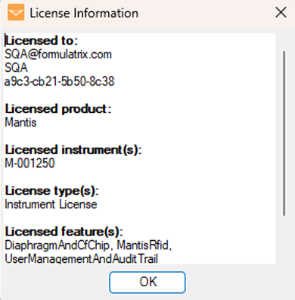
| View License |
Use this option to view detailed information about your current license.
License Information Window |
When your license has expired or is absent in your Mantis software, a License Violation notification will automatically appear. This notification will also appear after installing the Mantis software for evaluation purposes, in which case you can choose to use the software in simulation mode without a license.
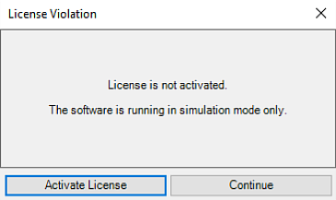
License Violation When the License is Absent or Not Activated
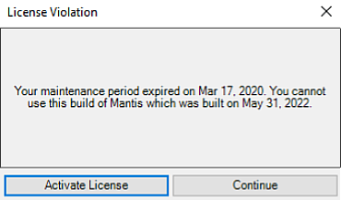
License Violation When the License is Expired
There are two options displayed in the License Violation notification window:
Activate License
Click this button to activate/reactivate the license using a license file or Client ID. Read the instructions below to request a license and/or activate/reactivate it.
Continue
Click Continue to run the Mantis software in simulation mode to evaluate the Mantis software.
Note: If your active license expires, you can still operate Mantis with the current software version. However, you will need to activate a new license to continue your maintenance and support services and to access software upgrades.
In the License window, click Request License based on your license activation preference:
Manual Activation
The identifying information from your Mantis instrument will be automatically copied to your computer's clipboard. Paste this information into an email to licensing@formulatrix.com.
After you have received the license file, save it somewhere easy to find, such as the Desktop. Note that if the license is in ZIP format, you will need to extract it to access the XML file.
Online Activation
Fill in the Reply-to-Address field.
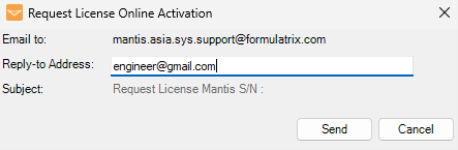
Request License Online Activation
Click Send. The identifying information from your Mantis instrument will be automatically sent to licensing@formulatrix.com and the support team will send you a Client ID.
Choose from the following options:
Go to the Help menu, and select Licensing.
OR
If a License Violation notification appears, click Activate License.
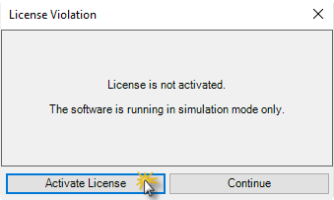
License Violation Notification
In the Licensing window, select your preferred method:
Manual Activation
Click Activate.
Then, locate the license file in your local directory, and open the file. Wait for a moment while Mantis activated your license.
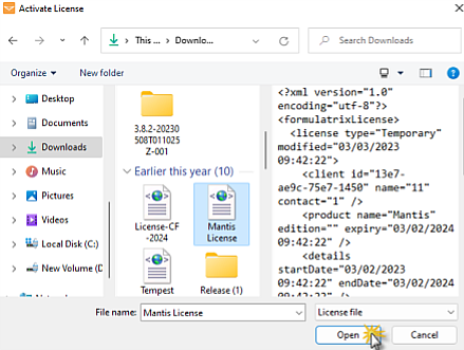
Select the License File
Online Activation
Click Activate.
Note: If you click Activate and Mantis detects an active license in your current software, the following notification will appear. Click Yes to proceed with the reactivation.
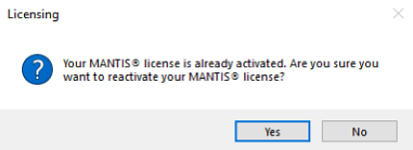
License Reactivation Notification
Input Client ID in the provided field. If the Client ID is correct, a green check icon will appear. Click Continue to confirm.
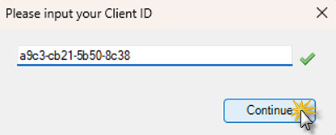
Input the Client ID
Note: A red X indicates your Client ID is incorrect. Make sure to input the correct Client ID and try again. If this problem persists, contact FORMULATRIX support for further assistance.
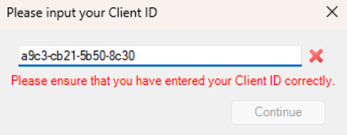
Incorrect Client ID
Congratulations! Your Mantis license has been successfully activated. Click OK to restart the software.
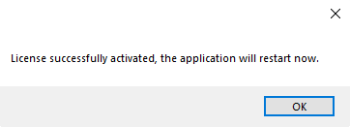
Mantis License Has Been Activated

|
|
| MAOWH-V54R126 |