The Liquid Classes feature allows you to precisely dispense reagents of different viscosities. Mantis comes with default liquid class groups, each with its own optimized dispense settings. You can create a custom liquid class to dispense unique or challenging reagents optimally.
Read the sections below to learn about the liquid class overview, how to create a custom liquid class, and nozzle and liquid class recommendations for dispensing based on reagent viscosities.
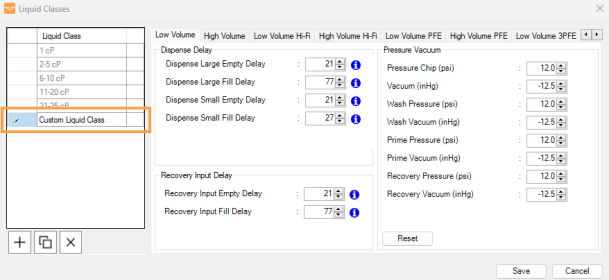
The Liquid Classes window, accessible from the Tools menu, allows you to manage liquid classes. There, you will find 2 main panels: Liquid Class and Chip Settings.
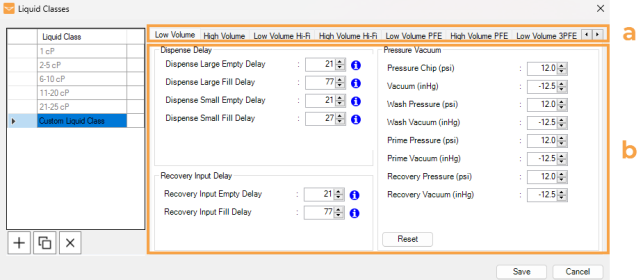
The Liquid Class column lists all the available liquid classes. Each liquid class has an associated Chip Settings section that allows you to adjust dispense delays and pressure/vacuum levels for each chip type.
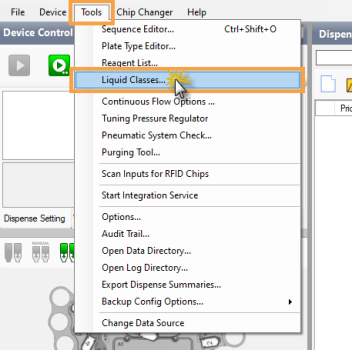
Select Liquid Classes Option
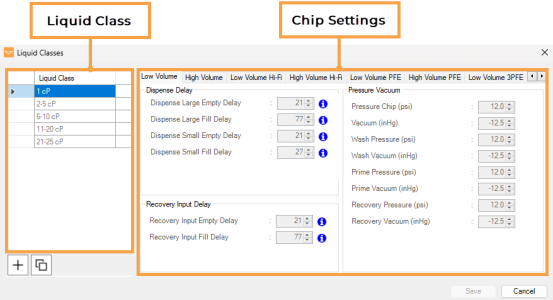
Liquid Classes Window
The following are the default liquid classes:
Note: The centipoise (cP) is a unit of dynamic viscosity. It corresponds to the resistance of liquid to flow. At 20°C, the viscosity of water is about 1 cP.
Note: The XL Volume PFE chip's default liquid classes are 1 cP and 2-5 cP. For optimal dispense results with XLP chips, assign reagents with a viscosity of 1-5 cP.
Under the Liquid Class column, there are functional buttons you can use to manage your liquid classes:
Add New Liquid Class allows you to create a new liquid class.
Duplicate Existing Liquid Class allows you to duplicate the selected liquid class, which can then be modified.
Delete Selected Liquid Class allows you to remove a user-created liquid class. This button is available once you create a new/custom liquid class.
Empty Delays: The time for which the diaphragm remains under pressure, enabling the reagent expulsion from the cavity. While it has minimal impact on most liquids, highly viscous reagents may benefit from slightly longer empty delays to ensure complete expulsion.
Fill Delays: This is the primary parameter for customizing a liquid class. It defines the time the diaphragm experiences a vacuum, allowing reagent inflow to fill the cavity beneath the diaphragm. Longer fill delays work better with more viscous reagents.
Empty Delays: The time for which the large diaphragm remains closed while the chip is being emptied during recovery.
Fill Delays: The time for which the large diaphragm stays open while the chip is being filled during recovery.
Pressure and Vacuum: The Chip and Output pressure/vacuum settings control the actuation of diaphragms and valves, respectively. Higher pressure and/or vacuum result in more rapid diaphragm actuation and benefits when working with more viscous reagents.
Note: Coordination between pressure/vacuum and delay timing is crucial for efficiently dispensing liquids of different viscosities.
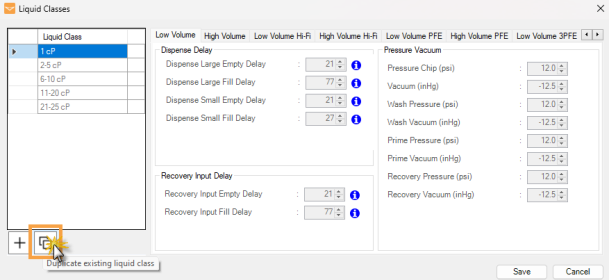
To create a custom liquid class, we recommend you start by duplicating a default liquid class and then customizing the parameters. It is essential to set the delay and pressure vacuum values to fall within the range defined by the default Mantis liquid classes. Using values that are out of range may affect the accuracy and precision of the dispense.
In the Liquid Classes window, choose from the following options:
Click the Add new liquid class button.
OR
Select a default liquid class of your choice, and then click Duplicate existing liquid class.
Duplicating a Default Liquid Class
Define the new liquid class name, and press Enter on your keyboard.
The Duplicated Liquid Class
Modify the dispense settings by following these steps:
Important: It is preferred to adjust liquid class by modifying Fill Delays and Empty Delays. The Pressure Vacuum settings should not be altered unless you are directed by FORMULATRIX support to do so. See the recommendations below to adjust the pressure/vacuum settings.
Define the dispense delay, recovery input delay, and pressure/vacuum settings as needed.
Modify the Settings for Each Chip Type
Repeat steps a-b to modify the settings for the other chip types as needed.
Click Save to save the new liquid class and close the window.
Important: The delay and pressure/vacuum settings of the Mantis default liquid classes cannot be modified or deleted. However, any liquid class assigned to a reagent in the Reagent List can be modified but cannot be deleted.
To edit an existing liquid class, click on the selected liquid class and modify the settings as needed.
To delete an existing liquid class:
Select the liquid class you want to delete. You can use the Ctrl key to select multiple liquid classes.
Click the Delete selected liquid class button.
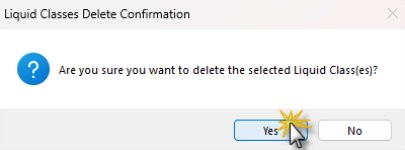
Then, click Yes on the pop-up message.
Liquid Class Delete Confirmation
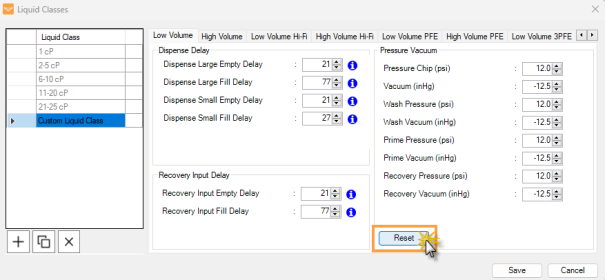
Click Reset to revert to the default settings.
Click the Reset Button
Click Save to save the changes.
Mantis can dispense liquids with viscosities up to 25 centipoise (cP) using the default liquid classes provided in the software. Working with high-viscosity reagents without properly assigning liquid class can cause inaccurate dispense volume, higher coefficient of variation (CV), and hanging drops.
Here are some commonly used reagents with viscosities approaching the top-end of the default liquid classes:
PEG 1000, 40%
PEG 3350, 28%
PEG 4000, 25%
PEG 8000, 18%
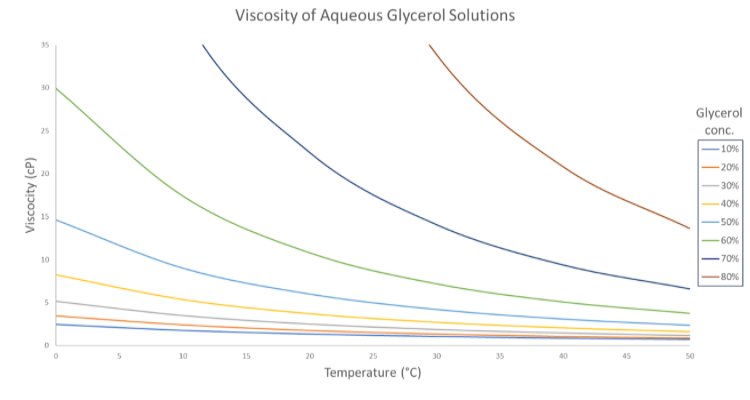
Use the following table and plot as a rough guide for liquid class selection.
| Viscosity of Aqueous Glycerol Solutions (cP) | ||||||
|---|---|---|---|---|---|---|
| Glyc % Wt. | Temperature (°C) | |||||
| 0 | 10 | 20 | 30 | 40 | 50 | |
| 0 | 1.792 | 1.308 | 1.005 | 0.8007 | 0.6560 | 0.5494 |
| 10 | 2.44 | 1.74 | 1.31 | 1.03 | 0.826 | 0.680 |
| 20 | 3.44 | 2.41 | 1.76 | 1.35 | 1.07 | 0.879 |
| 30 | 5.14 | 3.49 | 2.50 | 1.87 | 1.46 | 1.16 |
| 40 | 8.25 | 5.37 | 3.72 | 2.72 | 2.07 | 1.62 |
| 50 | 14.6 | 9.01 | 6.00 | 4.21 | 3.10 | 2.37 |
| 60 | 29.9 | 17.4 | 10.8 | 7.19 | 5.08 | 3.76 |
| 70 | 76 | 38.8 | 22.5 | 14.1 | 9.40 | 6.61 |
| 80 | 255 | 116 | 60.1 | 33.9 | 20.8 |
13.6 |
(taken from Physical Properties of Glycerine and Its Solutions (1963), p.10)
Viscosity of Aqueous Glycerol Solutions Graph
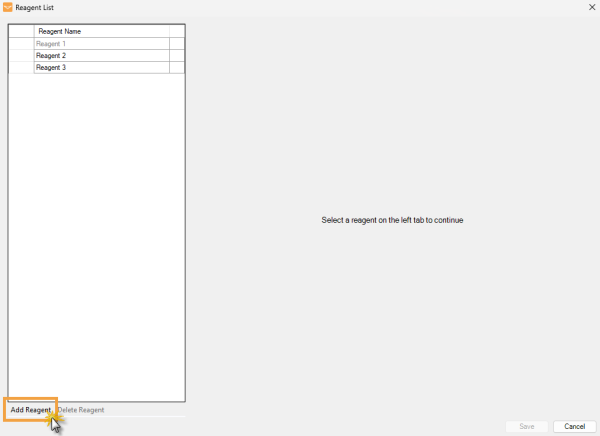
From the Tools menu, open the Reagent List window, and add a new reagent.
Create a New Reagent
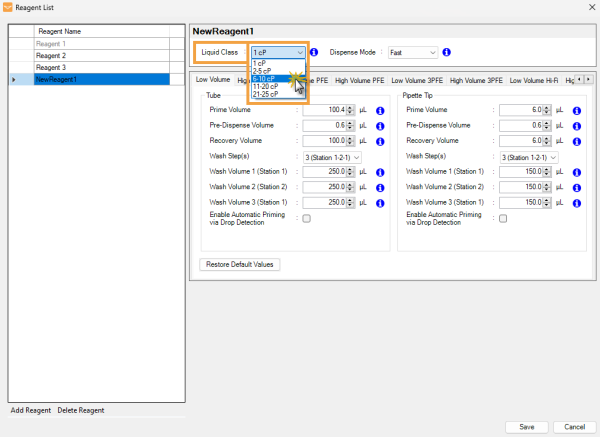
Select a liquid class based on your reagent viscosity from the Liquid Class dropdown selection at the right side of the Reagent Name list.
Selecting Liquid Class
Click Save to save the changes.
In the Reagent List window, select the reagent of your choice.
Choose the liquid class based on your reagent viscosity.
If your reagent is too viscous for the default liquid classes, you can create your own custom liquid classes with longer delay timings and higher pressures. For more information on creating custom liquid classes, see Managing Liquid Classes.
Note: Use of custom liquid classes may damage your chips and will impact performance. Chip specifications are not guaranteed when using custom liquid classes, and we recommend contacting support@formulatrix.com for assistance with this process.
For Continuous Flow (CF) dispensing, increase the Bottle Pressure value to help dispense viscous reagents. Each reagent might require a slightly different bottle pressure for optimal dispensing.
Note: You should recalibrate the CF chips whenever you change the bottle pressure. For more information on calibrating the CF chips, see Calibrating Continuous Flow Chips.
As your reagents’ viscosity might vary from <1 cP (very low) to >25 cP (very high), selecting the correct chip nozzle size and liquid class for your reagents is critical to achieve optimal dispense quality. Selecting the proper nozzle size prevents large hanging drops from building up on the nozzle.
As a general rule, more viscous reagents (glycerol, PEG, etc.) are best dispensed through smaller nozzles and less viscous reagents (alcohols, detergents, surfactants, etc.) are dispensed best through larger nozzles. Small nozzle inner diameter (ID) creates more backpressure, resulting in a higher liquid ejection velocity, whereas larger nozzles cause a "softer" dispense.
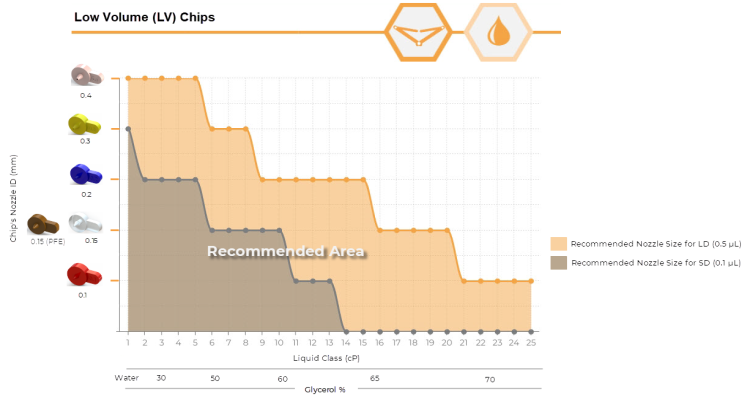
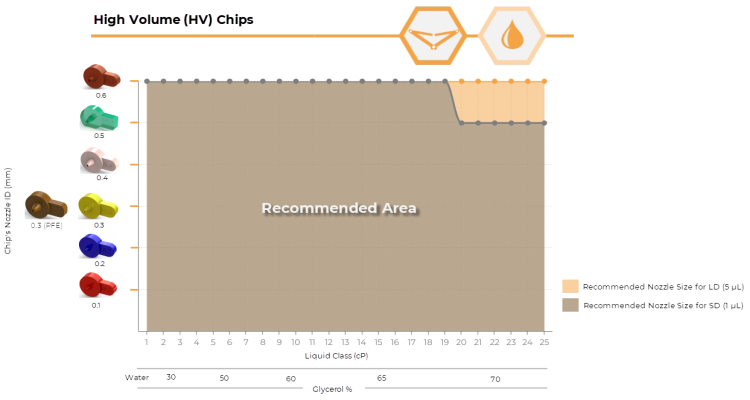
Use the following plots to guide your nozzle selection process. All nozzle sizes under the curves have been tested to work for the specified reagent viscosity. Nozzle sizes falling above the shaded area are not recommended. These recommendations were generated using glycerol and will not be definitive for all reagents as fluid properties can vary widely.
Mantis LV Chip’s Nozzle Size Guide Chart
Mantis HV Chip’s Nozzle Size Guide Chart
| Low Volume (LV) Hi-Fi Chip | |||||||
|---|---|---|---|---|---|---|---|
| Viscosity (cP) | Large Diaphragm/Small Diaphragm | Nozzle Compatibility | |||||
|
|
|
|
|
|
||
| 0.5 | 0.4 | 0.3 | 0.3 (PFE) | 0.2 | 0.1 | ||
| 1 | Small Diaphragm | ✘ | ✘ | ✔ | ✔ | ✔ | |
| Large Diaphragm | ✘ | ✔ | ✔ | ✔ | ✔ | ||
| 2-5 | Small Diaphragm | ✘ | ✘ | ✘ | ✔ | ✔ | |
| Large Diaphragm | ✘ | ✘ | ✔ | ✔ | ✔ | ||
| 6-10 | Small Diaphragm | ✘ | ✘ | ✘ | ✘ | ✔ | |
| Large Diaphragm | ✘ | ✘ | ✘ | ✔ | ✔ | ||
| 11-20 | Small Diaphragm | ✘ | ✘ | ✘ | ✘ | ✔ | |
| Large Diaphragm | ✘ | ✘ | ✘ | ✘ | ✔ | ||
| 21-25 | Small Diaphragm | ✘ | ✘ | ✘ | ✘ | ✔ | |
| Large Diaphragm | ✘ | ✘ | ✘ | ✘ | ✔ | ||
Mantis LV Hi-Fi Chip’s Nozzle Size Recommendation
| High Volume (HV) Hi-Fi Chip | ||||||||
|---|---|---|---|---|---|---|---|---|
| Viscosity (cP) | Large Diaphragm/Small Diaphragm | Nozzle Compatibility | ||||||
|
|
|
|
|
|
|
||
| 0.6 | 0.5 | 0.4 | 0.3 | 0.3 (PFE) | 0.2 | 0.1 | ||
| 1 | Small Diaphragm | ✔ | ✔ | ✔ | ✔ | ✔ | ✔ | |
| Large Diaphragm | ✔ | ✔ | ✔ | ✔ | ✔ | ✔ | ||
| 2-5 | Small Diaphragm | ✘ | ✘ | ✔ | ✔ | ✔ | ✔ | |
| Large Diaphragm | ✘ | ✘ | ✔ | ✔ | ✔ | ✔ | ||
| 6-10 | Small Diaphragm | ✘ | ✘ | ✘ | ✔ | ✔ | ✔ | |
| Large Diaphragm | ✘ | ✘ | ✘ | ✔ | ✔ | ✔ | ||
| 11-20 | Small Diaphragm | ✘ | ✘ | ✘ | ✘ | ✘ | ✔ | |
| Large Diaphragm | ✘ | ✘ | ✘ | ✘ | ✘ | ✔ | ||
| 21-25 | Small Diaphragm | ✘ | ✘ | ✘ | ✘ | ✘ | ✔ | |
| Large Diaphragm | ✘ | ✘ | ✘ | ✘ | ✘ | ✔ | ||
Mantis HV Hi-Fi Chip’s Nozzle Size Recommendation
When dispensing with CF chips, larger nozzles result in higher flow rates. The nozzle vs viscosity chart for HV chips is a good reference for CF chips.
For more information on the Mantis chip’s nozzle size, see Hardware Overview.
The list below is the general recommendations for creating a custom liquid class in Mantis. Actual effects may vary based on specific liquid properties, hardware conditions, and other external factors. Always perform iterative testing to find optimal settings.
A moderate pressure and vacuum with short dispense delays are sufficient as low-viscosity liquids flow easily.
Use the standard fill delays and empty delays.
No adjustments to pressure/vacuum settings are required.
Consider reducing the pressure while increasing the empty delay for gentle dispensing or to avoid splashing. This can be helpful with cells or reagents that are prone to foaming.
High-viscosity liquids flow into the diaphragm cavity slowly, often necessitating higher pressure/vacuum and prolonged delays.
Increase fill delay to accommodate the slower inflow. Consider increasing the fill delay further if under-dispensing is observed.
Extend empty delay to ensure complete evacuation of the reagent. However, increasing the empty delay will not be necessary for most reagents.
Slightly increase the vacuum (1-3 inHg) to ensure the complete filling of the diaphragm cavity.
Elevate the pressure (1-3 psi) for effective expulsion of the liquid.
Consider increasing the pressure and empty delay to avoid hanging droplets on the nozzle. Using a smaller nozzle ID can also help avoid droplet formation when working with viscous reagents.
DO NOT exceed 21 psi for pressure or -18 inHg for vacuum. Doing so could damage your Mantis instrument.
Related Topics
|
|
| MAOWH-V54R126 |