Click the Recover All Inputs button  .
.
Reagent recovery is a process in which the Mantis chip pushes excess reagent volume from the chip back to the input source. This process can help you conserve reagent volume.
Note: For the Continuous Flow (CF) chips, you can determine the recovery duration, enable the double recovery setting, and determine the delay time between two recoveries. For more information, see Input Control Panel.
Click the Recover All Inputs button .
Right-click on a reagent in the Input Control Panel and select Attach Input to Hand.
OR
Click the reagent number.
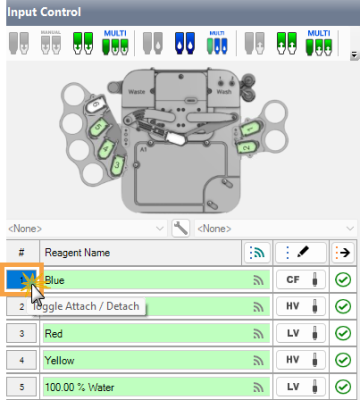
Click the Reagent Number to Attach the Chip
Click the Recover Input button  .
.
Important: We recommend washing the chips after each use. See Washing the Mantis Chips for further details.
Click the Recover Selected Inputs button  to open the Recovery Inputs Selection window.
Select the desired reagent, or check the Select All box to select all reagents assigned in the Input Control panel. You can also search for a reagent by typing the name in the Search field.
OPTIONAL: Click Select From Dispense List to only select the assigned reagents listed in the dispense list.
Click Recover.
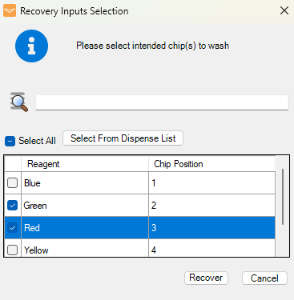
Recovery Inputs Selection Window
 | |
| MAOWH-V54R126 |