Open topic with navigation
Washing the Mantis Chips
Washing the Mantis chips after use prevents cross-contamination and dried reagent buildup. Start by removing reagent tubes from the bottles and placing them in a waste container. When setting up the wash stations, fill Wash Station 1 with water and Wash Station 2 with wash solution.
The Mantis provides three wash options: 1-step, 2-step, and 3-step. The 1-step wash uses water only. The 2-step wash uses a wash solution followed by water. The 3-step wash includes sequential rinses of water, wash solution, and water. Recommended use of these is as follows:
-
For regular use, always run a 3-step wash with your chosen wash solution.
-
Before storing the chip in alcohol, perform a 2-step wash with alcohol as wash-solution.
-
When using the chip stored in alcohol again, use a 1-step wash with water before using.
For more information, refer to the Wash Step(s).
Before washing the chips, you must configure the wash settings and set up the wash stations on the Mantis instrument, especially after using reagents with varying viscosities.
Configuring the Wash Settings
-
Go to the Tools menu and select Reagent List.
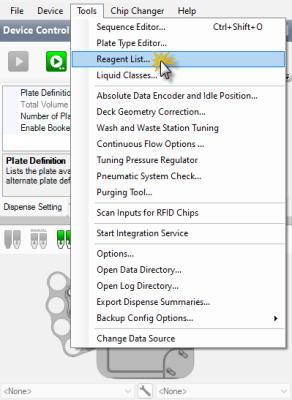
Reagent List Menu
-
Select the Reagent Name that you want to configure.
-
Select the chip type tab based on the chip you want to configure.
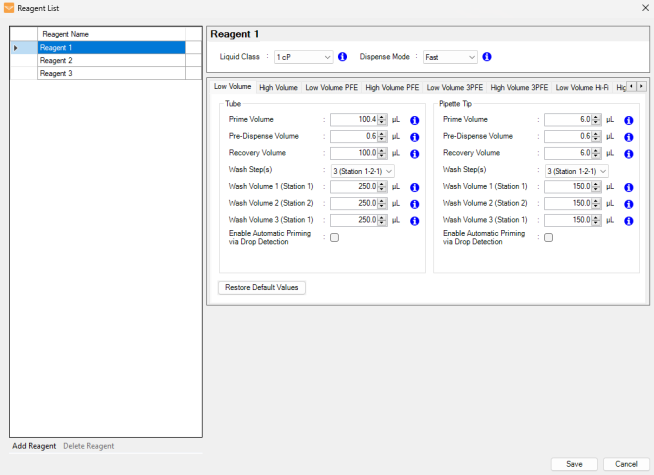
Reagent List
-
Select the desired wash step option from the Wash Step(s) list for the input source type you are using (Tube or Pipette Tip).
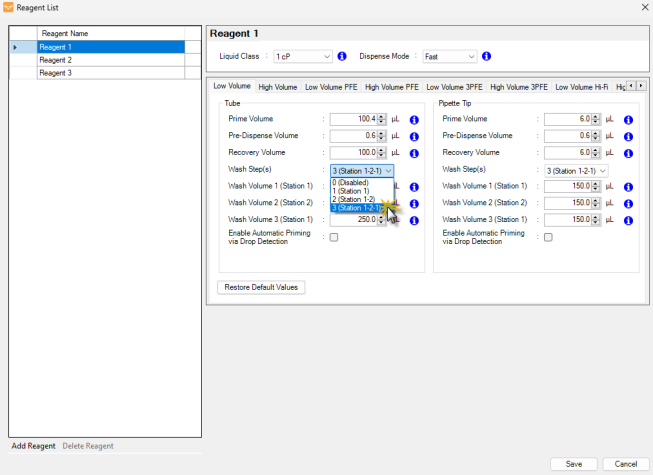
Select the Desired Wash Step Option
-
Then, type the desired volume for Wash Volume 1 (Station 1), Wash Volume 2 (Station 2), and Wash Volume 3 (Station 1), depending on the wash step you selected. To see the default volume, go to Default Volume and Tubing Length Recommendation.
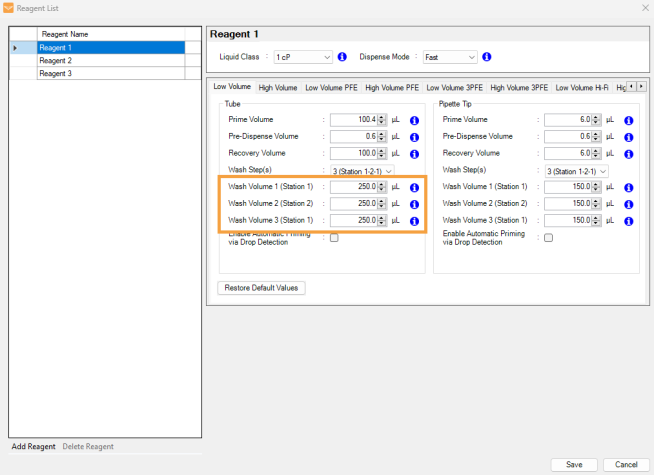
Type the Wash Volume
-
Repeat steps 2-5 to configure the wash settings for other reagents.
-
Click Save.
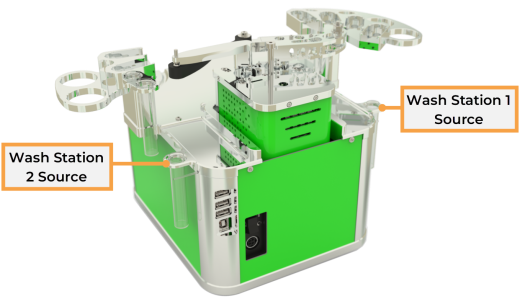
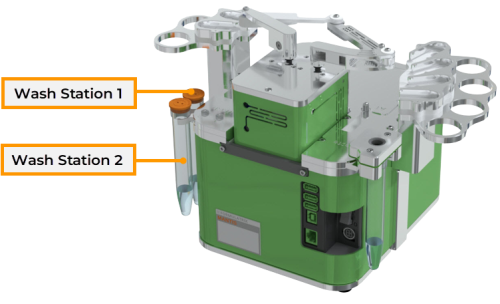
Setting up the Mantis wash stations:
|
|
| Mantis V3 Wash Stations
|
Mantis V4 Wash Stations
|
-
Fill the bottle in Wash Station 1 Source with water.
-
If you want to run a 2 (Station 1-2) or 3 (Station 1-2-1) step wash, fill the bottle in Wash Station 2 Source with wash solution. See also Wash Step(s).
Note: Acceptable wash solutions include: Low molar (~0.01N) NaOH, 10% bleach, or 70% ethanol.
-
Put the input tubes into a waste container.
General Cleaning of Diaphragm and CF Chips
Prerequisites:
To wash an individual diaphragm chip:
- Right-click a reagent on the Device Control panel and select Attach Input to Hand, then click the Wash Input button
 .
.
To wash all chips:
- Click the Wash All button
 .
.
To wash selected chips:
-
Click the Wash Selected Inputs button  on the Input Control Panel.
-
Select the assigned chips by choosing the following options:
-
Type a reagent name that is assigned to the chip in the Search box. Then, select the checkbox next to the reagent name.
-
For multiple selections, select the checkboxes of the selected reagents which are assigned to the chips in the table.
-
Click the Select From Dispense List button to only select reagents available in the loaded dispense list.
-
Select the Select All option to select all of the reagents in the table.
Note: You cannot select a reagent that is assigned to the Continuous Flow (CF) chip. To wash the CF chip, go to the Cleaning the Continuous Flow Chips section.
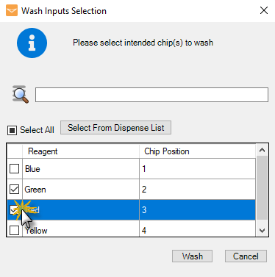
Select the Reagents of the Assigned Inputs
-
Click Wash when you’re done.
Molecular Grade (MG) Cleaning of Diaphragm and CF Chips
This guide provides instructions for sterilizing Mantis chips to a molecular-grade standard, ensuring they are free from DNA, RNA, RNase, DNase, proteases, and microbial contamination. It is intended as a reference only, and all local cleaning protocols should be certified by the appropriate laboratory personnel.
The procedure has been validated to achieve the sterility levels described in the Certifications section.
Precautions
Chip exposure to any object that is not MG grade or cleaned to MG grade will pose a risk of contamination.
We strongly recommend that all operations be supervised by authorized operators, with personnel trained on the importance of preventing RNase, DNase, and protease contamination.
Mantis MG chips were originally cleaned and packaged in an isolated, MG-grade clean environment. All surfaces and objects must be wiped with a cleaning solution before coming in contact with MG chips.
Important: Always wear gloves when touching the chip and use tweezers to remove/attach nozzles. Avoid direct contact with the chip/nozzle during the cleaning process to prevent the chip from contamination.

|
0.1 N NaOH wash solution has a pH of 13 and is highly corrosive. Handle with care to prevent injury. |
Summary of Method
The standard cleaning procedure of the MG chips should follow the steps below.
-
Prepare a clean working environment (e.g. Bio Safety Cabinet, clean room, or laminar airflow cabinet) by wiping all working surfaces with a 0.5% hypochlorite solution or suitable disinfectant.
-
Before use, pre-clean the required materials by wiping them with the hypochlorite/cleaning solution to prevent cross-contamination among the materials.
-
Proceed to the cleaning process by choosing the following options:
-
Prewash the chips by running a standard wash, such as 70% alcohol and water, using the built-in Mantis wash stations to remove large debris and pre-clean the chips.
-
Using Mantis, dispense NaOH solution through a chip to fill the chip’s diaphragms. Then, let the solution stay in the chip for at least 5 minutes. Following the soak, dispense the remaining NaOH solution out of the chip and disassemble it by removing the nozzle and tube adapter. Soak all the components of the chip in the NaOH solution for 5 minutes.
-
Then, rinse the chip components with Molecular Grade (MG) water. Assembled and returned to the Mantis. Dispense the MG water through the chip twice to remove residual NaOH.
-
Put the chip in the sterilized container with proper sealing for storage, or use it immediately.
Important: To prevent contamination, immediately use the clean chips or store them in a clean air-tight container. The cleanliness of chips is dependent upon individual site storage conditions. Rewash the chips before use if there are concerns with the sterility of the storage environment.
MG Chip Cleaning Procedure
Required Materials:
-
Mantis instrument and computer
-
2 pcs of Molecular Grade (MG) pipette tips
-
3 pcs of 50 mL beakers:
- 1 beaker for NaOH solution
- 1 beaker for rinse 1
- 1 beaker for rinse 2
-
Paper towels
-
1 pc of Tweezers
-
Powder-free gloves
-
Sterilized clean container for storing the chips
Required Solutions:
- 50 mL of 0.1 N NaOH to clean and submerge the chips
- 500 mL of MG water for the rinse process
Prerequisites:
- You have prepared the materials and cleaned the equipment as instructed in the Summary of Method section.
- You have opened the Mantis software.
- You have labeled each beaker with “NaOH”, “Rinse 1”, and “Rinse 2”.
To clean the MG chips:
-
Prepare the materials and solutions by following the steps below:
-
Pour ~25 mL NaOH into the NaOH beaker, ~25 mL MG water to each Rinse 1 and Rinse 2 beaker.
-
Remove the tube adapter from a Mantis chip input and attach the chip to the chip changer. For more information, go to Setting Up Mantis for a Dispense.
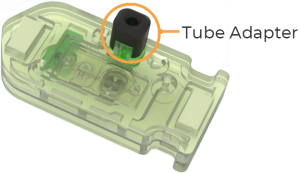
Tube Adapter on the Mantis Chip
-
Take one pipette tip and manually fill it with the NaOH solution with the following volume:
- 1000 µL if you are using an HV chip.
- 150 µL if you are using an LV chip.
-
Attach the pipette tip to the chip input.
-
Dispense 500 µL of the NaOH if you are using an HV chip or 75 µL of NaOH if using an LV chip.
Note: This can be done via a manual prime to dispense directly into the waste station.
-
Proceed to step 2 to start the cleaning process.
-
Activate the chip diaphragms to fill the fluid path with NaOH by following the steps below.
-
In the Mantis software, click the Valve Control tab in the Device Control Panel. The controls in the Valve Control tab will automatically change when you click on the particular valve, control, or diaphragm.
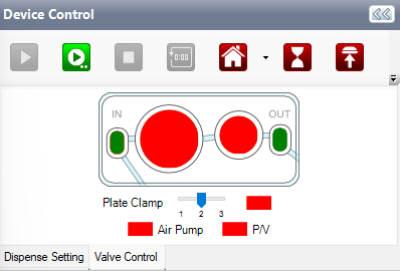
Valve Control Tab
- Red indicates that the diaphragm, valve, or control is closed or turned off.
- Green indicates that the diaphragm, valve, or control is open or turned on.
-
Open the Air Pump by clicking the red indicator to green.
-
Open the OUT valve by clicking the red indicator to green.
-
Close both of the chip’s diaphragms by clicking both circles until they turn red.
-
Close the OUT valve by clicking the green indicator to red.
-
Open the IN valve by clicking the red indicator to green.
-
Open both diaphragms by clicking both circles until they turn green.
-
Wait for the NaOH to soak inside the chip for 5 minutes.
-
Then, dispense the remaining 500 µL of NaOH (for HV chip) or 75 µL of NaOH (for LV chip).
-
When the dispense is finished, detach the pipette tip and remove the chip from the chip changer.
-
Disassemble the chip by removing the silicone nozzle. Use the tweezers if needed.
-
Submerge the chip components (chip, nozzle, and tube adapter) in the NaOH beaker, and agitate the bath to ensure all surfaces are in contact with the solution. Soak them for ~5 minutes.
-
After that, rinse the chip, nozzle, and tube adapter with MG water in the Rinse 1 beaker. Make sure that all chip components surfaces come in contact with the rinse solution.
-
Repeat step 8 to proceed to the 2nd rinse process, using fresh MG water in the Rinse 2 beaker.
To rinse the MG chips:
-
Reassemble the chip components and attach the chip back to the chip changer.
-
Take the second pipette tip and attach it to the chip.
-
Fill the pipette tip with the MG water with the following volume:
- 1200 µL for HV chip
- 250 µL for LV chip
-
Dispense with 1250 µL of MG water (for HV chip) or 260 µL of MG water (for LV chip). The dispense volume is more than the fill volume to ensure that you completely purge the liquid from the chip.
-
Repeat steps 2-4 for the second wash.
-
Finally, keep the chips in a sterile container or use them immediately.
Note: For long-term storage, flush the chip with MG-grade 30% glycerol solution before storing it to the container to avoid the tendency of the washed valve clusters getting sticky after some months.
Certifications
Internal testing has shown that this procedure can clean Mantis’s chips below the following levels of detectable contamination.
Free of any detectable DNAse/RNAse contamination as tested with commercial fluorometric assays.
Free of any detectable DNA contamination (will not inhibit PCR reactions)
- Sensitivity: 1 pg
- PCR certified, no PCR inhibition, free of detectable human DNA.
Free of any detectable protease contamination
Cleaning the Continuous Flow Chips
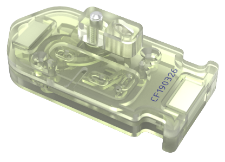
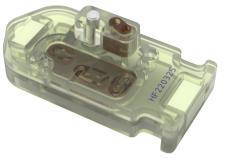
For the Continuous Flow (CF) chips cleaning process, clean both silicone and PFE CF chips by following this method.

|

|
| CF Silicone Chip with 0.5 mm Nozzle Size
|
CF PFE Chip with 0.15 mm Nozzle Size
|
Required Tools
- 1 pc of tweezers
- 1 pc of 1.5 mm hex key
- A pair of gloves
- Lint-free cloth (e.g. kimwipes)
Required Materials
- CF chip (silicone or PFE)
- Cleaning solutions: distilled water and alcohol
- Falcon tube, Nalgene bottle, or Schott bottle to match your CF harness
- A small container for soaking the nozzle
- Optional:
- 1 pc of a 96-well or deep-well plate as a waste container
- 1 pc of a weigh boat or another reservoir to collect dispersed wash fluid
Prerequisites
- The Mantis with Continuous Flow functionality has been activated.
- The appropriate CF harness has been connected to your CF chip.
- CF bottles have been attached to the Tube Holders to hold wash liquids.
- You have launched the Mantis software.
To clean the CF chip:
-
Attach the CF harness to a bottle/tube filled with your chosen wash solutions.
Tips: Run multiple steps (e.g. water followed by alcohol followed by water) cleaning procedure for best results. Increase wash volumes if carryover contamination is present.
-
To start the cleaning procedure, choose from the following common options.
-
Place the 96 or 96 deep-well plate on the Mantis deck, and dispense the cleaning solution to all wells of the plate.
-
Dispense the cleaning solution to the reagent reservoir or weigh boat on the Mantis deck. You can run a single large dispense or dispense the reagent to multiple locations within the target reservoir.
-
Click the Priming Input button  to prime the cleaning solution through the chip into the Mantis waste container on the Waste Station. The waste container will need to be emptied periodically.
-
OPTIONAL: After the dispense, you can hold the primed CF chip on the Mantis hand to soak the chip internals for 5 minutes. To do so, follow the steps below.
-
Go to the Tools menu, and select Options.
-
Under the Options tab, set the Detach Chip After Dispense option to False.
- Click OK to save the changes.
-
Manually recover and return the chip to the chip changer location following the soak period.
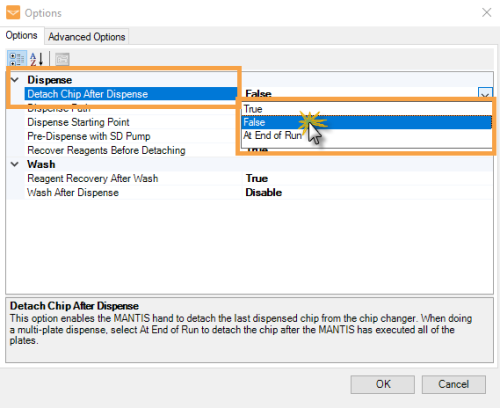
Set the Detach Chip After Dispense to False
-
Clean the external surfaces of the chip and nozzle by following the steps below:
-
Manually disengage the chip from the Mantis chip holder.
-
Remove the harness/tube from the chip by using the 1.5 mm hex key.
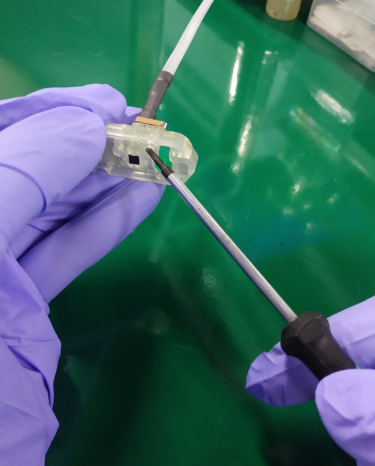
Removing the Harness/Tube from the Chip
-
Using tweezers, carefully remove the nozzle from the chip as shown in the image below. Avoid contact with the nozzle tip to minimize the risk of damage.
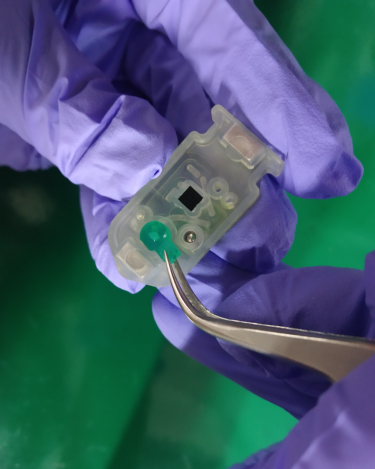
Removing the Nozzle from the Chip
-
Soak the nozzle in a container with alcohol for 3-5 minutes or until there is no dirt/particles on the nozzle. When it’s clean, take out the nozzle using tweezers, and let it dry completely.
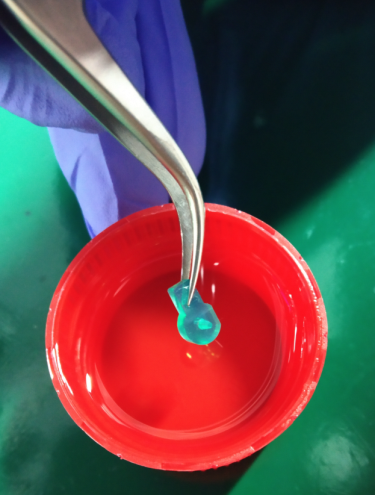
Take Out the Nozzle from the Alcohol
-
Gently wipe the external surfaces of the chip and the harness terminals with alcohol using a lint-free cloth. Allow the chip to air dry.
Important: Avoid excessive alcohol cleaning of the printed chip serial number on the top of the chip, as alcohol can erase the printing.
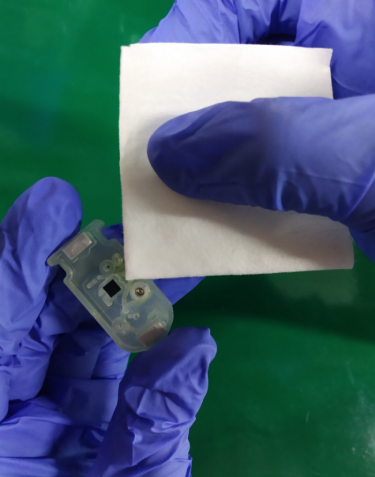
Wipe the Chip with Alcohol
-
Reattach the chip nozzle and store the CF chip in a clean location.
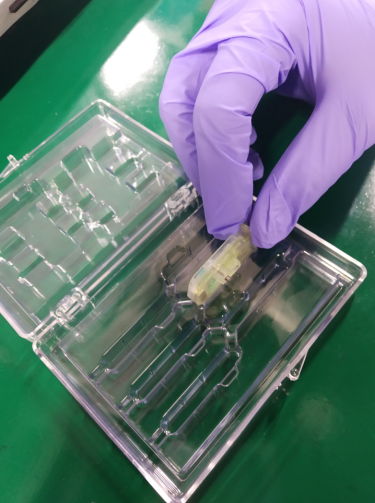
Storing the Chip into a Clean Container
-
Lastly, wipe the underside of the CF cap with alcohol. Do not shake the bottle as there is a filter in the cap that should not get wet.
Related Topics
|
|

|
| MAOWH-V54R126
|
|