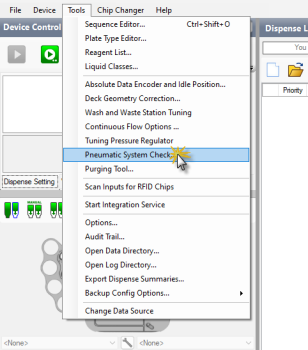
The Pneumatic System Check provides automated diagnostics for the pressure and vacuum regulators and solenoids in the Mantis device. The wizard runs in two sequential steps: the Regulator Check first, then the Solenoid Check. The test automatically runs at startup or can be executed manually from the Tools menu.
Opening the Pneumatic System Check from the Tools Menu
Important: Make sure there is no chip attached to the Mantis hand before performing the test to prevent inaccurate results.
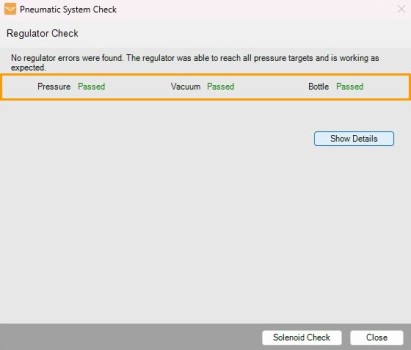
Once the Pneumatic System Check wizard is open, Mantis will first execute the Regulator Check. This test verifies that the pressure and vacuum regulators reach their target values and remain stable.
|
|
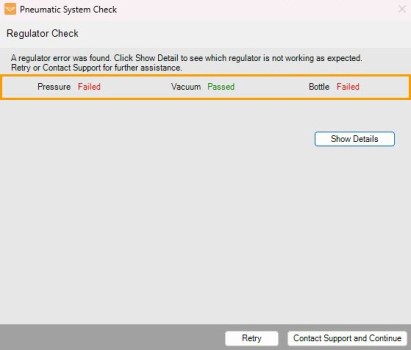
| Regulator Check Passed | Regulator Check Failed |
To display the complete Regulator Check result, click Show Details. The regulator test results will be automatically generated in the table that consists of the following sections.
Pressure: The regulator that provides pressure to the small, large, fill, and output solenoids.
Vacuum: The regulator that provides vacuum to the small, large, fill, output, and Continuous Flow solenoids.
Bottle: The regulator that provides pressure to the Continuous Flow solenoid.
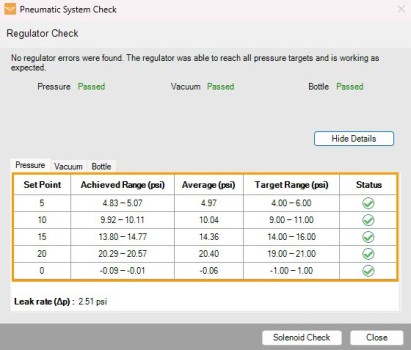
Detailed Values of Each Checking and Status Shown in Table
Set Point: The set point of pressure and vacuum that the regulators are instructed to reach during the test.
Achieved Range (psi or inHg): The actual pressure values reached by the regulator during the test.
Average (psi or inHg): The average values that the regulators achieved during the test. To pass the check, the Average values of each Set Point must be in the stable state and within the Target Range.
Target Range (psi or inHg): The passing range for a given Set Point value.
Status: Shows the test results as passed or failed, indicated by the green check icon and red cross icon
 . Any failed Set Point will be described under the Error details section.
The Pneumatic System Check fails if the pressure/vacuum value of the Achieved Range and/or the Average are outside the Target Range for any Set Point. Retry the procedure and/or contact FORMULATRIX support to report the issue.
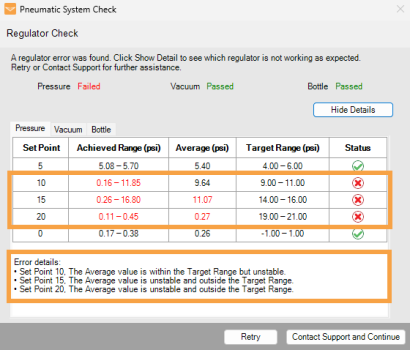
Failed Status in the Regulator Check
Note: Clicking Contact Support and Continue will automatically close the Pneumatic System Check wizard. In the Contact Technical Support window, the Reply-to Address field is mandatory and you may add multiple email addresses, separated by commas. The Attach log files option is selected by default to automatically include the log files in the email.
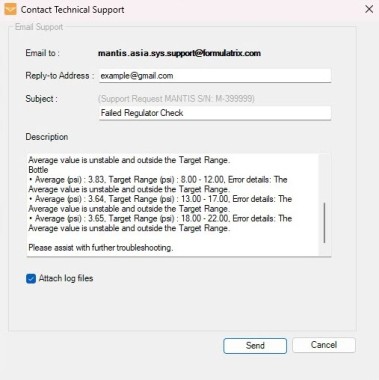
Contact Technical Support Window
If you run the Pneumatic System Check from the Tools menu, Mantis will automatically calculate the Leak Rate (Δp) value that is generated after checking the highest Set Point. This process is to detect any possible pressure leaks in the regulators. Leak Rate (Δp) will not cause the Regulator Check to fail.
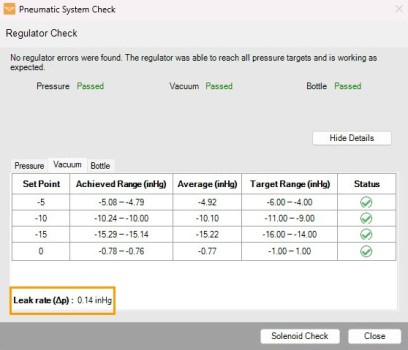
Leak Rate Information on Regulator Check
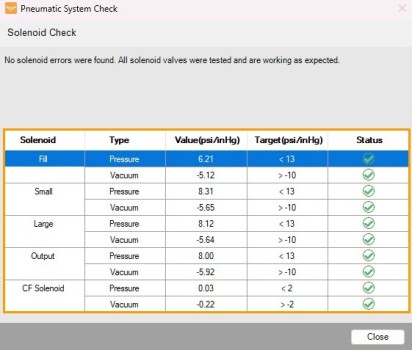
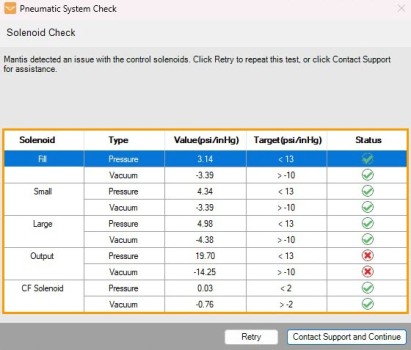
After the Regulator Check completes, the system automatically proceeds to the Solenoid Check. This procedure verifies that the solenoid control valves are operating normally by measuring the pressure or vacuum change produced by each switching event. When the Solenoid Check finishes, the results will be displayed in a table along with a clear passed or failed icon.
|
|
| Solenoid Check Passed | Solenoid Check Failed |
The Solenoid Check results are displayed in 5 valve functional statuses:
The values displayed under the Value and Target columns assist the FORMULATRIX support team when troubleshooting solenoid problems. A simple test result is shown under the Status column.
Type:
Value (psi or inHg): The remaining pressure/vacuum drop values after solenoid switching.
Target (psi or inHg): The passing pressure drop value that must be achieved during the test.
Status: Shows the test results as passed or failed, indicated by the green check icon and red cross icon .
If any of the expected values under the Value (psi/inHg) column exceed the default Target (psi/inHg) target value, retry the procedure and/or contact FORMULATRIX support to report the issue.
Note: Clicking Contact Support and Continue will automatically close the Pneumatic System Check wizard. In the Contact Technical Support window, the Reply-to Address field is mandatory and you may add multiple email addresses, separated by commas. The Attach log files option is selected by default to automatically include the log files in the email.
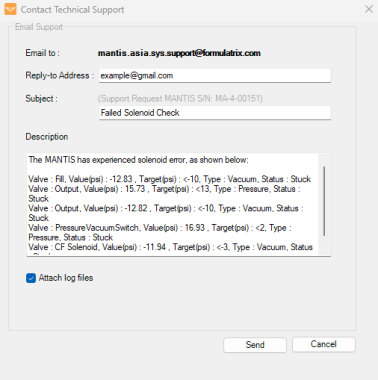
Contact Technical Support Window

|
|
| MAOWH-V55R126 |