Open topic with navigation
Designing Your Experiments
Both the CONSTELLATION hardware and software need to be set up before you can design an experiment. If you're not familiar with the CONSTELLATION hardware components, see the Hardware Overview for more information.
Setting Up the Hardware and a Microplate
-
Connect the CONSTELLATION to a power outlet using the power cable.
-
Find the power switch located on the back of the CONSTELLATION and turn it on.
-
Tap the CONSTELLATION software icon on your tablet or PC to run the software.
-
Prepare the reaction mix:
-
If you have premixed the reaction mixture, pipette at least 10 μL (for 96- and 16-well plates) or 20 μL (for 24- and 8-well plates) of the mixture into the bottom of the circular wells in the dPCR microplate
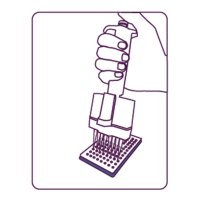
Pipette the Reaction Mix
OR
-
The Mantis liquid handler from Formulatrix can make sure your samples are mixed perfectly and ready for use. After you've pipetted your sample into your plate, Mantis can dispense the master mix with just enough force to mix it with the sample.
-
Remove the backing from the rubber plate seal and apply the plate seal to the dPCR plate, taking care not to create air bubbles.

Applying the Rubber Plate Seal to the dPCR Plate
-
Use the roller to affix the plate seal to the dPCR plate. Begin at the center and gently apply pressure while rolling to one edge. Go back to the center and repeat the process in the opposite direction, affixing the seal to the other half of the plate.
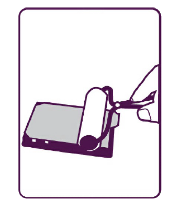
Rolling the Rubber Plate Seal to Affix it to the dPCR Plate
-
Then, your dPCR plate is ready to be placed into the CONSTELLATION storage tray. At this point, you can proceed to Creating a Task in CONSTELLATION.
Creating a Task in CONSTELLATION
CONSTELLATION enables you to easily create an experiment consisting of one or multiple tasks, depending on your needs After you set up the plate, you can start priming/rolling, thermocycling, and imaging.
To create a task in CONSTELLATION:
-
Tap the EJECT TRAY button in the Task screen to open the CONSTELLATION’s storage tray.
-
Then, place the plate on the plate slot. Position the A1 well location in the back right corner of the plate slot.
-
Tap the RETRACT TRAY button in the Task screen to close the plate tray. The plate barcode will be automatically scanned and the barcode number will appear on your screen.
-
Tap EDIT PROTOCOL available on each active plate tray to assign your experiment task(s).
-
After the Edit Protocol window appears, drag one of the available tasks to the task grid. The available tasks are Priming/Rolling, Thermocycling, and Imaging. You are allowed to add, adjust, and delete the task(s) accordingly.
-
When you are done, do one of the following:
OR
-
If you want to continue editing the protocol and assigning task(s) for the other experiments, tap OK. Then, you can edit the protocol for all desired experiments. When you are finished, tap the Run button button in the lower-right corner of the Task screen to run all of the experiments as defined in all of the active plate trays.
-
You are all set! CONSTELLATION will run all of the tasks that you have defined.
Note: Once the CONSTELLATION has finished imaging your plate(s), you can immediately view imaging results on by going to the Viewer screen. See also, Viewing Imaging Results.
Related Topics
|
|

|
| COC-V20R018
|
|