Managing Spare Part Compatibility Matrix
The Spare Part Compatibility Matrix is a complete reference that shows which spare parts can be used with which hardware versions.
A Hardware Version identifies a specific version of a hardware product, while an Item represents a spare part. A Spare Part Compatibility record connects them and specifies their Compatibility Status.
This section explains how these components relate, how compatibility information is formed, and how it is carried forward when hardware or spare parts change.
Spare Part Compatibility
A Spare Part Compatibility defines the relationship between an Item and a specific Hardware Version, along with their Compatibility Status, which indicates whether the item can be used with that hardware version.
Spare Part Compatibility records are created from the Spare Part Compatibility table or from the Related Tables of Hardware Versions or Items table by the “Engineering Manager” group members. When a record is created from a related table, TIGA automatically fills the corresponding Hardware Version or Item.
Compatibility Status
Each Spare Part Compatibility record has one of the following statuses:
Status |
Meaning |
|---|---|
Compatible |
The Item has been verified and is confirmed to work with the Hardware Version. Support teams can use this part without concern. |
Incompatible |
The Item has been verified and is confirmed not to work with the Hardware Version. Support teams should not use this part. |
Unknown |
Compatibility has not yet been verified. The Engineering team needs to review and update this status to either Compatible or Incompatible. |
For example:
Item |
Compatibility Status |
Hardware Version |
|---|---|---|
Breach Sensor Assembly |
Compatible |
Space Mantis V1.1.0 |
Breach Sensor Assembly |
Unknown |
Mantis V4.1.0 |
Air Control Assembly |
Incompatible |
Space Mantis V1.1.0 |
Air Control Assembly |
Compatible |
Space Mantis V1.2.0 |
Note
A Hardware Version can be associated with multiple Items, and vice versa. However, the same Item and Hardware Version combination can only have one Spare Part Compatibility record. This prevents conflicting statuses for the same pair.
Hardware Versions
A Hardware Version represents a specific release of a hardware product and shows which hardware version a spare part is compatible with. Each Hardware Version has its own set of Spare Part Compatibility records because compatibility is defined for a specific Hardware Version, rather than the entire Product Family. This means two Hardware Versions from the same Product Family can have completely different compatibility records, even if they look similar. For example, a part that works with “Mantis V4.0.0” may not work with “Mantis V4.1.0” if the hardware design changed between versions.
Version Naming
Each Hardware Version belongs to a Product Family and is identified by its Major Version, Minor, and Bugfix numbers. TIGA combines these values to generate the Version name in the format ProductFamily VMajor.Minor.Bugfix.
For example:
Product Family |
Major Version |
Minor |
Bugfix |
Version |
|---|---|---|---|---|
Mantis |
4 |
0 |
0 |
Mantis V4.0.0 |
Mantis |
4 |
1 |
2 |
Mantis V4.1.2 |
Mantis LC3 |
2 |
3 |
0 |
Mantis LC3 V2.3.0 |
You can fully edit the generated Version name and replace it with any custom name, such as RockImager360 instead of RI360. If any of the three numbers or the Product Family is changed later, TIGA still regenerates the Version name automatically.
Compatibility Data Inheritance Method
When a new Hardware Version is created, the “Engineering Manager” group members decide how its Spare Part Compatibility records are populated from the Prior Version. TIGA provides three Data Inheritance Methods which can only be selected during creation and cannot be changed afterward.
Copy with Unknown Status
TIGA copies all Spare Part Compatibility records from the selected Prior Version, but resets every Compatibility Status to Unknown. Use this when the new hardware is similar enough that the spare parts list is the same, but you cannot guarantee the previous statuses are still valid. This forces the Engineering team to re-verify each part.
For example, if Mantis V4.0.0 as the Prior Version has the following compatibility records:
Item
Status
Air Control Assembly
Compatible
Breach Sensor Assembly
Incompatible
Creating Mantis V4.1.0 with Copy with Unknown Status results in:
Item
Status
Air Control Assembly
Unknown
Breach Sensor Assembly
Unknown
Copy and Keep Status
TIGA copies all Spare Part Compatibility records from the selected Prior Version and retains their existing Compatibility Status. Use this when the new hardware is very similar to the Prior Version and you have verified that the compatibility statuses remain valid.
For example, if Mantis V4.0.0 as the Prior Version has:
Item
Status
Air Control Assembly
Compatible
Breach Sensor Assembly
Incompatible
Creating Mantis V4.1.0 with Copy and Keep Status results in:
Item
Status
Air Control Assembly
Compatible
Breach Sensor Assembly
Incompatible
Do Not Copy (Enter Manually)
TIGA does not copy any Spare Part Compatibility records from another Prior Version. It prevents the compatibility from being carried over from a different version, potentially with a very different hardware design. Compatibility information for the new Hardware Version must be entered manually.
This is the default and only available option when creating a new Major Version.
Note
A Hardware Version is treated as a new Major Version when:
No other Hardware Version already exists with the same Major Version number, regardless of its Minor or Bugfix values.
No other Hardware Version already uses the same generated Version name within the same Product Family.
Note
A Hardware Version can only be deleted if it is not linked to any records in Related Tables.
Items
An Item represents a spare part used for repairs, such as a temperature sensor or a power board. It can be associated with multiple Hardware Versions through Spare Part Compatibility records, and its compatibility status can differ for each Hardware Version. This allows the Engineering team to maintain compatibility information for the same spare part across different hardware versions.
For example, “Breach Sensor Assembly” can have different compatibility statuses for different hardware versions:
Item |
Hardware Version |
Compatibility Status |
|---|---|---|
Breach Sensor Assembly |
Space Mantis V1.1.0 |
Compatible |
Breach Sensor Assembly |
Mantis V4.1.0 |
Unknown |
Compatibility for New Item Versions
An Item can have multiple versions (for example, 833602A, 833602B, 833602C). When “Item Processor” or “Master Data Administrator” group members create a new item version with the same Base Item ID as the previous version, TIGA automatically creates Spare Part Compatibility records for the new version based on the previous version’s records.
The status is carried forward according to the following rules:
Previous Item Version |
New Item Version |
Reason |
|---|---|---|
Compatible |
Compatible |
The part worked before. If the design is unchanged, it still works. |
Incompatible |
Unknown |
The part did not work before, but the new version may have changed. Compatibility must be re-verified. |
Unknown |
Unknown |
It was never verified. It still needs to be verified. |
For example:
Suppose 833602A has these Spare Part Compatibility records:
Item Version |
Linked Hardware Versions |
Statuses |
|---|---|---|
833602A |
Mantis V4.0.0 |
Compatible |
833602A |
Mantis V4.0.1 |
Incompatible |
Now you create 833602B (a new version of 833602A). TIGA creates:
Item Version |
Linked Hardware Versions |
Statuses |
|---|---|---|
833602B |
Mantis V4.0.0 |
Compatible |
833602B |
Mantis V4.0.1 |
Unknown |
Note
If the previous item version does not have a Spare Part Compatibility record for a particular Hardware Version, TIGA does not create a compatibility record for that Hardware Version for the new Item version.
Maintaining the Spare Part Compatibility Matrix
Compatibility information changes as hardware and spare parts evolve. There are four ways to maintain the matrix. Each exists for a different situation:
Scenario |
Where to Start |
|---|---|
You need to create a new compatibility relationship or update an existing one. |
Spare Part Compatibility table (or the Related Tables section of Hardware Versions or Items table) |
You are creating a new Hardware Version and want to reuse the compatibility list from an existing version. |
Hardware Versions table, when creating a new record. |
You want to copy specific Spare Part Compatibility records from one Hardware Version to one or more other Hardware Versions, without creating a new version. |
Hardware Versions table, using the Copy Spare Part Compatibility action |
You are creating a new item version and want TIGA to automatically create Spare Part Compatibility records. |
Items table, using the Create New Version action |
Each method is explained in detail in Working with the Spare Part Compatibility Matrix.
Note
TIGA also provides a weekly report to help the Engineering Manager identify compatibility information that still requires attention for maintaining the compatibility matrix. The report is generated every Sunday at 5:00 PM FUSA time (Eastern Time) and sent to hardware.compatibility.notification@formulatrix.com.
The report contains:
Hardware Version records without any linked Spare Part Compatibility records.
Spare Part Compatibility records with Unknown compatibility status.
This report helps the Engineering Manager pinpoint incomplete compatibility information and ensures the compatibility data remains up to date.
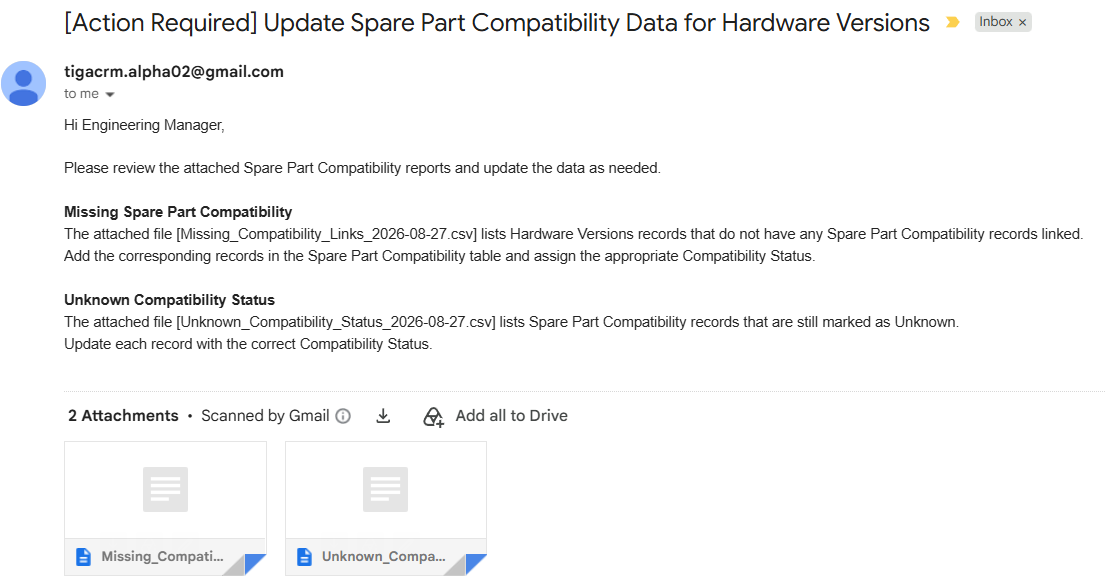
Spare Part Compatibility Email Report
Related Topics:
Spare Part Compatibility Matrix Overview for an introduction to the Spare Part Compatibility Matrix and its purpose.
Working with the Spare Part Compatibility Matrix for procedures for creating Hardware Versions, Spare Part Compatibility, and new Item versions, and copying compatibility information.