Group Preferences Submenu
Note
Only group administrators can access this feature.
The Group Preferences submenu - accessible from the User menu – manages settings for each available group. Group settings apply to all users in the group, but a group member can adjust the settings using the User Preferences submenu. The RESET PREFERENCES button at the bottom bar allows you to reset all property settings to the Global Preferences settings.
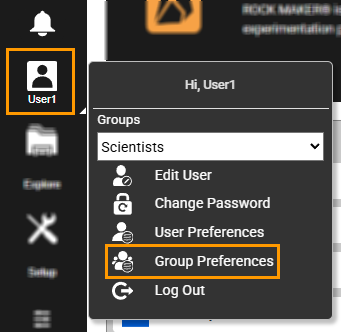
Group Preferences Location
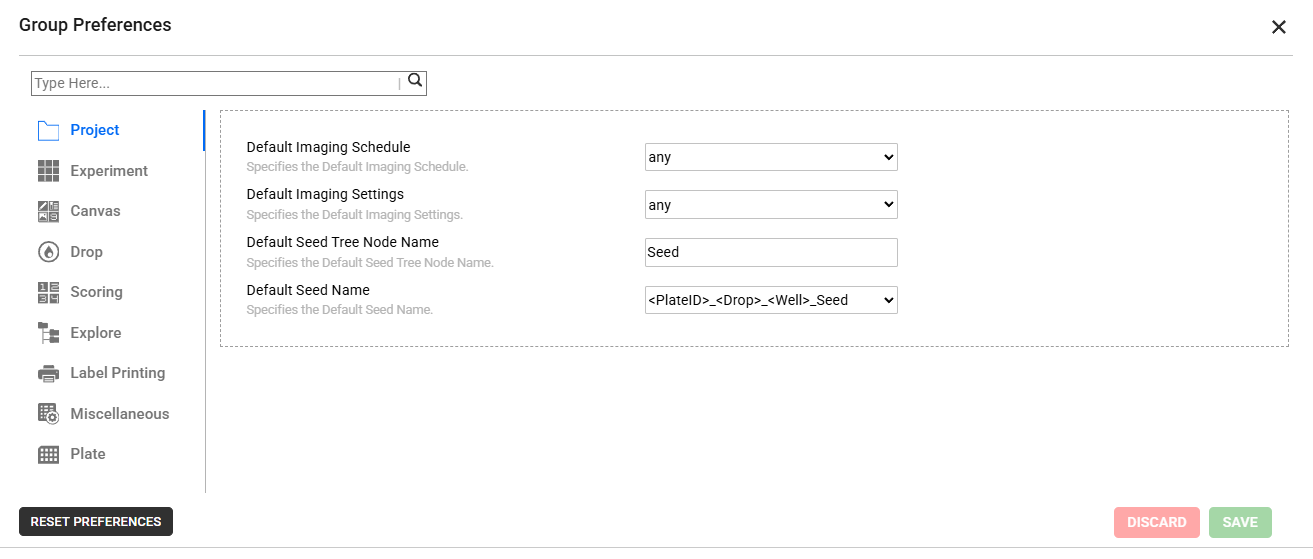
Group Preferences Dialog Box
Opening the Group Preferences submenu displays the Group Preferences dialog box, which lists system properties. Project properties are open by default.
Project
System Property |
Description |
|---|---|
Default Imaging Schedule |
Selects the default imaging schedule assigned to an experiment. |
Default Imaging Settings |
Selects the default imaging settings. |
Default Seed Tree Node Name |
Specifies the default name for a seed folder in ROCK MAKER Explorer. |
Default Seed Name |
Specifies the default naming format used when you create a seed. You can select one naming format from the dropdown list, as desired. |
Experiment
System Property |
Description |
|---|---|
Default Plate Type |
Selects the type of microplate that you will use in the experiment. |
Incubation Temperature |
Selects the default incubation temperature applied to each new experiment. This is the temperature at which the plate is stored in order to grow crystals. |
Plate Column |
Defines the default number of the plate columns in every new experiment. |
Plate Row |
Defines the default number of the plate rows in every new experiment. |
Setup Temperature |
Selects the temperature at which the plate is set up. |
Default Dispensing Robot |
Determines which Dispensing Robot you will use. |
Experiment Default Imaging Schedule |
Selects the default imaging schedule assigned to an experiment. |
Show prepared status in stock picker |
Enables it to show the prepared status when adding or editing a standard ingredient. |
Canvas
System Property |
Description |
|---|---|
Protein Layer’s name based on Protein Formulation name |
Enables it to show the protein layer’s name, which is based on the protein formulation name on the canvas. |
Navigator: Vertical Image Prefetch Count |
Determines the number of adjacent images to prefetch when navigating up or down in the Navigator panel of the Canvas menu to minimize loading delays. |
Navigator: Horizontal Image Prefetch Count |
Determines the number of adjacent images to prefetch when navigating to previous or next images in the Navigator panel of the Canvas menu to minimize loading delays. |
Drop
System Property |
Description |
|---|---|
Annotation text default font |
Defines the annotation’s default font. |
Reset Drop Location in Overview image |
Enables it to reset Drop Location in Overview image. |
Point of Interest Crosshair Color |
Selects the crosshair color of the Point of Interest. |
Vertical Image Prefetch Count |
Determines the number of adjacent images to prefetch when navigating up or down in the Drop menu to minimize loading delays. |
Horizontal Image Prefetch Count |
Determines the number of adjacent images to prefetch when navigating to previous or next images in the Drop menu to minimize loading delays. |
Scoring
System Property |
Description |
|---|---|
Move to next well after scoring |
Enables it to automatically navigate to the next image when you assign a score in an image in ROCK MAKER. |
Delete score via hotkey |
Allows you to delete scores using Hot Keys. |
Restart from first well once the last is reached |
Enables you to automatically move back to the first image when you have assigned a score to the last image in ROCK MAKER. |
Enable UV/SHG/UVTPEF Auto Score |
Allows UV and/or SONICC images Auto Score. |
Enable FRAP Auto Score |
Allows FRAP Auto Score. |
Enable scoring mother plate of ISO |
Allows modification of the scores in a mother plate after creating an Iterative Screen Optimization (ISO). |
Enable scoring without images |
Enables you to give scores to experiment results that don’t have associated images. |
Explore
System Property |
Description |
|---|---|
Show Print Barcode menu in Tree |
Enables it to show the Print Barcode button in the Explore menu. |
Show Confirmation Dialog when Moving any Items in Tree |
Enables it to show a confirmation dialog when you are about to move items in ROCK MAKER. |
Follow Me |
Enables it to follow your experiment activity with a highlight so that you can get back to your current experiment in an instant. |
Plate Node Format |
Determines the Plate Node format in ROCK MAKER. |
Label Printing
System Property |
Description |
|---|---|
Label Printer |
Defines the full name of the label printer. |
Miscellaneous
System Property |
Description |
|---|---|
Default Export Path |
Defines the default path of an exported experiment. |
Show Rotate Canvas MessageBox |
Shows a dialog box before ROCK MAKER rotates the screen 180°. |
Screen Default Plate Type |
Determines the default container (plate) used in screen experiment. |
Screen Experiment Wizard Date Time Format |
Determines the default date and time format of the experiments generated from the screen experiment wizard to be appended to the experiment names. |
Screen Experiment Wizard Name Delimiter |
Determines the delimiter, generated from the screen experiment wizard, used in experiment names. |
Format Timepoint Display |
Selects to determine if inspections are grouped based on the absolute time or relative time with respect to the imaging date. |
Search & Filter - Enable Canvas |
Enables the canvas to appear in Search and Filter. |
Protein Formulation - Show API Data |
Displays the API data stored by the protein formulation data importer (used by some users) on the protein formulation’s graphical user interface. |
Protein Formulation - API Data Label |
Specifies the label on the protein formulation’s graphical user interface stored by its data importer (used by some users). |
Protein Formulation: Default Liquid Class |
Selects to determine the default liquid class of the protein formulation. |
Plate
Note
The Plate properties allow you to set each registered plate’s preferences. The plate types listed in the Plate Type Name dropdown match those in the Plate Types Submenu.
System Property |
Description |
|---|---|
Plate Type Name |
Selects the plate type. |
Plate Default Imaging Schedule |
Selects the plate’s default imaging schedule. |