Quote Price Calculation
Pricing for a quote in TIGA is calculated by combining the following:
Product Price, which represents the core commercial value of the selected products.
Shipping & Installation Cost, which covers the one-time expenses of shipping products and the installation service when applicable.
Each component is derived from specific tables and calculation rules that vary depending on the quote type.
Product Price
The product price is determined through a combination of several components and adjustment elements, with specific logic applied based on the quote type. This section outlines the formulas applied for each quote type, followed by the pricing elements.
Price Formulas by Quote Type
Quote Type |
Formula |
|---|---|
Instrument & Consumable |
Price = ( Base Price + Controlling Software Price + S&TC ) x Zone Price Factor + Tariff Note
|
Service Contract |
Coverage History Price = ( Cost × Actual Price Factor ) + ( S&TC × Actual Price Factor ) Note
Service Price = Base Price × Quantity Note For FSESV price = Base Price x Travel Zone Multiplier x Quantity |
Service Estimate |
Price = (Base Price × Zone Price Factor × Quantity) + Tariff Note For FSESV price = ( Base Price × Zone Price Factor × Travel Zone Multiplier × Quantity ) + Tariff |
The elements referenced in the formulas above are explained in detail below. All prices are denominated in USD.
Base Price
The Base Price is the global default selling price of the product in USD, retrieved from the Base Price field in the Quote - Products table. The price is applied across all quote types as the primary price component, forming the starting point for all adjustments. Read more about creating a new quote product.

Base Price of a Product
Shipping & Travel Cost (S&TC)
The S&TC, previously known as NCA (Non-Commissionable Amount), represents the portion of the product’s commercial price that covers shipping and travel-related costs but is excluded from the sales commission calculation.
S&TC is automatically calculated using the following formula:
Component |
Description |
Field |
Table |
|---|---|---|---|
Travel Chance |
Expected number of support trips during the selected product maintenance period. |
Travel Chance |
Quote - Products |
Shipping Zone Travel Cost |
Standard support travel cost for the customer’s zone. |
Travel Cost for 1 person for 1 day as an emergency last minute trip (note, add 30% safety factor and include ALL costs) |
Quote - Service/Installation Zone Cost |
Ship Chance |
Expected number of shipments for the selected product during the maintenance period. |
Ship Chance |
Quote - Products |
Shipping Zone Cost |
The standard base shipping cost for the customer’s shipping zone. |
Cost for 1 round trip shipment (minimum, note add 30% safety factor) |
Quote - Service/Installation Zone Cost |
Ship Weight |
Expected product weight before shipment (kg). |
Ship Weight |
Quote - Products |
Shipping Zone Cost Extra |
Additional shipping cost per unit weight for the customer’s shipping zone. |
Cost per kg for round trip shipment (add 30% safety factor) |
Quote - Service/Installation Zone Cost |
Zone Price Factor |
Adjustment multiplier for each sales zone and business unit. |
Price Factor |
Quote - Service/Installation Zone Cost |
Quantity |
Number of quoted items. |
Controlling Software Price
Some instruments do not include their software component in the Base Price. For these instruments, the software is treated as a separate product. This relationship is managed through the Controlling Software table, which links the instrument to its associated software record in Quote – Products.
At quotation time, the Price of the product combines the Base Price of the instrument and the Controlling Software product records. If no separate software is linked, this value is set to “0” in the calculation.
Zone Price Factor
The Zone Price Factor is a multiplier used to adjust price based on the customer’s Sales Zone and Business Unit (BU). It accounts for regional market differences (e.g., higher costs in certain areas) without altering the base logic. The value is retrieved from the Price Factor field in the Quote - Service/Installation Zone Cost table.
For example:
Cell Business Unit in Singapore: 1.25
LH Business Unit in Singapore: 1.1
The multiplier allows one area to have different final prices depending on the BU to align with the marketing strategies. Read more on how to add a price factor.

Different Price Factor for Different Business Units
Tariff
The Tariff is an adjustment applied to cover the import duty cost for shipments to applicable countries. It is automatically calculated by the system using the following formula:
Tariff = Transfer Price x Tariff (%)
Transfer Price
The price charged when the product is imported into a country. It should include the production cost, shipping, as well as a profit to the exporter (Formulatrix ID), allowing for an “arm’s length” profit. It is best to check with the finance team about how to set this value in the Transfer Price field of the Quote - Products table.
Tariff (%)
The percentage rate of import duty applied based on the shipment destination. It is defined per zone in the Tariff (%) field of the Quote - Sales Zones table.
Note
The tariff currently applies only to shipments to the United States.
A naive implementation of tariff would have been to change the price factor for the zone. The problem with this approach is that this factor is assigned to the total price and not to the transfer price only. Since all products have transfer prices that affect the products differently, it would’ve been very challenging to find one that applies to all.
Travel Zone Multiplier
The Travel Zone Multiplier is an adjustment factor applied specifically to the Field Service Engineer Site Visit (FSESV) product to account for travel variability by BU and state. It is retrieved from the Quote - Travel Zones table, depending on the BU:
LH Support Travel Multiplier
PC Support Travel Multiplier
Cell Support Travel Multiplier
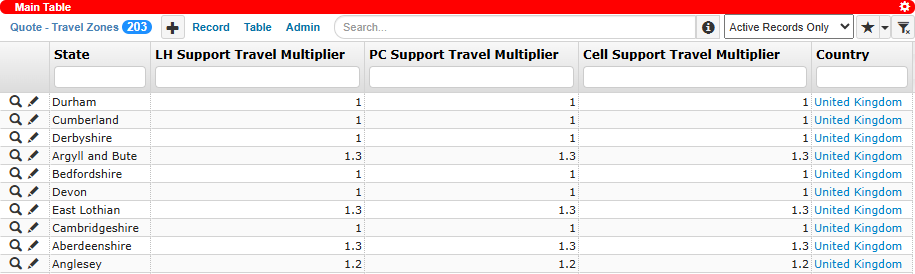
Support Travel Multiplier for the United Kingdom
Cost
The Cost is the reference value stored in the Coverage table and used in Service Contract price calculations. These values are maintained by the Admin team, who update them based on the “Optional annual service contract after first year” table when configuring Instrument and Consumable quotes. The system retrieves the Cost from all Coverage records associated with the customer account, then displays them for selection in the Coverage History section, excluding the following coverage types:
DO NOT Support Without PO
DO NOT Support Without Pre-payment
DO NOT Support
DO NOT SUPPORT (EOL)
Pricing of Custom Products
A Custom product does not have a predefined price. The user must manually define both the price and cost breakdown by clicking the Formula button  in the product row. For further guidance, see
Adding a Custom Product to a Quote.
in the product row. For further guidance, see
Adding a Custom Product to a Quote.
Shipping & Installation Cost
Shipping and installation costs represent the immediate, one-time expense of packing, delivering, and setting up products at the customer’s site. These costs apply to Instrument and Consumable quotes and are determined differently, as outlined below:
Quote Type |
Shipping Cost |
Installation Cost |
|---|---|---|
Instrument |
Shipping Cost is calculated based on the quote’s Sales Zone and the Product Family. Rates are retrieved from the Quote - Shipping Zone Cost table. Learn more about adding shipping costs.
|
Installation Cost is obtained from the travel cost defined in the Quote - Service/Installation Zone Cost table based on the quote’s Sales Zone and the Business Unit. This value applies when the Installation Type is Install By Visit, and the fee is always counted as one unit regardless of product quantity.
|
Consumable |
Shipping Cost must be entered manually through the Configure Shipping & Travel section. |
Installation Cost does not apply. |
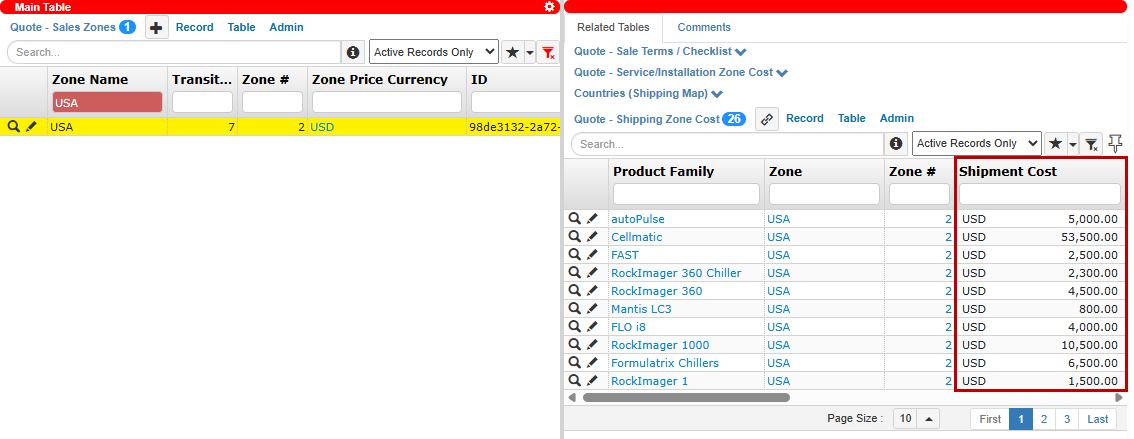

Note
Products marked with the Exclude Shipping Charge in the Quote - Products table are excluded from both shipping and installation cost calculations.
For Instrument quotes, the Shipping & Discounts section displays the Shipping Cost Calculator, which shows the calculated values for the main products, and the Shipping Cost List, which provides a detailed breakdown of shipping rates for each product family in the sales zone.
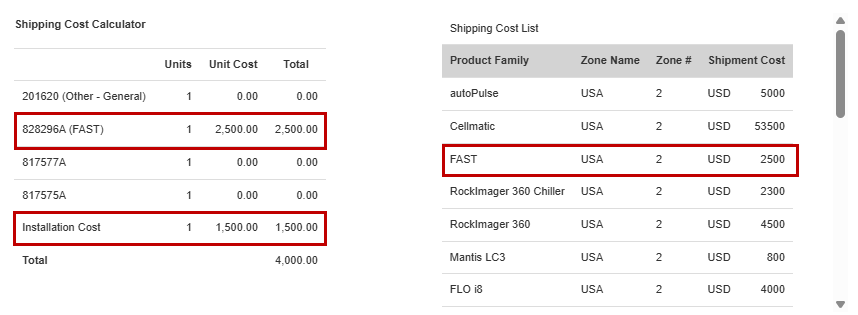
Shipping Cost Calculator and Shipping Cost List