Serial Number Management
A Serial Number is a unique identifier assigned to each product unit to distinguish it from all other items. In TIGA, every product produced from a Work Order (WO) marked as For Production, whether an instrument or a consumable, is assigned a Serial Number.
The Serial Number serves as the product’s permanent identity from the moment the unit enters production until it is delivered and used. This document explains how serial numbers are structured, generated, tracked during production, and used after shipment in TIGA.
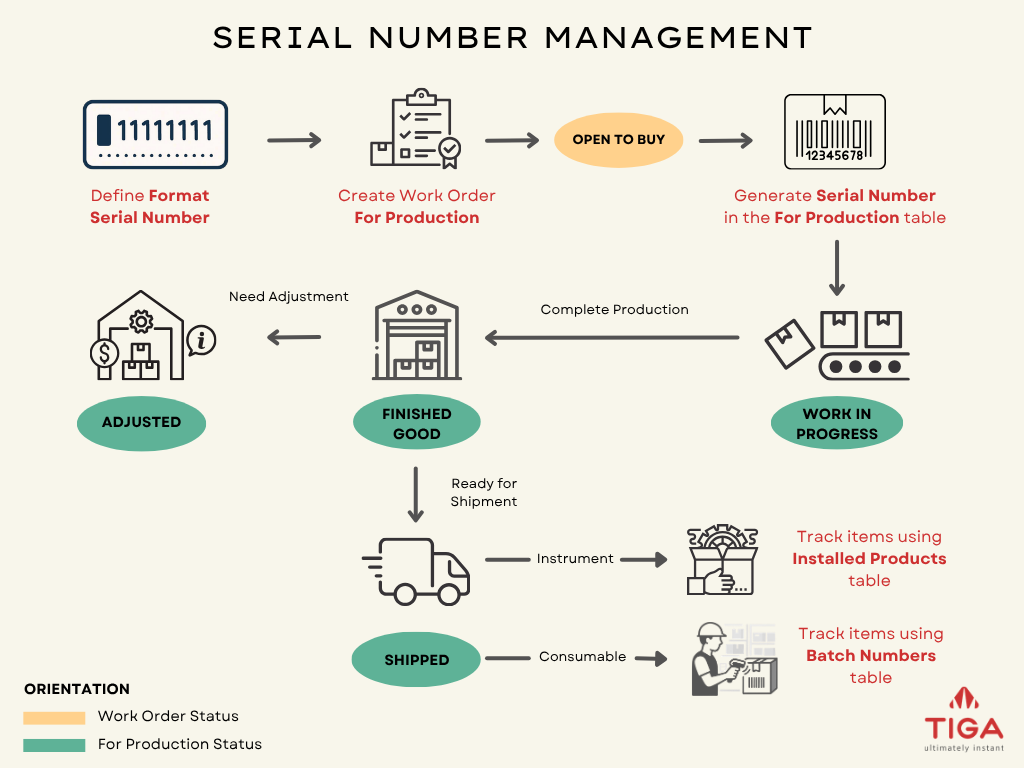
Serial Number Management Workflow
Serial Number Format
A serial number format must be created in the Format Serial Number table within the Bonded Zone application by members of the “For Production Manager” group.
The Format Serial Number record defines the naming structure and numbering range to be used during production. When a Work Order (WO) For Production is created for a specific item, TIGA checks the related Format Serial Number record to determine which serial number scheme should be applied.
Without a format defined for the item, the WO cannot proceed as a WO For Production and is instead treated as a “General” or “Engineering” WO.
Each Format Serial Number record contains the information required to control serial number generation, including:
The serial number naming format.
The starting and ending serial number range.
The latest serial number that has been used.
The Product Family associated with the format.
The Item ID that uses the format.
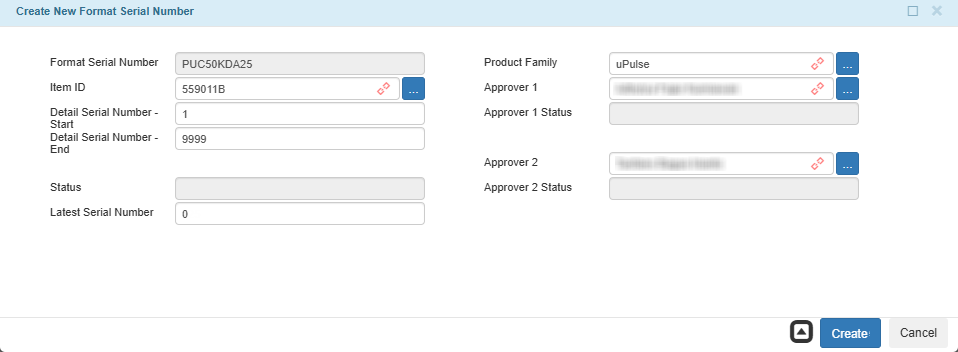
Create New Format Serial Number
Note
One Item ID can only have one Format Serial Number. Creating a second format for the same Item ID returns an error.
A Format Serial Number record can only be deleted if there are no serial numbers allocated to any WO within that format.
Changes to Detail Serial Number - Start cannot exceed any already-allocated serial number, and Detail Serial Number - End cannot be reduced below the Latest Serial Number.
Serial number formats may vary depending on the product type. Some products may use product codes, version numbers, or production years as part of the serial number structure. The format itself is defined manually by the user. TIGA generates the sequential running number automatically to ensure that serial numbers are not duplicated.
Example format for consumables or accessories
KK L XXXXX MM - 00000 PU C 5kDa 26 - 00001 |
Component |
Description |
|---|---|
KK |
First two letters of the product family name (e.g., PU for PULSE). |
L |
Product type initial: A for Accessories, C for Consumables. |
XXXXX |
Abbreviation of the part name, maximum 8 characters. (e.g., 5kDa as an abbreviation for Pulse Chip V3 5 kDa). |
MM |
Last two digits of the production year (e.g., 26 for 2026). |
00000 |
Sequential running number, maximum 5 digits. |
Serial Number Generation
Serial numbers are generated through a combination of the Format Serial Number data and the Work Order (WO) created For Production.
When a WO is created and marked as For Production, the following production planning information must be input:
The target warehouse for storing the finished goods.
The specific Item ID to be produced.
Note
The system checks whether the selected Item ID is linked to the Format Serial Number record. If a matching format exists, the Format Serial Number field is automatically populated.
The number of units to be built. The system uses this to calculate the end of the serial number range automatically.
The Format Serial Number scheme.
The production company.
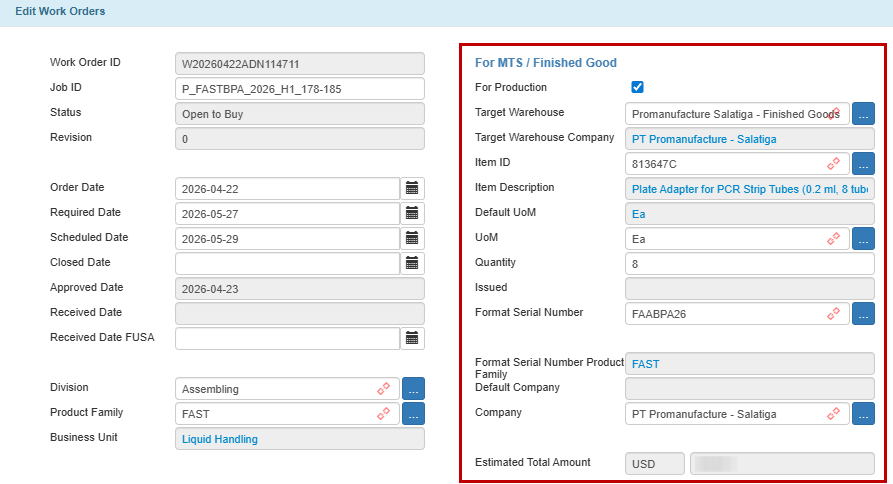
For MTS / Finished Good Section
Work Order Line Items (WOLI) are also created to represent the total materials required to fulfill the entire WO quantity.
At this stage, the WO only represents production planning. Actual serial numbers are generated only after the WO reaches Open to Buy status, which indicates that all approvals are complete and production is ready to begin.
Once the WO is set to Open to Buy, TIGA automatically:
Creates records in the For Production table with Work In Progress status and the WIP Date information.
Assigns a unique Serial Number to each For Production record, combining the Format Serial Number prefix with the next available sequential number.
Creates For Production Line Items (FPLI) for each For Production record. These line items provide a breakdown of the same materials listed in the WOLI, with quantities specified per unit.
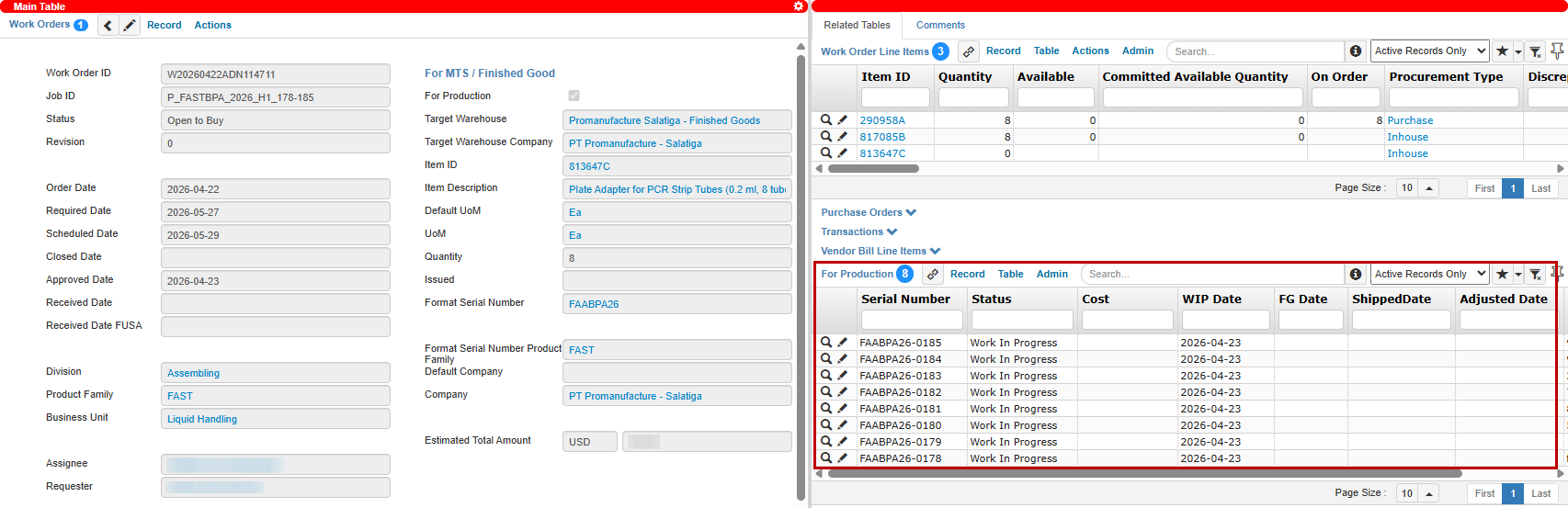
For Production Records for Several Serial Numbers
For Production Line Item Records for One Serial Number
Serial Number Tracking During Production
Each record in the For Production table represents an individually tracked unit identified by its unique Serial Number. Throughout the production and inventory process, the system automatically updates the status based on confirmed transactions and inventory movement.
Status |
Description |
|---|---|
Work In Progress |
The item is currently in production. Materials may have been issued, and production activities are ongoing. |
Finished Goods |
The item has completed production and has been transferred to the Finished Goods warehouse using a Transfer In transaction. |
Shipped |
The item has been shipped out from the Finished Goods warehouse via a Shipment Out, Shipment Out Consumable, Shipment Request Out, or Support Part Request Out transaction for delivery. |
Adjusted |
The item has been removed from the Finished Goods warehouse via an Adjustment transaction for inventory correction or internal handling purposes. |
Issue Materials During Production
Once production begins, the raw materials and components required to build the product are issued from the source warehouse by creating an Issued Out transaction. When this transaction is created with reference to the WO For Production, and the stock is available, TIGA automatically generates Transaction Line Items (TLI) based on the linked Work Order Line Items to represent the materials issued for production.
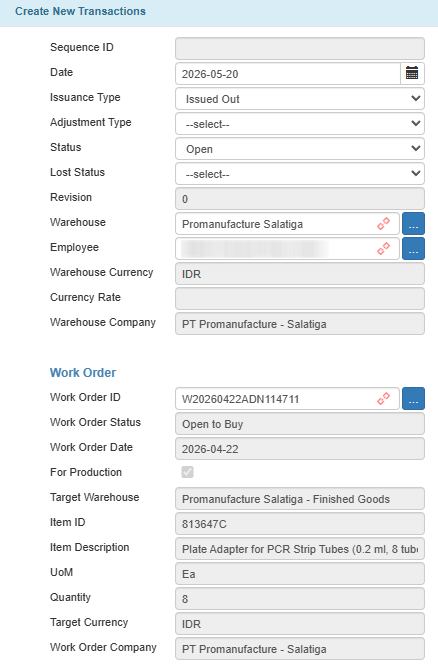
Create New Transaction using Work Order Reference
After the TLIs are confirmed, scheduled FIFO (First In First Out) allocation processes distribute the issued materials and their costs to the related For Production Line Items (FPLI). Each FPLI represents the material requirement for one specific serial-numbered unit. During the allocation process, the system:
Updates the Issued and Issued Discrepancy quantities for the related FPLI according to the confirmed quantity.
Updates the Cost column using the Cost from the FIFO Track table multiplied by the Quantity of FPLI.
Calculates the Total Cost for each FPLI by multiplying the Issued quantity by the Cost.

Transaction Created and Cost Updated
Complete Production and Move to Finished Goods
Once production is completed, finished units are moved into the Finished Goods warehouse using a Transfer In transaction. This transaction must be linked directly to the corresponding WO For Production. The system automatically identifies all For Production records associated with the selected WO that still have Work In Progress status. It then creates Transaction Line Items (TLI) for those serial numbers.
After the TLIs are confirmed:
The status of each linked Serial Number changes to Finished Good, along with the FG Date information.
The total production Cost for each Serial Number unit is finalized from the sum of the Total Cost values of all related For Production Line Item.
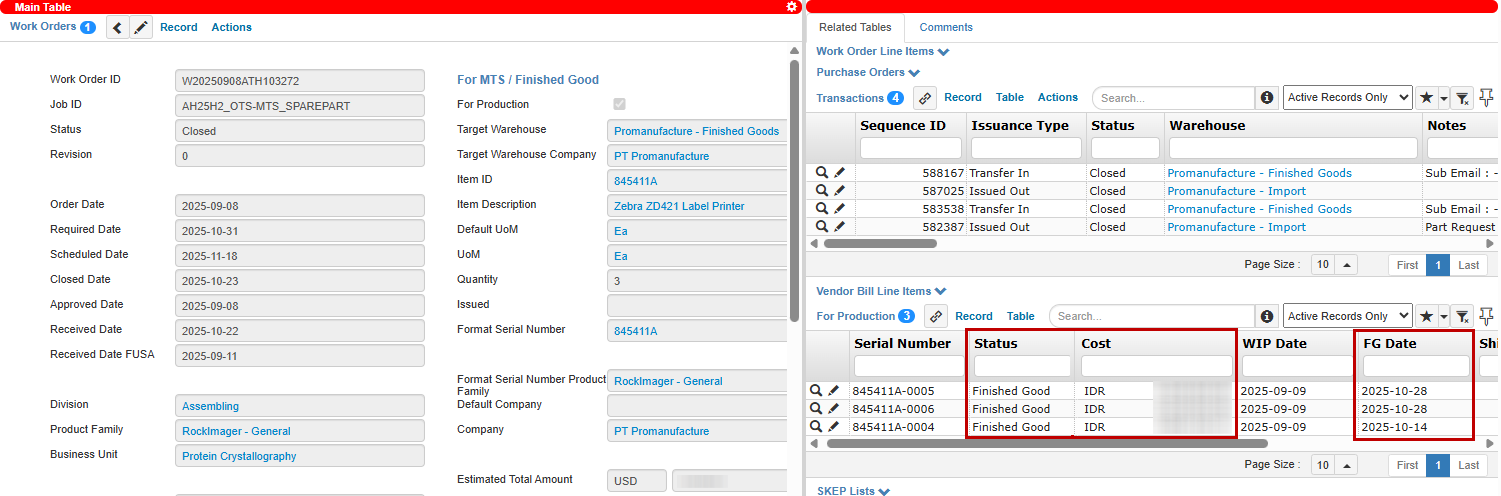
For Production Status, Cost, and FG Date
The Cost column in each confirmed Transfer In TLI is updated using the finalized Cost from its related For Production record.
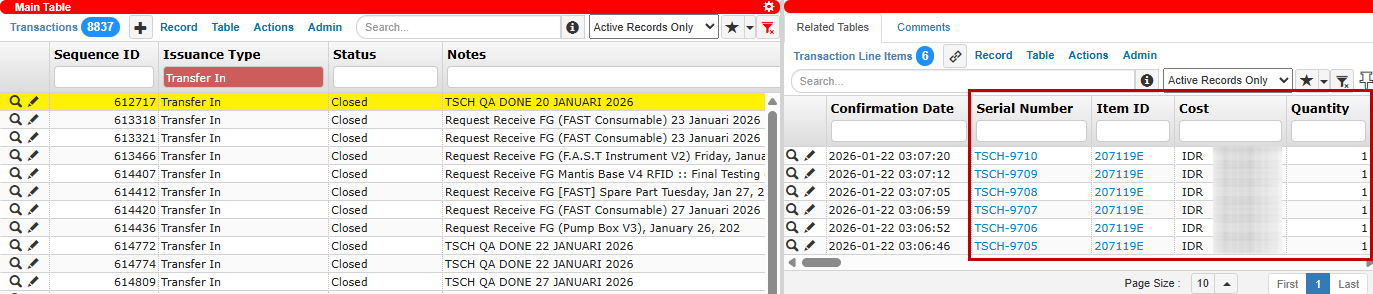
Production Cost for Each Serial Number in TLI
Process Shipment and Adjustment
Once a unit reaches Finished Good status, it can be moved out of the Finished Goods warehouse either for shipment or inventory adjustment. Both require the user to manually link a Serial Number to each Transaction Line Item (TLI).
Shipment
Shipment-related transactions, such as Shipment Out, Shipment Request Out, and Support Part Request Out, are used to deliver finished units to customers, Support teams, or other destinations.
During shipment processing, users manually determine which serial numbers should be shipped by creating the TLI and linking the related Serial Number to the Finished Good status.
After the TLIs are confirmed, the For Production status changes to Shipped, along with the ShippedDate information.
Adjustment
Adjustment transactions are created by the Finance team when finished units must be removed from the Finished Goods warehouse for reasons other than shipment, such as damaged or rejected products, inventory correction, or other internal operational purposes.
During adjustment processing, users manually determine which serial numbers should be adjusted by creating the TLI and linking the related Serial Number with the Finished Good status.
After the TLIs are confirmed, the For Production status changes to Adjusted, along with the Adjusted Date information.
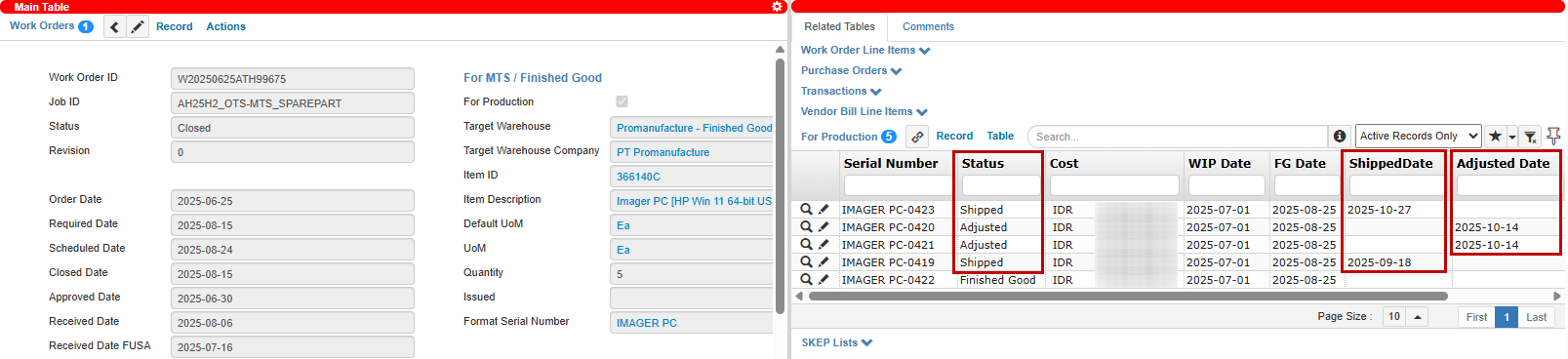
For Production Status, ShippedDate, and Adjusted Date
Note
For shipment and adjustment involving large quantities, users can use the Mass Link Serial Number action instead of linking Serial Number one by one.
Using this action, users can select the Item ID, define the required quantity, and select the Format Serial Number to retrieve available serial numbers with Finished Good status. The system then automatically:
Creates or updates Transaction Line Items with the Serial Number based on the selected quantity.
Assigns a Serial Number to each Transaction Line Item.
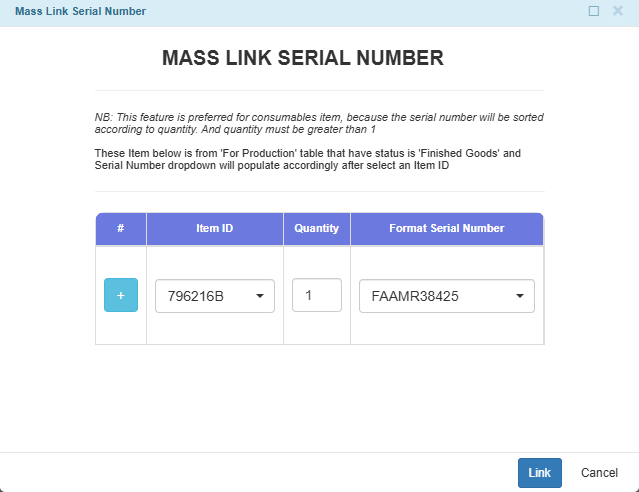
Mass Link Serial Number Action
Serial Number Usage After Shipment
Serial numbers are still used after products leave the manufacturing warehouse. In TIGA, the serial number is used to identify which unit was shipped, where it was sent, and to whom (the customer) it was delivered.
For instruments, the serial number becomes the main identifier of the installed unit. The Installed Products table uses the serial number to store information related to the instrument, such as:
Customer account and installation location.
Hardware version, software version, and firmware version.
Service and warranty history.
Production and shipment history related to the unit.
This information helps teams such as Support, Quality Assurance (QA), and Engineering trace the history of a specific instrument when investigating issues or handling service activities.
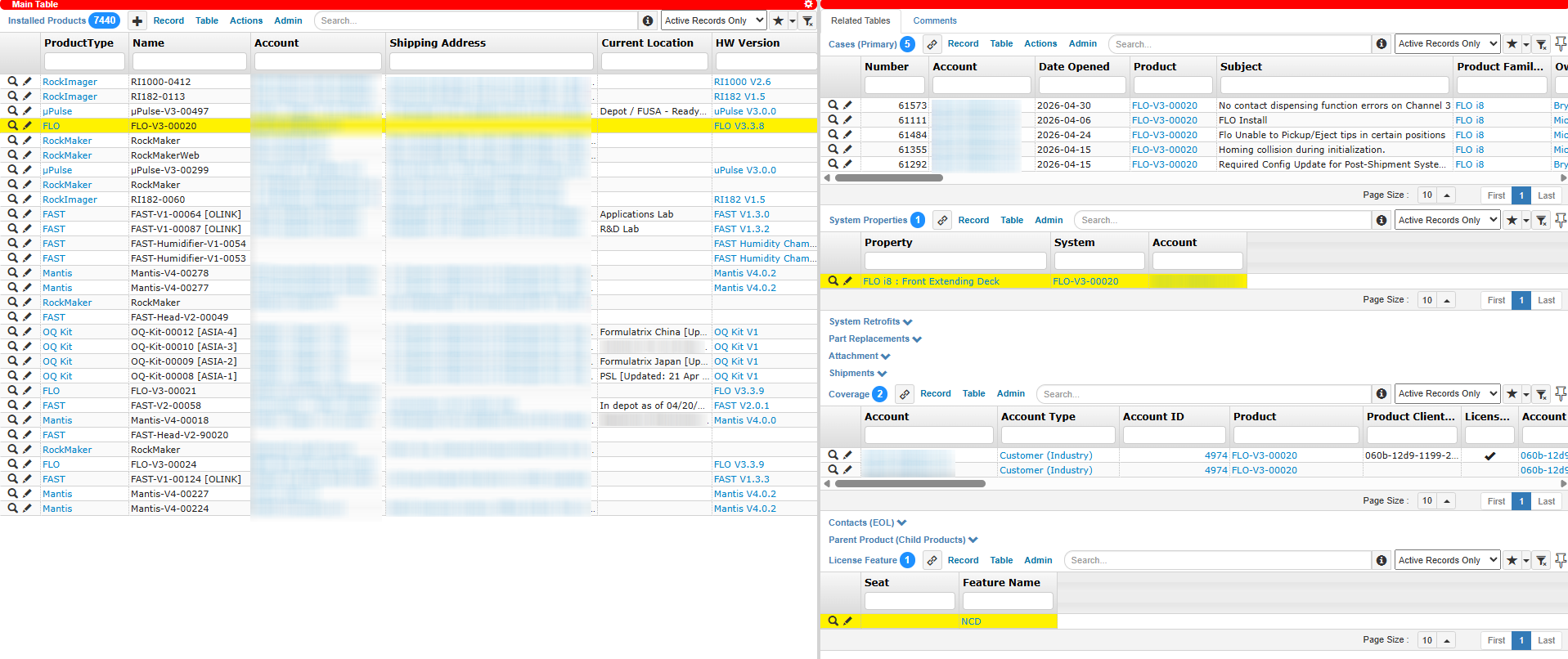
Installed Product Table and Related Tables
For consumables and accessories, traceability after shipment is handled through the Batch Number table during shipment confirmation. During the confirmation process, users manually enter or scan the Serial Number printed on the product packaging. TIGA then creates a Batch Number record linked to:
The shipment transaction.
The shipped item.
The destination account.
The Serial Number entered during confirmation.
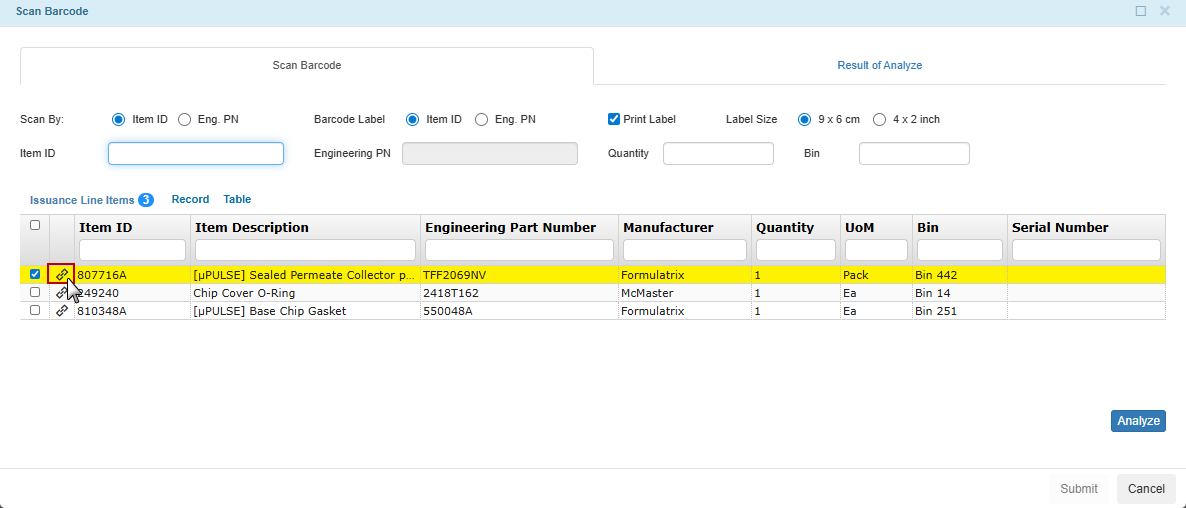
Link Icon to Add Batch Number
Note
In the current implementation, each Batch Number record represents one shipped consumable item. Although the table is named Batch Number, the stored value is the Serial Number assigned to that item.
The Batch Number table is used to retain the item identifier after shipment so the item can still be traced later. It does not store a manufacturing lot number or a batch code shared across multiple units.