Adding Labware to the Library
The Labware Library is a database that stores information about the labware utilized in Cellmatic. Cellmatic Suite has some pre-registered labware, either from FORMULATRIX or other sources.
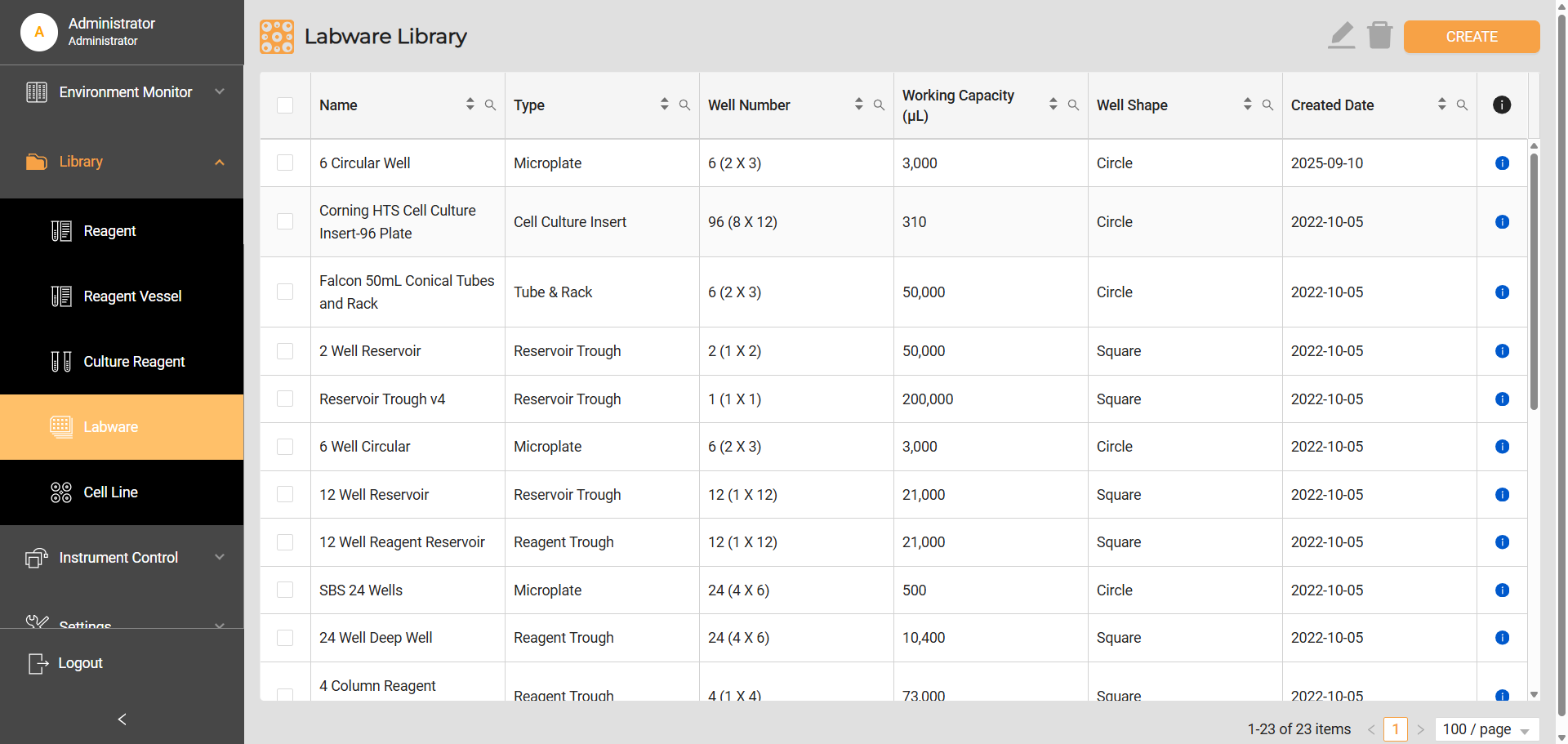
Labware Library
To add labware to the library:
Navigate to Library > Labware, and click the CREATE button on the top right corner.
On the Create Labware page, fill in the required information. The fields with a red asterisk ( * ) are mandatory.
Note
Additional forms may appear as you select trough as labware type.
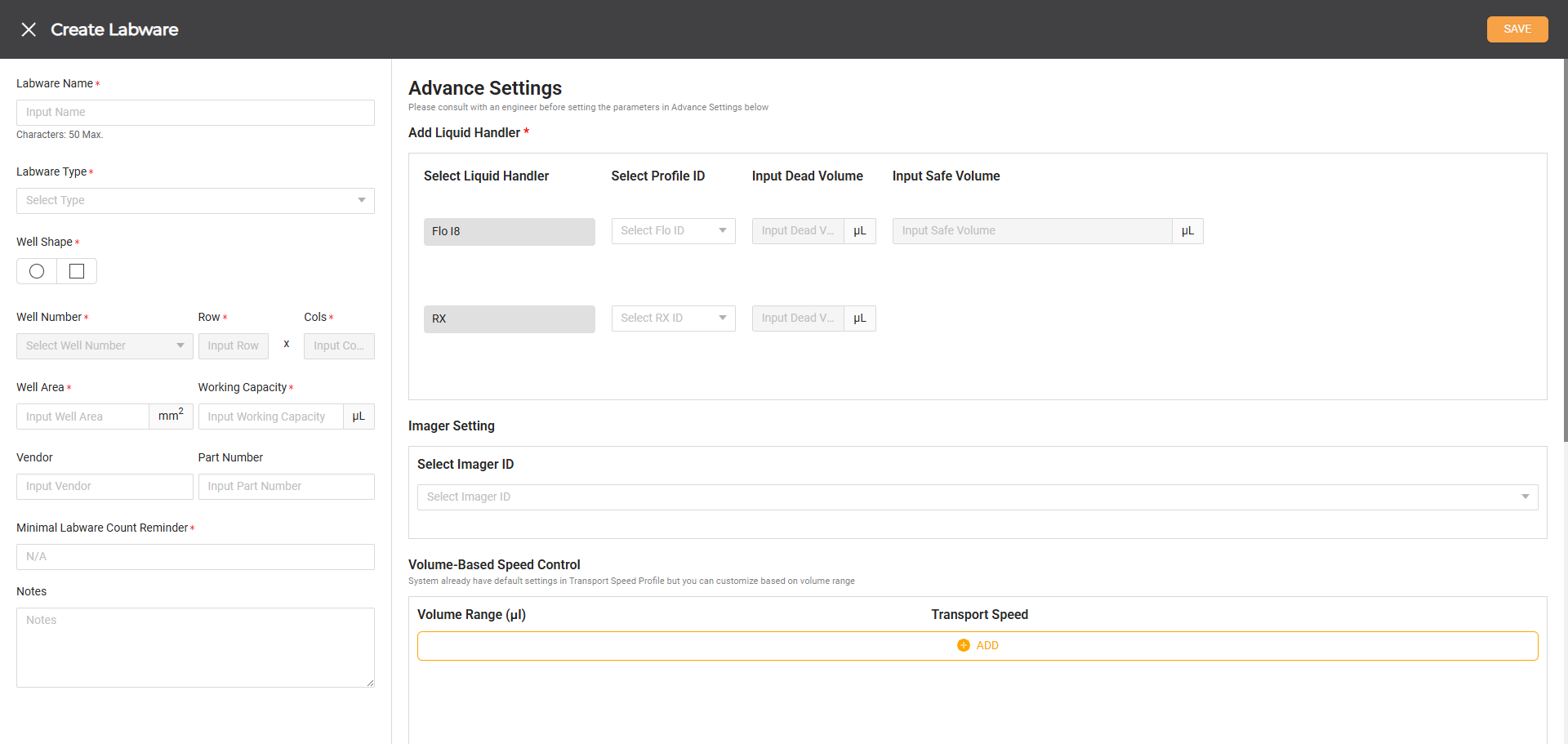
Create Labware Page
Item
Description
General Information
Labware Name
Descriptive name for the labware.
Labware Type
A list of labware supported by Cellmatic. If you select troughs or microplates, make sure the labware IDs for FLO, RX, and Imager match.
Well Shape
Options for the shape of the well: round and square.
Well Number
A list of well numbers of the selected labware. The Rows and Columns are automatically specified when the well number is selected. Selects Custom to define new well number(s) that are not mentioned in the list. Then, specify the rows and columns.
Well Area
The well area of labware in mm2.
Vendor
The company that sells the labware.
Part Number
The identifier number of the labware.
Minimal Labware/Chip/Tip Amount Reminder
The lowest chip/labware/tip amount before the reminder. The minimal amount shouldn’t exceed well number.
Notes
A space for additional information if any.
Advance Settings
Add Liquid Handler
Select Liquid Handler
Two liquid handlers used for the labware: Flo i8 and RX.
Select Profile ID
A list of labware supported by Flo i8 and RX. Match the FLO ID with the RX and/or Imager when you select labware types such as microplate, counting plate, and trough.
Input Dead Volume
The remaining volume of liquid in the labware after full aspiration.
Input Working Capacity
The working volume of labware when the labware is in flat and tilted positions.
The total volume a well can hold, minus the dead volume.
Note
The feature is available when users select a microplate as the labware type.
Input Safe Volume
The minimum liquid volume in the labware required to ensure no air is aspirated during transfer in flat and tilted positions.
Imager Setting
Select Imager ID
A list of labware supported by Imager. Match the Imager ID with the FLO and/or RX IDs when you select labware types such as microplate and counting plate.
Volume-Based Speed Control
Volume Range (μL)
The volume range assigned to a specific transport speed.
Transport Speed
How fast the Rover transports the labware to the destination: Slow, Medium, and Fast.
Dislodger
Volume Range (μL)
The volume range assigned to a specific dislodging setting.
Velocity (RPM)
The dislodging speed when operating.
Acceleration (RPM/s)
The dislodger’s capacity to gain speed within a short time.
Duration Per Rotation (s)
The time taken to complete one full rotation.
Rotation
The action of the Dislodger rotating around an axis or center.
Additional Settings
Dispense Minimum Volume
The smallest volume that the system is permitted to dispense into the labware.
Weight
The weight of the labware.
Need Warming
Indicates the labware is rated for high-temperature applications.
Compatible with Dispenser
The registered labware is validated for use with the Cellmatic dispensing module.
Enable Well Refill
When active, the system automatically replenishes the well with the designated reagent to maintain the required volume.
Use the table below as your reference for the labware’s Working Capacity, RX, and FLO Dead Volumes. Alternatively, refer to the labware’s technical data sheet for the working volume.
Labware Name
Plate Orientation
FLO Working Capacity (µL)
FLO Dead Volume (µL)
FLO Safe Volume (µL)
RX Working Capacity (µL)
RX Dead Volume (µL)
1-Well Plate
Flat
24,000
6,045
19,000
25,000
500
Tilted
8,000
580
1,200
4-Well Plate
Flat
8,000
2,200
3,000
5,000
250
Tilted
6,000
500
900
6-Well Circular Plate
Flat
2,000
900
1,400
16,000
0
Tilted
1,000
179
500
8-Well Plate
Flat
8,000
1,000
2,600
3,000
150
Tilted
3,000
300
800
24-Well Plate
Flat
1,000
341
260
2,000
0
Tilted
1,000
248
200
96-Well Plate
Flat
1,000
0
90
250
5
Click SAVE to store the information and add labware to the library.
Related Topics