Task list
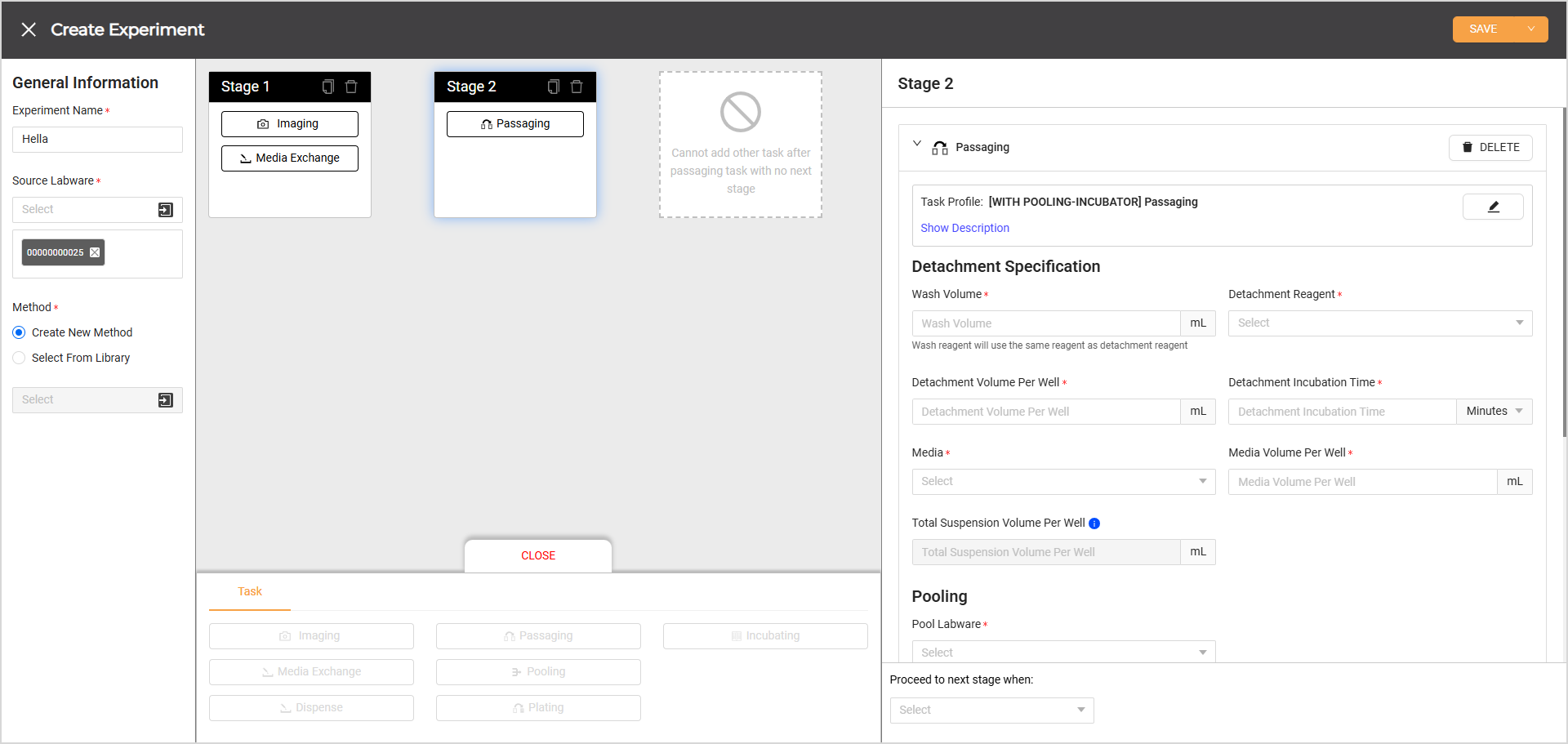
Create Experiment Page
The Cellmatic Suite streamlines cell culture workflows with a card-based system. Each card represents a distinct stage in a cell culture experiment. Stages include tasks like Imaging, Media Exchange, Dispense, Passaging, Incubating, Plating, and Pooling. One task can be added to each stage, except for imaging and media exchange, which can be combined within a single stage. Each task, except Incubating and Dispense, offers various task profiles tailored to different experimental needs.
Task profiles define the sequence of steps for a specific operation. The list of available profiles updates based on the selected source labware. To help users distinguish between similar profiles, tags indicating the required instruments and labware are displayed beneath each profile name.
Upon selecting a task profile, users are prompted to complete the associated parameters. These parameters are generated based on the selected task profile and may vary from one profile to another.
Task profiles can be created using JSON files. For assistance, contact cell.support@formulatrix.com.
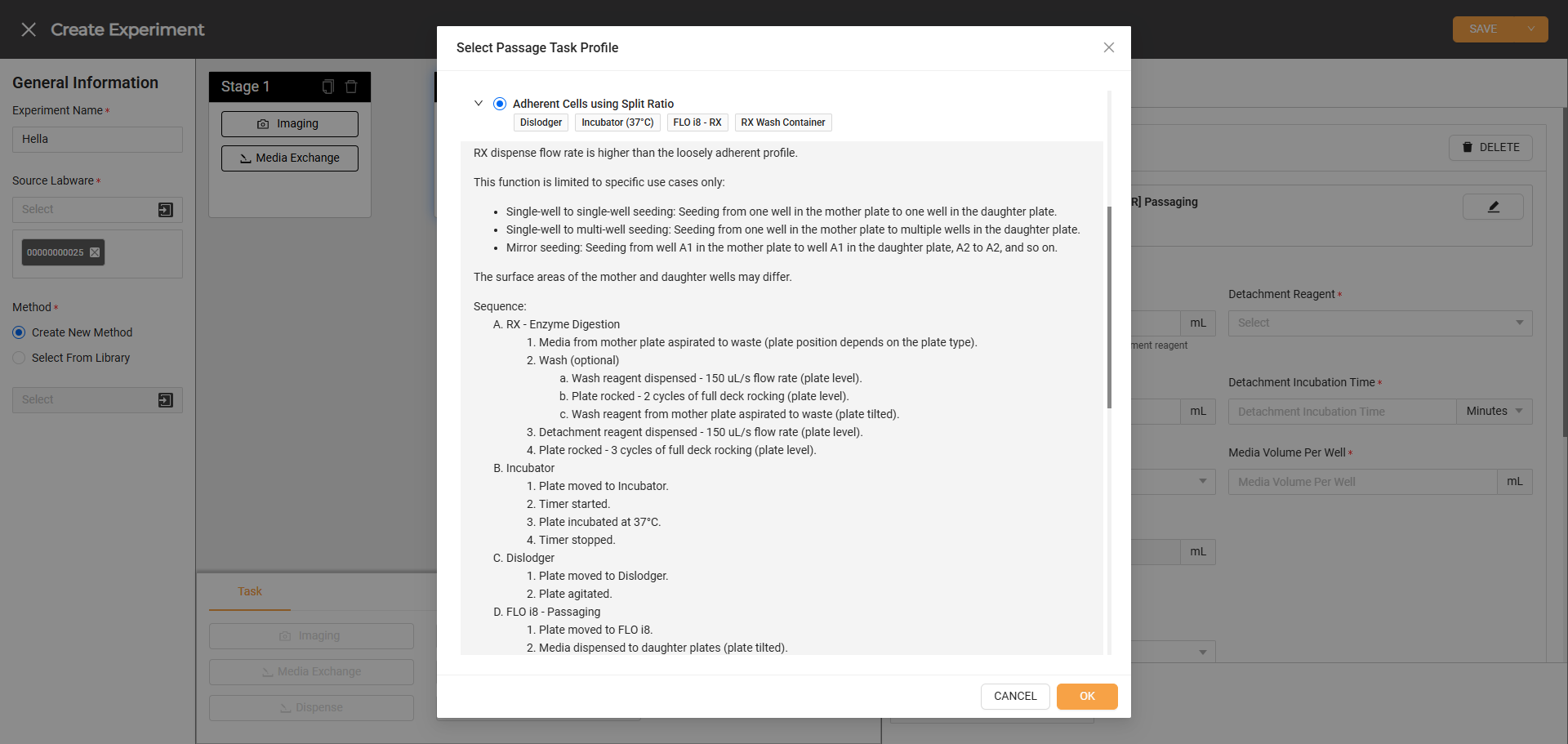
A Task Profile in Passaging
Tasks in the experiments are executed sequentially, meaning each must be completed before moving to the next stage. Certain tasks, like media exchange, dispense, and imaging, allow users to create multiple schedules with different task profiles. Similar to the tasks, these schedules also run sequentially. Once the task is set up, users must configure specific conditions for each stage to ensure proper progression through the experiment. After experiment execution begins, users can monitor the progress on the Experiments page in the Cellmatic Suite.
Protocol Tasks
1. Imaging
Imaging captures cell confluency and morphology to analyze the cell growth and behavior throughout the experiment.
When adding an imaging task, users can choose when it begins:
Immediately: The task begins execution without any delay.
After set interval: The task starts after a specified delay, based on the interval set in the Repetition section when adding a schedule.
After selecting the starting time, users can select +ADD SCHEDULE to choose a task profile and enter parameters specific to that profile.
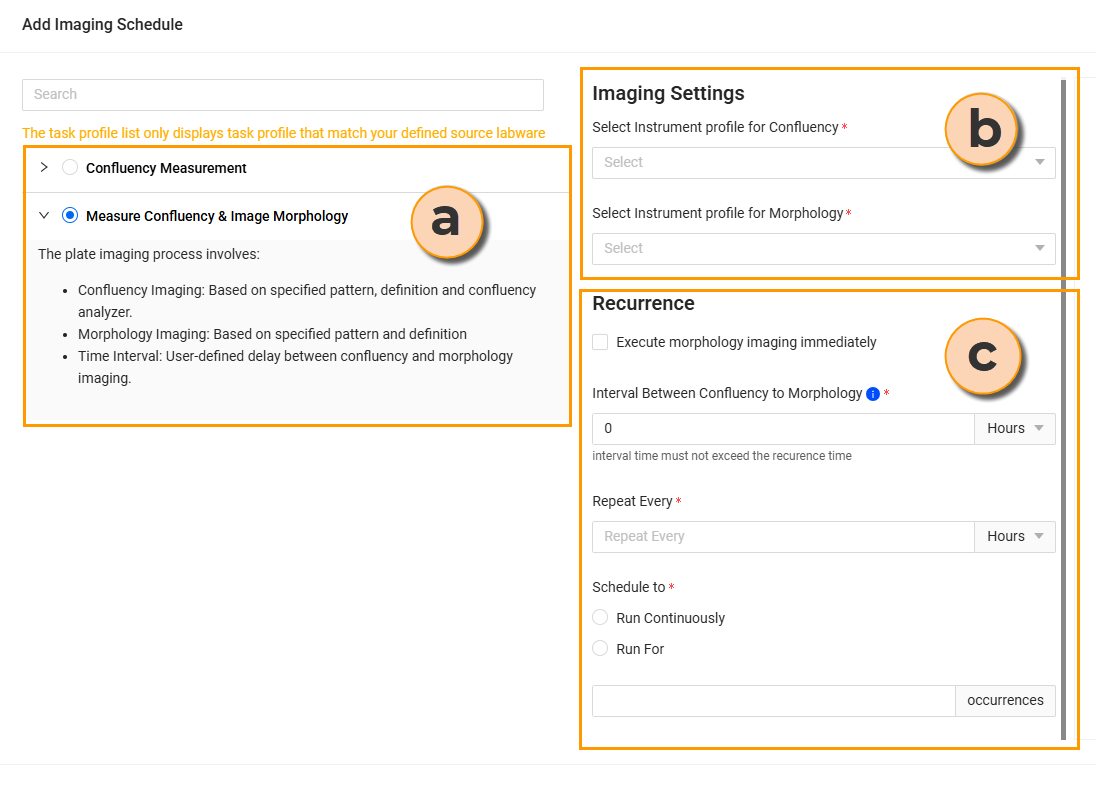
Adding the Imaging Schedule
Task Profile: Displays compatible configurations tailored to your source labware.
Imaging Settings: Specifies the imaging profile for evaluating cell confluency and morphology.
Recurrence: Sets the frequency and timing intervals between runs.
Imaging tasks allow for multiple schedules within a single task, enabling users to apply different imaging profiles in one experiment. When adding multiple schedules to one imaging task, the system will complete the first task before executing the second one. For this reason, the first task must not have a never ending repetition or the system will throw an error during the validation.
2. Media Exchange
Media exchange replaces the old media with fresh media to maintain the health and viability of the cultured cells. When scheduling a media exchange task, users have two start-time options:
Immediately: The task begins execution without any delay.
After set interval: The task starts after a specified delay, based on the interval set in the Repetition section when adding a schedule.
After selecting the starting time, users can select +ADD SCHEDULE to choose a task profile and enter parameters specific to that profile.
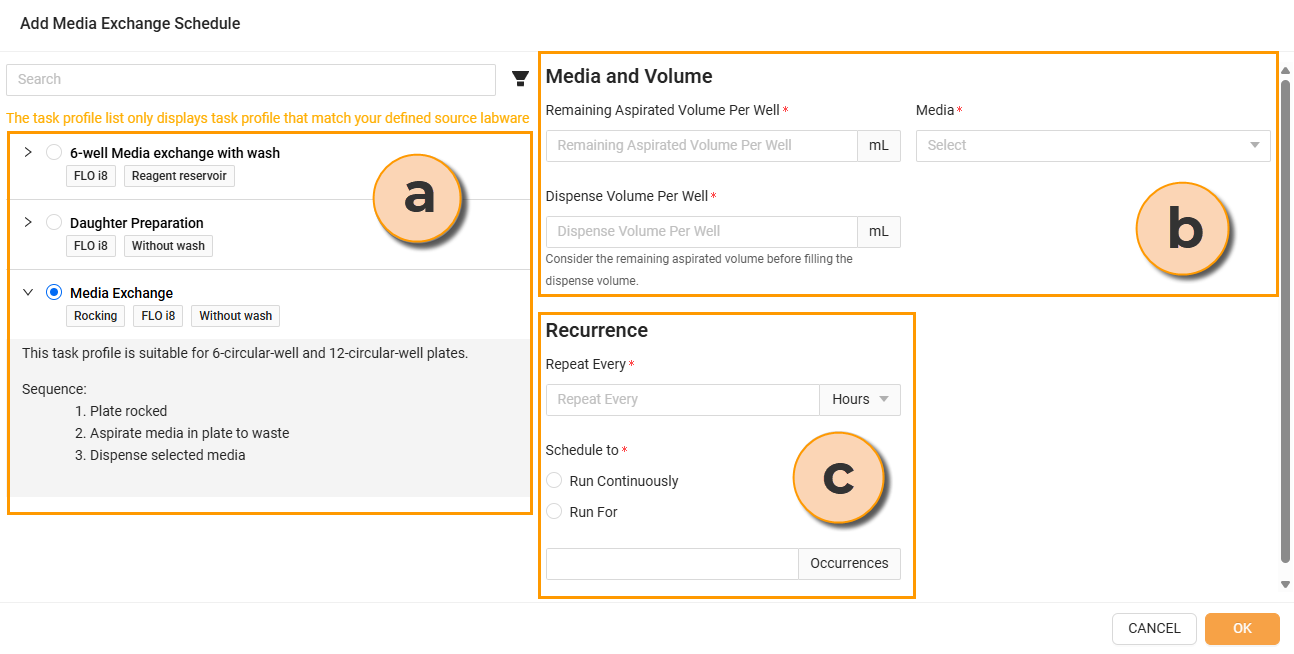
Adding the Media Exchange Schedule
Task Profile: Displays compatible configurations tailored to your source labware.
Media and Volume: Defines the media type, and the desired remaining aspirated and dispense volumes per well.
Recurrence: Sets the frequency and timing intervals between runs.
Similar to imaging, users can set multiple schedules within a single media exchange task. This allow users to apply different profiles throughout the experiment.
3. Dispense
Dispense adds a specified reagent to plates with cells without discarding existing media, unlike the media exchange. When adding a dispense task to a stage, users can set when the task begins:
Immediately: The task begins execution without any delay.
After set interval: The task starts after a specified delay, based on the interval set in the Repetition section when adding a schedule.
After selecting a start time, users can define the task profile for the Dispense task. Then, users can fill out the necessary parameters right away. When filling out the dispense volume per well, users should consider the existing media volume to prevent spills.
Dispense supports multiple schedules that allow users to add different reagents as needed within the same experiment.
4. Passaging
Passaging transfers cells from existing plates to new plates once they reach a specified confluency or density level. This ensures cell health and provides sufficient cells for experiments. Users can set the target confluency when creating an experiment, and the system will automatically monitor cell confluency, initiating the passaging process once the target is reached. Users also need to confirm that empty daughter plates are registered in the system for use. Refer to Registering Labware Via Cellmatic Suite for the details.
The passaging process consists of two main steps: enzyme digestion and seeding.
Enzyme Digestion:
The RX aspirates the old media, washes, and dispenses the detachment reagent onto the mother plate.
The plate is incubated at either 25°C or 37°C, based on the user’s settings.
Seeding:
After incubation, the Rover transports the mother plate to the Flo i8, where quenching and dislodging are performed before the cells are seeded onto daughter plates.
Note
In some task profiles, dislodging is performed separately in the Dislodger, a stand-alone instrument.
When adding a passaging task to an experiment method, select a task profile to determine the passaging method. Since each task profile may have different procedures, carefully review the description before making a selection.
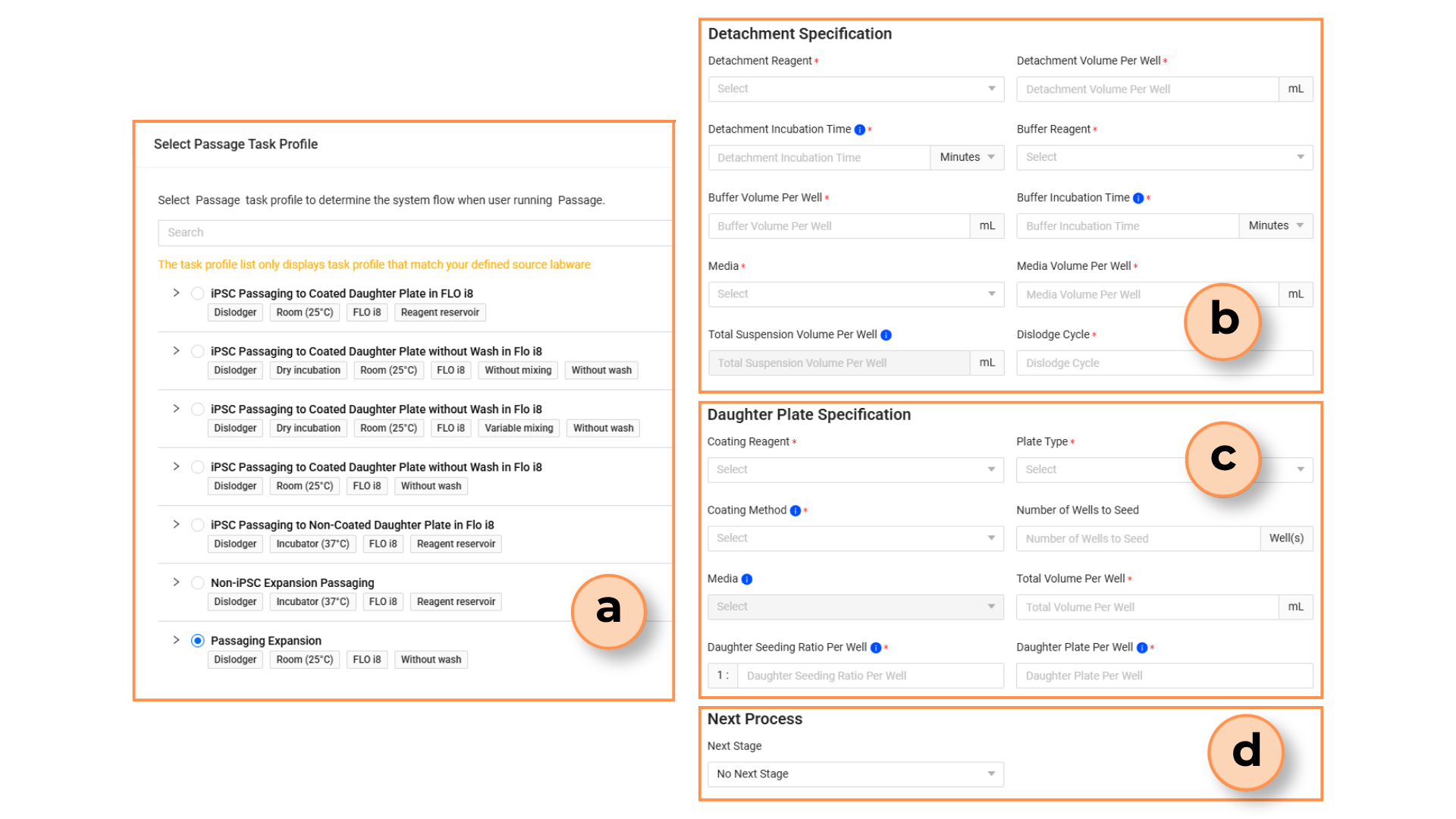
Passaging Task Profiles and Parameters
Task Profile: Displays compatible configurations tailored to your source labware.
Detachment Specification: Defines the reagent types, volumes, and dislodging cycle during the enzyme digestion and buffer solution addition processes.
Daughter Plate Specification: Defines the coating reagent types, volumes, and seeding ratio during seeding.
Next Process: Selects the next stage upon the passaging completed.
5. Incubating
Incubating moves the plates to the Incubator and stores them at 37°C for a specified duration, as the experiment requires. The incubation timer begins once the plate arrives in the Incubator.
6. Plating
Plating involves enzyme digestion, counting, diluting, and collecting cells in suspension at a specified concentration before dispensing them into multi-well assay plates.
Enzyme Digestion:
The RX aspirates the old media, washes, and dispenses the detachment reagent onto the mother plate.
The plate is incubated at 37°C in the Incubator.
Counting:
After incubation, the Rover transports the mother plate to the Flo i8, where quenching and dislodging are performed before the cells are prepared for counting.
Note
In some task profiles, dislodging is performed separately in the Dislodger, a stand-alone instrument.
Cell counting preparation is performed on the Flo i8, where an aliquot of cells is stained with trypan blue and then dispensed into the cell counting plate which is then imaged in the Imager.
Essential steps for cell counting preparation include:
Prepare and register a 96-deep well block containing trypan blue
Register a cell counting plate
Set up the Imaging profile
To see the cell counting result, refer to View Counting.
If the cell counting result meets the required threshold, the cells from the mother plates will be harvested or collected in a reservoir before being dispensed into the target plates.
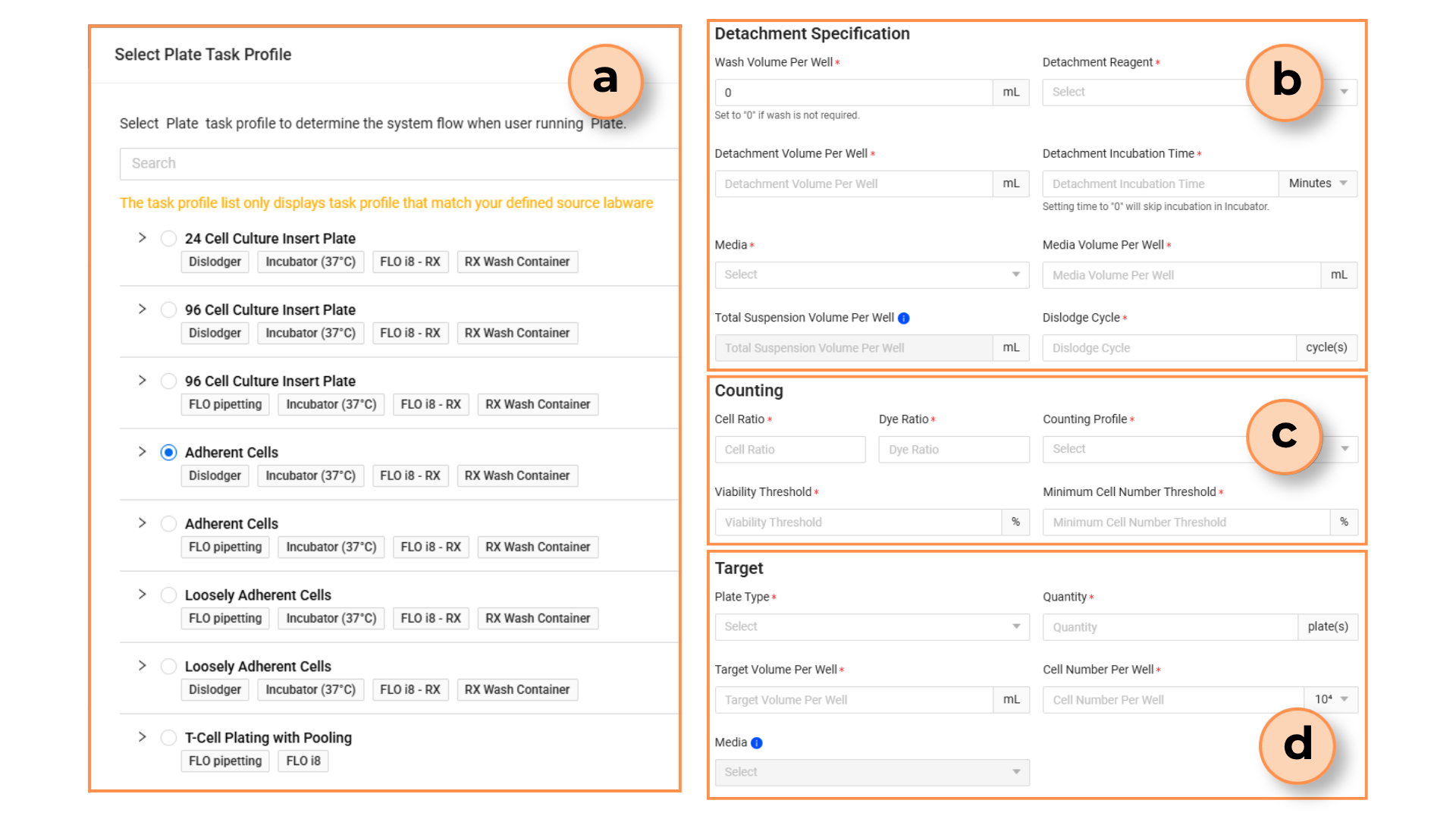
Plating Task Profiles and Parameters
Task Profile: Displays compatible configurations tailored to your source labware.
Detachment Specification: Defines the reagent types, volumes, and dislodging cycle during the enzyme digestion and buffer solution addition processes.
Counting: Defines the counting configurations. Please note that the cell viability and actual cell number are below the threshold, the plating will be cancelled and the mother plate will be transferred back to the Incubator.
Target: Specifies the target plate specifications, incuding well volumes and cell densities.
7. Pooling
Pooling collects cells in suspension from mother plates and transfers them to a cell reservoir. The process involves enzyme digestion, incubation, and dislodging before pooling occurs. Like other tasks, Pooling offers multiple task profiles, each with different sequence details that users should carefully review before selecting.
Related Topics