2026
TIGA Cadence 11.9
September 26, 2026
What’s New
Spare Part Compatibility Across Hardware Versions and Items
TIGA introduces the Spare Part Compatibility table to record whether a spare-part Item works with a specific Hardware Version. Each record has a status of Compatible, Incompatible, or Unknown, giving Engineering and Support teams a reference to verify whether a spare part is suitable for specific hardware.
Engineering Managers can create the records manually, but in most cases, they don’t have to. TIGA can automate it when:
Creating a new record or using the new Copy Spare Part Compatibility action in the Hardware Versions table.
Creating a new Item version using the Create New Version action.
TIGA also sends a weekly report to the Engineering Managers listing Hardware Versions without Spare Part Compatibility records and compatibility records with an Unknown status.
TIGA Data Console for Looker Studio Data
Created TIGA Data Console for authorized users to view the tables and data stored in the Postgres database used by Looker Studio dashboards without needing direct database access. The console provides:
Overview – record counts for Accounts, Contacts, and Pipeline, Order Value, a Data Landscape summary, and the status of Recent Syncs.
Individual tables – access to tables such as Accounts, Contacts, Sales Pipeline, Sales Orders, and more from the sidebar.
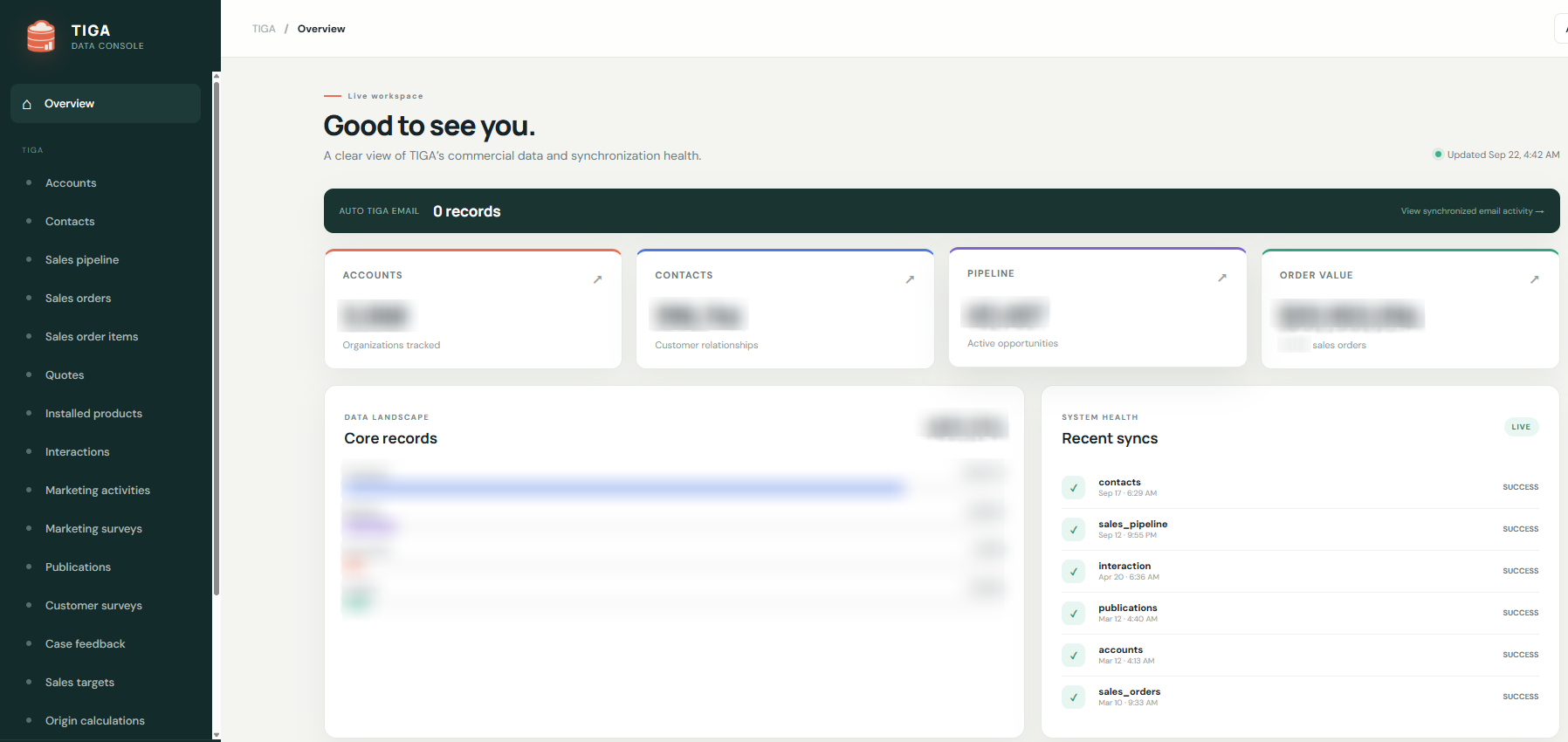
TIGA Data Console
Enhancements & Updates
Support
Updated the History log for Coverage records created by the Move System To Different Account action. The Action entry now identifies the action that triggered the record creation.
Updated Installation and OQ cases to allow the Product field to be left empty when creating a case. A Product must be selected before the case can be Closed. Read more about creating cases.
Sales & Marketing
Added the Clean Contact action to the Contacts table. It converts special characters in contact data into ASCII-compatible characters and exports the selected data as a CSV file for integration with Brevo.
Added additional recipient groups for “Interaction - Demo Report” email notifications based on the Product in the Demo Interaction:
Cellmatic: cell.lead@formulatrix.com, cell.sales@formulatrix.com, and productmanagers@formulatrix.com.
Reagent Exchanger: lhsales@formulatrix.com, productmanagers@formulatrix.com, and cell.sales@formulatrix.com.
Added an Is Default field to the Territory Mapping Rules table to improve territory assignment for Sales Pipeline records created from web forms with incomplete addresses. When an address matches multiple territory rules, TIGA assigns the default rule for the corresponding country.
General
Increased the Version Changes field character limit in the Items table from 255 to 2,000 characters to support longer descriptions of item changes. This applies when creating a new record manually or via the Create New Version action.
Bug Fixes
Support
Fixed the following issues related to Item Requests:
Orphaned part tracking failed when Part Tracking Notes exceeded 1,000 characters. The character limit has been increased to 4,000 characters to support longer part tracking information.
The Sender Information section was not automatically populated after selecting a -Contact for Non Inventory Request, Installed Product Shipment (loaner/return) for Repair, and Swap Request type.
The Recipient section in “Item Request Submitted” email notifications for Non Inventory Request type displayed the Sender information when the recipient information was entered first. The notification now displays the correct Recipient information regardless of entry order.
Quotes
Fixed an issue where the Price Factor was not applied to S&TC when configuring an Instrument quote, causing the S&TC price to differ from the final quote. S&TC information has also been added to the “Optional annual service contract after first year” table.
Sales & Marketing
Fixed an issue where the scheduled Postgres Sync process did not consistently transfer updated data from TIGA to the Postgres database used by Looker Studio.
Fixed the following issues in the Sales Pipeline table:
Leads submitted through web forms with a 0% probability were assigned an Open status instead of New Lead. These leads are now assigned the New Lead status to ensure that they are correctly identified as new leads that have not yet been contacted.
Users could not save changes to a Sales Pipeline when a new Interaction was added or automatically created while editing the pipeline.
Bonded Zone & Warehouse
Fixed an issue in the Work Orders table where using the Request Part action did not validate selected items hidden by filters. The validation now includes all selected items when checking the total Requested Quantity against the allowed Issued Discrepancy quantity.
Fixed the following issues related to the Bonded Zone Report:
The report used excessive memory when retrieving FIFO Track data. It now processes only the FIFO data relevant to the selected end date instead of retrieving all records.
The report failed to generate when the selected date range spanned approximately two years. The report can now be generated for larger date ranges.
The Nilai Barang (Penyerahan - USD) column in the Good Outflow Report displayed more than two decimal places.
The report failed to load in Mozilla Firefox because of an unsupported function.
General
Fixed an issue where History logs were not created for records added through the Import feature. Imported records now have a History entry to track their creation.
Previous Releases
TIGA Cadence 11.8.1
September 3, 2026
Enhancements & Updates
Bonded Zone & Warehouse
TIGA now excludes cancelled Purchase Order Line Items from being generated as Transaction Line Items when creating Shipment In or Shipment Request Out transactions from a Purchase Order.
Bug Fixes
Bonded Zone & Warehouse
Fixed permission issues in the Purchase Orders table that incorrectly restricted certain actions to the “Purchasing” group when:
Inputting or updating the Delivery Date.
Changing the Purchase Order (PO) status from Sent to Closed.
The “Purchasing” group credential is required only when changing the PO status from Approved to Sent.
Resolved an issue where the “Intercompany Stock Availability” confirmation displayed inaccurate stock availability information. Read more about Automating Work Order for Intercompany Purchase Orders.
TIGA Cadence 11.8
August 22, 2026
What’s New
Work Order Child for Additional Material Requests
TIGA introduces the Work Order Child (WO Child) feature, allowing users to request additional items for a Work Order (the WO Parent) while keeping all related costs and materials associated with the WO Parent. The WO Child is automatically linked to its WO Parent. Read more about Creating a Work Order Child.
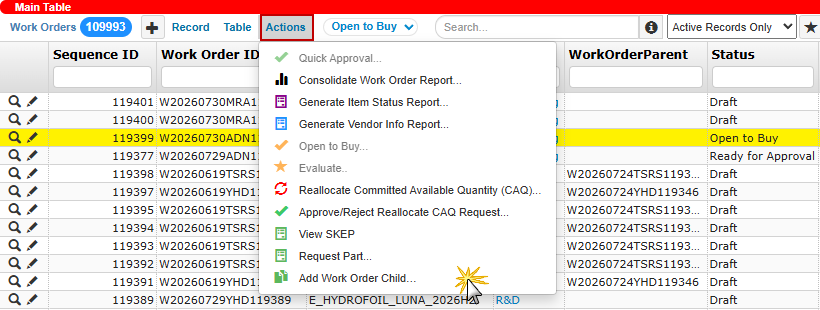
Add Work Order Child Action
Better Stock Visibility for Intercompany Purchase Orders
TIGA now checks stock availability when an intercompany PO is changed to Sent and notifies the Purchasing team when the requested items are only partially available or completely unavailable. This allows them to either proceed with the process using available stock or cancel the action to receive detailed stock availability information via email, reducing the need to manually identify and correct POs with insufficient stock. For more information, read about Automating Work Order for Intercompany Purchase Orders.
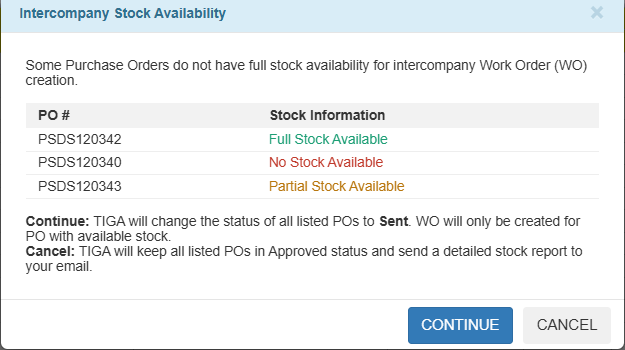
Intercompany Stock Availability
Event-Based Grouping for Sales Pipeline Leads
Sales pipeline leads can now be viewed in groups by event and institute, bringing related contacts from the same research group together in one place. Users can filter leads by Year, BU (Business Unit), Event, or Contact using the Sales Pipeline Event Wise Group action. Once filters are applied, leads are organized into their respective event groups. Each event header displays a summary of its institutes, individual contacts, and total leads.
Within each event, leads are divided into two sections:
Institute Group – contacts from the same institute are grouped together, with the Principal Investigator (PI) marked by a (PI) badge.
Individual Lead – contacts that are not part of a group remain listed individually.
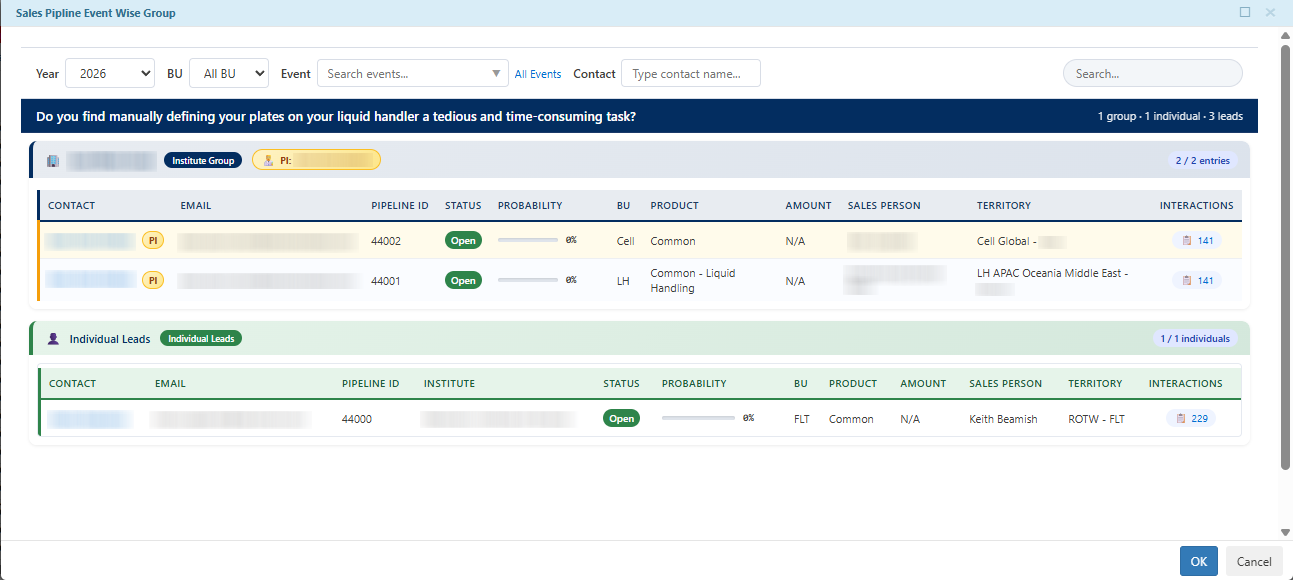
Sales Pipeline Event Wise Group
Enhancements & Updates
Support
Re-named the Support Team Calendars:
From USA PC to USA PC/FLT.
From USA LH/FLT/Cell to USA LH/Cell.
Sales & Marketing
Added the Account # and Account information to the “SC Sales Pipeline - Status Changed” notification email.
Added new questions to the “Trade Show Report & Post Survey Questionnaire” to collect additional trade show information, including booth evaluation, competitor information, lead quality, and recommendations for future events.
Added a new Survey Report action in the Marketing Activity Survey table. Users can filter survey data by status and date range, then download the results as an Excel file for improved reporting and analysis.
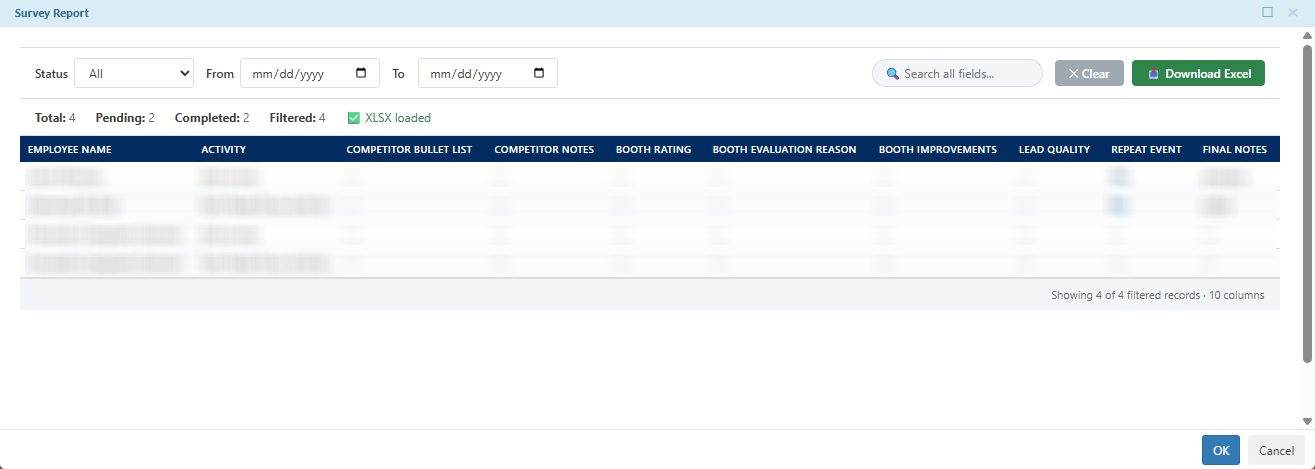
Survey Report
eStore
Improved customer communication during the eStore order process:
The “Order Confirmation” email sent after checkout no longer includes the invoice attachment.
Customers no longer receive another “Order Confirmation” email after the Admin team commits the invoice.
TIGA now validates the order and shipment status before synchronizing updates with eStore to avoid sending unnecessary customer emails.
Bonded Zone & Warehouse
Added Pickup Date column to the Transactions and Transaction Line Items tables. The column is automatically populated for transactions created from the Request Part action in the Work Orders table. Read more about requesting parts for issued out transactions.
Changed the recipient email address for the “PO Sent” notification from po@formulatrix.com to tiga.po@formulatrix.com.
Improved the performance when changing Work Order For Production status to Open to Buy.
Bug Fixes
Support
Fixed an issue where the Create New Version action in the Items table populated the Spare Part PIC in the new item version record even when the field was left blank in the dialog.
Bonded Zone & Warehouse
Fixed an error when users entered a Purchase Order ID while creating a Transaction.
General
Fixed an issue where exporting the Group records from the Security application generated a blank CSV file.
TIGA Cadence 11.7.1
July 28, 2026
Enhancements & Updates
Sales & Marketing
Updated the “Standing Order That is Not Complete Yet” email format by:
Adding Creation Time, Quantity, Shipping Discrepancy, and Shipped Quantity columns.
Renaming the Name column to Account Name.
Sorting records by Creation Time in descending order, newest Shipments first.
Read more about Standing Order for Consumables.
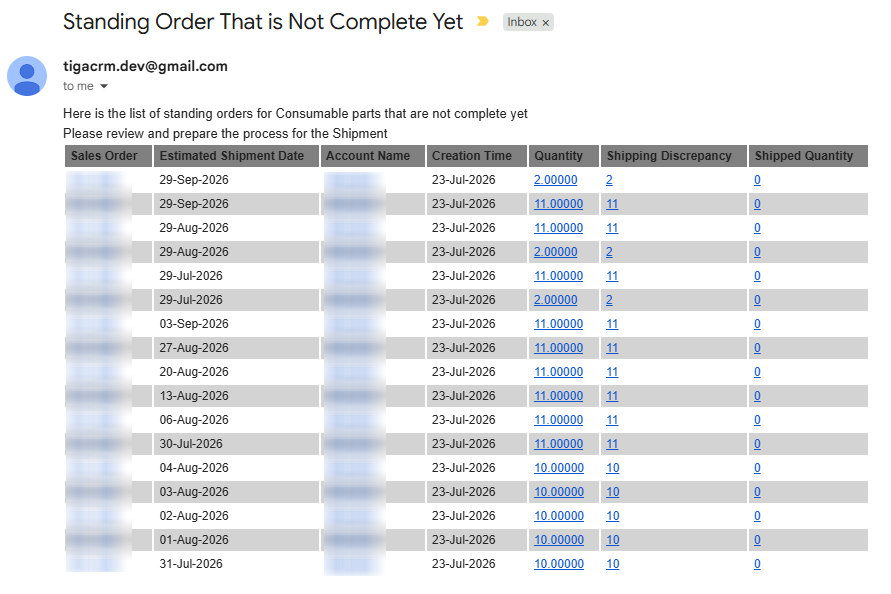
New Format of “Standing Order That is Not Complete Yet” Email
Bug Fixes
Quote
Fixed an issue where Tariff calculations for Instrument quotes with multiple bundled products did not account for the total bundle quantity. This results in incorrect Tariff amounts and inconsistent CA and NCA values between Quotes and the corresponding Sales Orders.
Sales & Marketing
Fixed an issue where Publications records could not be created or updated when the Summary field exceeded 255 characters. The character limit for the field has been increased to 2,000 characters.
Bonded Zone & Warehouse
Fixed the following issues in the Bonded Zone Report:
Exporting the report generated an empty CSV file due to missing creation and modified time attributes required by the Date period filter. The Export all records and Date period fields have been removed from the Export feature for the Bonded Zone Report to resolve this.
The Goods Outflow report displayed the incorrect Nomor Bukti Penerimaan column header instead of the Nomor Bukti Pengeluaran.
Read more about Bonded Zone Reports.
Resolved the following issues related to Work Orders (WOs) automatically created from intercompany Purchase Orders (POs):
Product Family was incorrectly mapped using the PO Company instead of the selected supplier’s Company.
Required Date and Scheduled Date were set to the same value as the Order Date. They are now automatically adjusted to be 14 days after the Order Date.
Read more about automating work order for intercompany purchase orders.
TIGA Cadence 11.7
July 18, 2026
What’s New
Simplified Intercompany Purchase Order Process
TIGA now simplifies the intercompany Purchase Order (PO) process for the Purchasing team to fulfill requested items using internal stock from another Formulatrix company instead of purchasing directly from an external supplier.
When a PO marked with Auto Create WO Intercompany is changed to Sent, TIGA automatically performs the following actions to reduce manual work:
Creates an Open to Buy Work Order (WO) for the intercompany PO.
Adds the matching Work Order Line Items (WOLI) based on available stock.
Emails the relevant stakeholders so the Warehouse team can immediately continue the fulfillment process.
For more information, see Automating Work Order for Intercompany Purchase Orders.

PO Marked for Auto Create WO Intercompany
Export Records with More Flexible Filtering
The Export feature now provides more flexibility when determining which records to include in an exported file. Instead of filtering records by date in the table before exporting, you can now choose whether to:
Export all records from the current table.
Export only records within a specific date range based on their Created Time or Last Modified Time.
When exporting records by date, specify the Start and End dates to define the required date range. This makes it easier to export only the records you need while helping prevent unintentionally exporting very large numbers of records. Read more about exporting records.
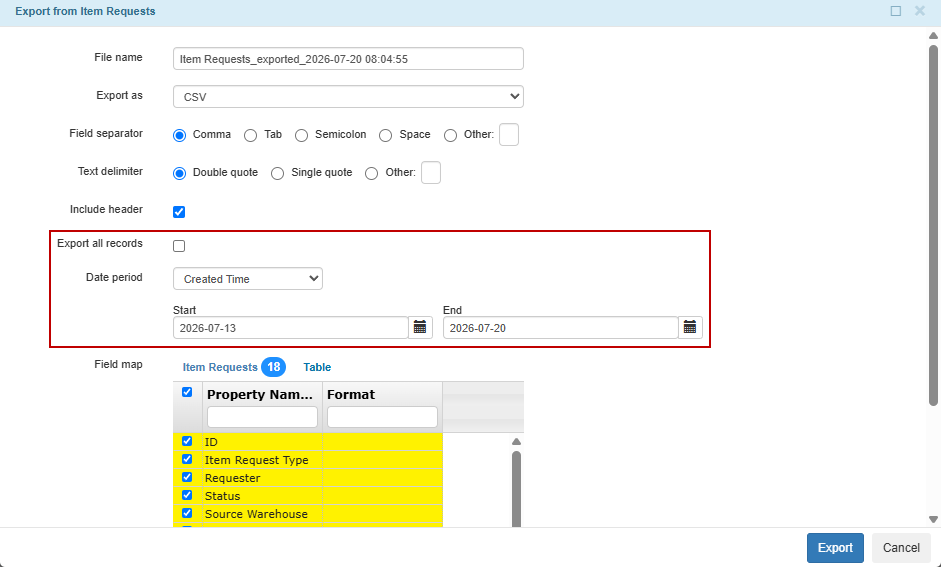
Export All Records and Date Period Fields
Enhancements & Updates
Support
Made the following changes to the Create New Version dialog in the Items table:
Redesigned the dialog to separate Previous Version and New Version information into distinct sections for easier comparison before creating a new version.
Added Item Description, Base Description, and Version Qualifier as reference fields for both version sections.
Made a Version Qualifier mandatory for the Latest Version if the Previous Version already contains one.
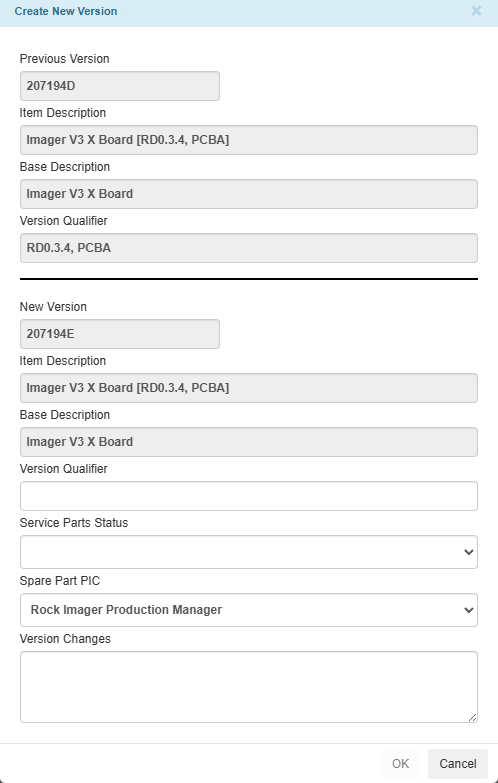
New Dialog of Create New Version Action
TIGA now automates tracking of orphaned parts for fulfilled Field Service Parts Request with the following details:
Automatically checks whether requested parts remain in the customer warehouse after the associated Cases are closed.
Updates the Part Tracking Status to Orphaned Parts Found - Initiate Tracking when remaining parts are detected, or No Orphaned Parts Found when none are found.
Appends details of any remaining requested parts in the Part Tracking Notes.
Quote
Added a # column to reorder line items during quote configuration for Service Estimate and Service Estimate (SIM) quotes. Read more about the quote wizard.
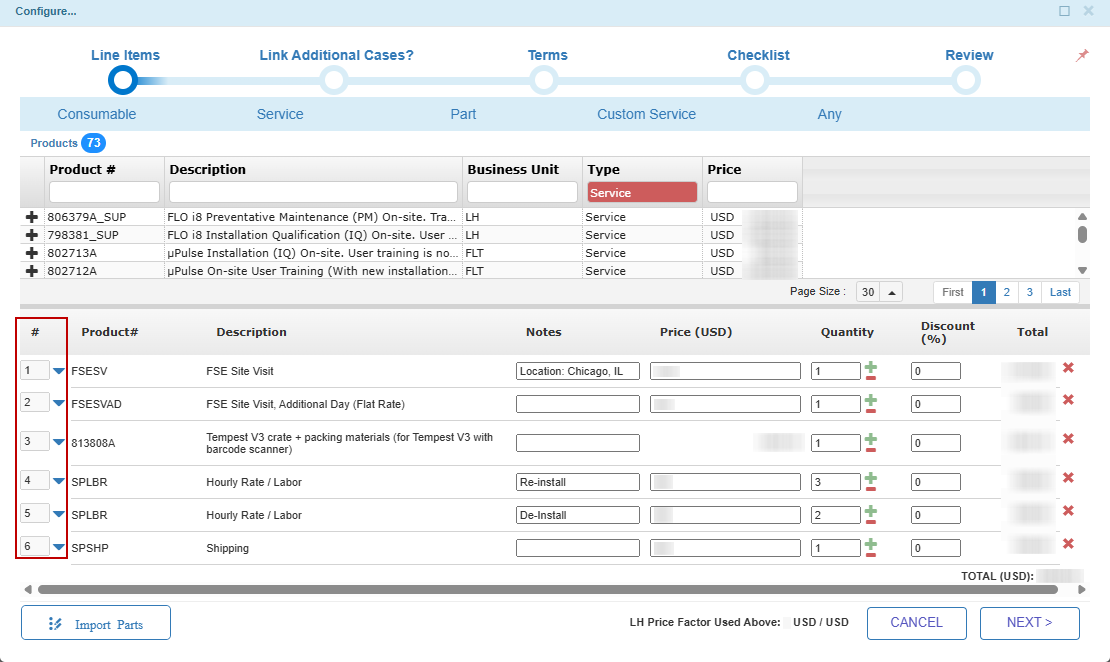
# Column in Configure Window
Sales Marketing
Automatically populated Ship To Address information for Sales Orders generated using Receive PO action.
Created email notifications to the admin.pk@formulatrix.com when duplicate Customer PO # values are detected in Sales Orders created from eStore orders.
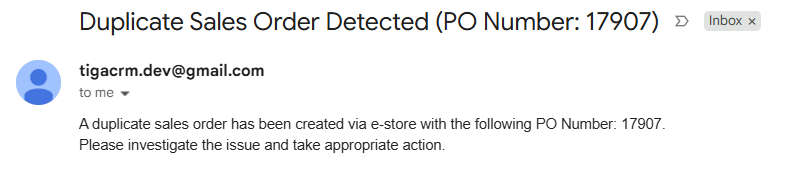
Email Notification for Duplicate Sales Order
Bonded Zone & Warehouse
Shipment creation confirmation dialog is now displayed when changing multiple POs to Sent using Bulk Update. Read more about bulk update.
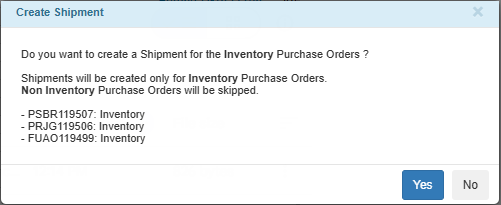
Create Shipment for Multiple POs
The Scan Barcode action now supports barcodes containing both Item ID and Serial Number by automatically using the Item ID. Read more about confirming items using scan barcode.
Added asterisk (*) indicators to required fields in the Work Orders table to make mandatory fields easier to identify.
General
Improved user account management by marking unused user accounts as inactive. Read more about configuring user accounts.
Made the Username field read-only in the Account Settings to ensure it remains the user’s email address.
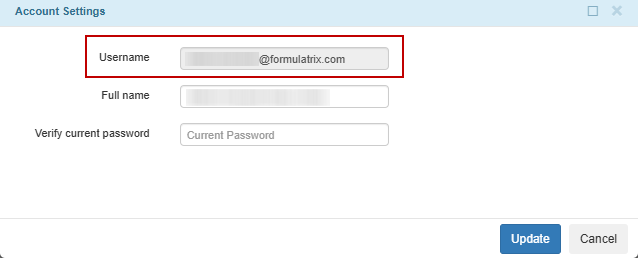
Username Field in Account Settings
Bug Fixes
Support
Resolved an issue where the related Installed Product Shipment (loaner/return) for Repair item request was not updated to Fulfilled after a Tracking Number was generated for its Shipment using the Configure FedEx Shipment action.
Quotes
Fixed an issue where the Receive PO action failed to generate a Sales Order for quotes containing a CULHI custom product with a Discount In Percent value.
Sales & Marketing
Fixed an issue where mass emails sent from HubSpot were not logged as Interactions in TIGA.
Resolved an issue where selecting Software Lite in the Type field of the Coverage table triggered an error. Selecting Software Lite now skips all RockMaker validations.
Bonded Zone & Warehouse
Resolved an error when using the Mark as Don’t Buy action if the Notes field in the Work Order Line Items table exceeded the 255-character limit. The maximum length of the Notes field has been increased to 500 characters.
Fixed an error when using the Move Part to Different Bin action in the Bin Inventories table due to a missing field in the View Designer configuration. Read more about moving parts to different bins.
TIGA Cadence 11.6.1
July 1, 2026
Enhancements & Update
Support
Updated the validation for the Conversation field in the Cases table to no longer require the “/archive” string. The corresponding error message has also been modified to match the new accepted format.
Sales & Marketing
Improved the error message displayed for Avalara errors when using the Credit Invoice action in the Invoices table. Detailed API response information is no longer visible to users and remains available in the system logs.
General
Updated the validation for the Email Address field in the Contacts table to allow email domain extensions up to 12 characters long. Read more about adding a contact.
Performances
Enhanced page load performance by storing list view and detail view information in the browser. This reduces loading time when opening tables and records while ensuring the latest information is always displayed.
Bug Fixes
Sales & Marketing
Fixed an issue where the Generate Schedule action in the Sales Orders table and the Start Processing Shipment action in the Shipments table failed to complete. Read more about standing order for consumables.
Bonded Zone & Warehouse
Fixed an issue preventing work orders from being closed when the Item ID selected for production was marked as Discontinued.
General
Resolved an issue where using Ctrl + Click on the table bar and on hyperlinked records caused both the current tab and the new browser tab to navigate to the selected page. The current tab now remains on the original page.
TIGA Cadence 11.6
June 20, 2026
Enhancements & Update
Support
Added a PreChecklistFileID setting to the Settings table to simplify management of the file used to generate pre-install checklists.
Only a user assigned to the Global Support Lead role can create or update Internal/Support Team cases. Read more about case categories.
Changed “Stocktake reminder for FSE warehouse” email frequency from daily to every two weeks.
Only members of the “Item Processor” group are allowed to create Installed Product records.
Made the following UI improvements to the Cases table:
Standardized the text box sizes for Summary (Auto-generate) and Summary (Reviewed/Approved) boxes.
Moved the Repair Failed, Return Visit Required fields to the Response Time (Hours) section.
Relocated the “10 Hours = 1 Day” reference text to display under the FMLX Resolution Time (Hours Customer Delay Excluded).
Added a Current Severity column to the “[Support] Open Cases You Are Watching” email report.
Bonded Zone & Warehouse
Shipment records linked to Closed purchase orders (PO) can now be edited. Previously, editing was only permitted when the linked PO had a Sent status.
General
Added email notifications to the Owner Username when a scheduled report fails to send due to an error. Read more about creating a custom report.
Disabled the Delete function in the User table for Administrators. User accounts can be set to Inactive or Archived instead to preserve data relationships across the system. Read more about archiving records.
Removed the Account Client ID field from the Coverage table and migrated existing Account Client ID values to Product Client ID where applicable to preserve existing coverage data.
Bug Fixes
Support
Resolved an issue where Case Entries displayed a service contract warning message for cases covered by an active Service Contract when the associated Coverage record had been archived.
Sales & Marketing
Resolved an issue where duplicate Customer PO # numbers could be entered when creating or updating Sales Orders. Read more about creating a sales order.
Fixed the following issues related to Service Contract quotes:
Start Date and End Date shifted one day earlier when saving the quote.
Receiving a PO displayed internal system error details instead of the intended error message when special characters existed in the related Coverage line items.
Bonded Zone & Warehouse
Fixed an issue where the PO PDF preview could remain in an infinite loading state when using the Download PO action for Sub Contract PO if:
The Purchase Order Line Items (POLI) were cancelled.
No fulfillment or shipment to Indonesia for the POLI.
Resolved an issue where Issued Out transaction line items (TLI) could be created or imported directly in Confirmed status, causing Committed Available Quantity to be updated incorrectly. TLI can only be changed to Confirmed through record updates or transaction confirmation actions. Read more about editing records and confirming items using scan barcode.
Fixed an issue where the system referenced the wrong warehouse when checking inventory availability after a PO was changed to Sent status, causing an error message to be displayed.
Fixed an issue where newly added approvers did not receive “WO Need Approval” notification emails when an Approved work order was returned to Ready for Approval status.
General
Resolved an issue where fields without inline help text displayed the description from a previously hovered field instead of showing no description.
TIGA Cadence 11.5.1
June 6, 2026
Enhancements & Update
Support
Updated the Inventory Recommendation Engine action in the Items table of CRM application to calculate request quantities using the total Quantity from Item Request Line Items instead of the number of records. This change applies to NumRequest1Y, NumRequest4Y, and NumRequest8Y columns, which represent request totals for the past 1, 4, and 8 years.
Quote
Quote - Product Options with Override Price enabled now automatically have Tariff value set to “0” in Instrument and Consumable quotes. Read more about the tariff.
Sales & Marketing
Disabled the Delete function in the Sales Pipeline table to ensure the data is retained. Records can be archived instead of deleted. Read more about archiving records.
Bonded Zone & Warehouse
Updated “PO SENT” email notifications with the following improvements:
Discount, Sales Tax, and Quantity values now display a maximum of 2 decimal places. This change also applies to PDFs generated through the Download PO action.
Added the WO Description column for Purchase Orders linked to a Work Order (WO), excluding Subcontract WOs.
Bug Fixes
License
Resolved an issue where the 2) Enter Values Manually option was disabled when editing Temporary License records. Read more about generating a temporary license.
Bonded Zone & Warehouse
Resolved an issue where the Support Part Shipment Out transaction could not be confirmed using Bulk Update when some Transaction Line Items with the same Item ID were linked to a Serial Number while others were not. Read more about bulk update.
Fixed an issue where the Bin field was automatically populated during the Scan Barcode confirmation process for Support Service Parts Disposal Out transactions when the item was available in multiple bins. Read more about confirming items using scan barcode.
Resolved an issue where CSV files generated through the Request Part action in the Work Orders table were not formatted correctly when the Item Description contained semicolon (;) characters, causing columns to appear misaligned. Read more about requesting parts for issued out transaction.
Time Tracking
Fixed an error preventing users from saving or submitting a timesheet after using Load Template and deleting one of the loaded rows. Read more about using time tracking templates.
General
Fixed an issue where the record count in the Reports table did not match the displayed results after applying a filter in the Condition field. Read more about creating custom reports.
Fixed an issue where the OK button was disabled in the Create New Version action of the Items table, preventing users from creating a new item.
TIGA Cadence 11.5
June 6, 2026
What’s New
Purchase Order for Tangible and Intangible Items
TIGA now supports two distinct Purchase Order Type to differentiate purchasing workflows based on whether a receiving process is required:
Inventory Purchase Orders (POs) are used for Goods and follow the existing workflow that requires a receiving process.
Non Inventory POs are used for Goods and/or Service items that do not require a receiving process.
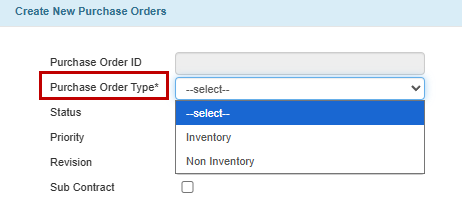
Purchase Order Type in the Purchase Orders Table
Comparison: Inventory PO vs. Non Inventory PO
Inventory PO |
Non Inventory PO |
|
|---|---|---|
Use for |
Goods that need to be received into the warehouse. |
Goods and/or Service that do not require warehouse receiving. |
Stock receiving |
Required. |
Not required. |
Shipment record |
Can be created when the PO is Sent. |
Cannot be created when the PO is Sent. |
Vendor Bill |
Auto-created from the Transaction Line Items when the PO is Closed. |
Auto-created from the Purchase Order Line Items when the Accounting team force-closes the PO. |
Enhancements & Update
Support
When editing Case Entries records, the Has Severity Changed? field now defaults to Leave Unchanged.
Added the following fields to the Item Requests table to support tracking of requested parts that were not used:
Part Tracking Status
Part Tracking Notes
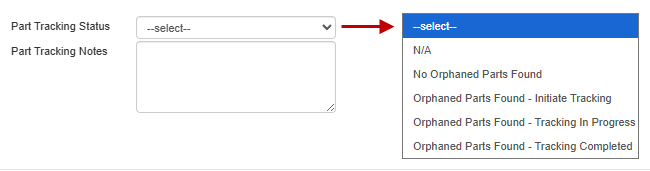
Part Tracking Status and Part Tracking Notes Fields
License
The License File Upload field in the Coverage table now automatically clears when the Start Date or End Date is modified. Read more about the license.
Sales & Marketing
Created email notifications to service.contracts@formulatrix.com when the Status field is updated to Not Interested or Received PO in the SC Sales Pipeline table. Warning messages are also displayed when creating or editing records with either status selected:
For Not Interested, users are reminded to send the TMSA (Time and Materials Service Agreement) if the system is not EOL (End of Life).
For Received PO, users are reminded to send TMSA for removed systems.
Added a Marketing Analytics section to the Sales Pipeline table to track lead sources. This section is automatically populated upon form submission and includes the following logic:
Captures “First Touch” and “Last Touch” data of source, medium, campaign, landing page, and timestamp.
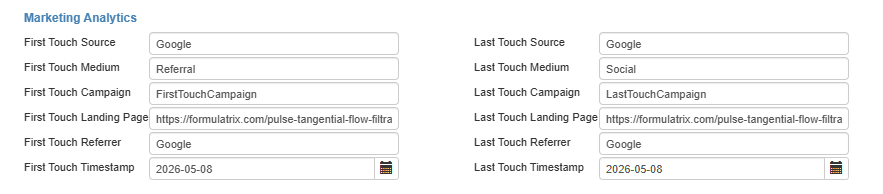
Marketing Analytics Section
The Origin 1 - Type field is automatically filled using First Touch Medium when it is blank.
Automatically creates a Contact record when a new pipeline is created without an existing contact and links it to the pipeline.
Added a yearly scheduler to automatically generate quarter and year selections for the next three years and remove outdated selections in the Order Date field dropdown of the Sales Pipeline table.
Bonded Zone & Warehouse
Added the Support Service Parts Disposal Out transaction to the FIFO Track table with the same FIFO cost calculation behavior as Support Request Out, Support Return Out, and Support Part Shipment Out transactions. Read more about FIFO Track.
Added validation to prevent items with a Service purchase type from being processed in warehouse and inventory-related actions, including:
Item Request Line Items and Part Replacement records.
Warehouse Transfer, Warehouse Adjustment, and Move Part to Different Bin actions.
Transaction Line Items confirmation processes.
Added validation to prevent users from creating, importing, or cloning Transaction Line Items records with the Status field set directly to Confirmed.
General
Updated the system to send error email notifications only for system-related errors. Validation errors caused by user input, such as missing required fields, no longer trigger email notifications.
Improved currency conversion handling by storing exchange rates in the database with automatic updates twice daily, reducing the need to retrieve rates from the external API for each request.
Added validation to prevent duplicate Client ID when creating or updating Account records.
Updated the cleanup scheduler for the External API Pending Actions table to run daily instead of every three hours and to extend the stored data period from one week to one month.
Performance
Improved performance when searching Interaction records through the Notes column by optimizing how search results are loaded, allowing faster data display and smoother navigation between pages.
Bug Fixes
Support
Fixed an issue where the Case History (Read Only) log incorrectly referenced the Current Severity value from the Cases table instead of the (Current Severity Level) value from the Case Entries table.
Quote
Fixed an issue where custom Product labels for Service line items in Service Contract quotes were not saved after saving or submitting the quote.
Sales & Marketing
Fixed incorrect USD Total conversion calculations for Service Estimate quotes in the Sales Orders table. Read more about sales orders.
eStore
Fixed an issue where eStore products continued to display as “onbackorder” even after stock was replenished. The inventory synchronization process now updates both stock quantity and stock status correctly. Read more about TIGA to eStore integration.
Bonded Zone & Warehouse
Fixed the following issues when importing CSV files containing duplicate entries into the Item Sub Assemblies (Children) related table in the Items table:
Duplicate records were created.
Rows were randomly skipped.
Read more about importing records.
Fixed the following issues in the Transaction Line Items (TLI) table for auto-generated records created through Parts Disposal Request:
The Confirmation Date field was not updated for auto-confirmed records with FSE (Field Service Engineer) warehouse.
The In Stock Before and In Stock After values were calculated incorrectly for FSE warehouse and Formulatrix warehouses mark as Support Warehouse.
Storage and UoM values were not linked correctly in the detail view for FSE warehouse.
General
Fixed the following issues in the Item Requests table:
The Source Warehouse field remained editable for the Installed Product Shipment (loaner/return) for Repair type. This field is now locked.
Automatically generated return shipment request for the Installed Product Shipment (loaner/return) for Repair and Swap Request types incorrectly populated the Return Serial Number field instead of leaving it blank.
Fixed the error message displayed for unauthorized users during the Start Processing Request action for Parts Disposal Request in the Item Requests table to indicate that only the “Support Requests Warehouse Processor” group is allowed.
TIGA Cadence 11.4.1
April 28, 2026
What’s New
Parts Disposal Request
A new Parts Disposal Request type is now available in the Item Requests table to support the proper removal of faulty or discontinued parts from the FSE (Field Service Engineer) warehouse or the Support Warehouse. Upon creation or submission, TIGA automatically generates a Support Service Parts Disposal Out transaction to record inventory reduction for disposal.
Enhancements & Update
License
Updated the Temporary License table with the following changes:
Renamed System field to 1) Select System:.
Renamed the Temp License Not For Actual System checkbox to 2) Enter Values Manually.
Added the guidance text at the top of the section to instruct users on selecting from the available options. Read more about generating a temporary license.

Temporary License Table Updates
Sales & Marketing
Removed the “95%” option from the Probability field and updated existing Sales Pipeline records with a value of “95%” to “80%”.
Admin & Finance
Added the Item Category column from the Revenue Recognition Schedule table to the “Revenue Recognition Tracker” report to provide additional item classification details in the report output.
Bug Fixes
General
Fixed an error when navigating back to the Accounts table after opening a Case record from the Cases related table.
Resolved an issue where newly created tables in the Application Manager were not set as Is Active by default.
TIGA Cadence 11.4
April 18, 2026
What’s New
Standing Order for Consumables
Introduced a new Standing Order feature to support recurring shipments of Consumable items directly from the Sales Order. This feature eliminates the need for manual shipment creation for each delivery cycle.
The Admin team can easily define a delivery schedule by setting the start date, shipment frequency, and quantity per shipment. TIGA takes care of the rest by automatically generating all necessary Shipment records in advance.
For more information, refer to the Standing Order for Consumables.

Generate Standing Order Schedule
Enhancements & Update
Support
Made the following changes to the Cases table:
Renamed the Faulty Child Component field to Child Component in the detail and list views.
Added Summary (Auto-generated), Summary (Reviewed/Approved), and Case Notes Quality Score fields.
Repositioned the Response Times (Hours) section, Case Closed Reminder, and Case Closed Reminder Resolved fields to improve layout clarity.
Changed the LLM Search Tool (Beta) action to Open Fxit (LLM Chatbot). Clicking on it now opens fxit.formulatrix.com in a new browser tab, directing users to a support tool for Formulatrix product inquiries and troubleshooting.

Fxit Website
Moved the Products field from the third column to the second column of fields in the Items table detail view.
Removed “Currency rates error” email notifications during quote-related processes.
License
Added a Product column to the Feature Name field selection in the License Feature related table of the Temporary License table. Read more about the license feature.
Sales & Marketing
Improved rounding in Quote - Products pricing to ensure values are consistently rounded when synced to eStore. Read more about managing product catalogs for the eStore.
eStore
Product variants dropdown on the eStore now follows the configuration defined in TIGA instead of appearing in a random order.
Time Tracking
Added a total row for weekly biometric working hours in the “Timesheet Submitted” email for Pakistan employees, providing better visibility for HR and managers during approval. Read more about approving or rejecting timesheets.
General
Added an Is Active checkbox for Administrators to enable or disable fields and tables options across TIGA.
Bug Fixes
Support
Fixed an error that prevented users from creating or linking a Part Replacement record from the Cases table when the selected item existed in multiple bins within the same warehouse, including bins with zero quantity.
Sales & Marketing
Fixed an issue in which currency conversion failed during Sales Order creation due to external API usage limits, resulting in incorrect USD values and error emails. The API configuration has been updated to use separate credentials for testing and live environments.
eStore
Fixed an issue where product synchronization from TIGA to eStore failed when currency rate data was unavailable due to external API limitations.
General
Resolved an issue where the RFID Tag field in the Employee table was cleared after updating Pakistan employee records in the Employee HR table.
TIGA Cadence 11.3.1
March 26, 2026
Enhancements & Update
Admin & Finance
Updated Item Request “Submitted” and “Processing Started” email notifications for the following types to include sender and recipient details with correct address order and field mapping:
Non Inventory Request
Installed Product Shipment (loaner/return) for Repair
Swap Request
Bug Fixes
License
Fixed an issue where Permanent Licenses failed to activate in Rock Maker due to hidden special character inserted during license data generation. The license generation process has been updated to use a standardized format across environments.
Bonded Zone & Warehouse
Fixed an issue where the Recalculating Available Quantity action in the Work Order Line Items table caused the Discrepancy value to display a small negative number due to rounding errors.
General
Fixed an issue where Autotiga failed to process received emails, preventing Interaction records from being created.
TIGA Cadence 11.3
March 14, 2026
What’s New
Work Order Approval Email Shows Previous Approver Status
Approver 3 can now see the previous approvers and their approval status in the “WO NEED APPROVAL” email when Sending Email Later is enabled. This helps the final approver quickly review earlier approvals before taking action. Read more about approving or rejecting work orders.
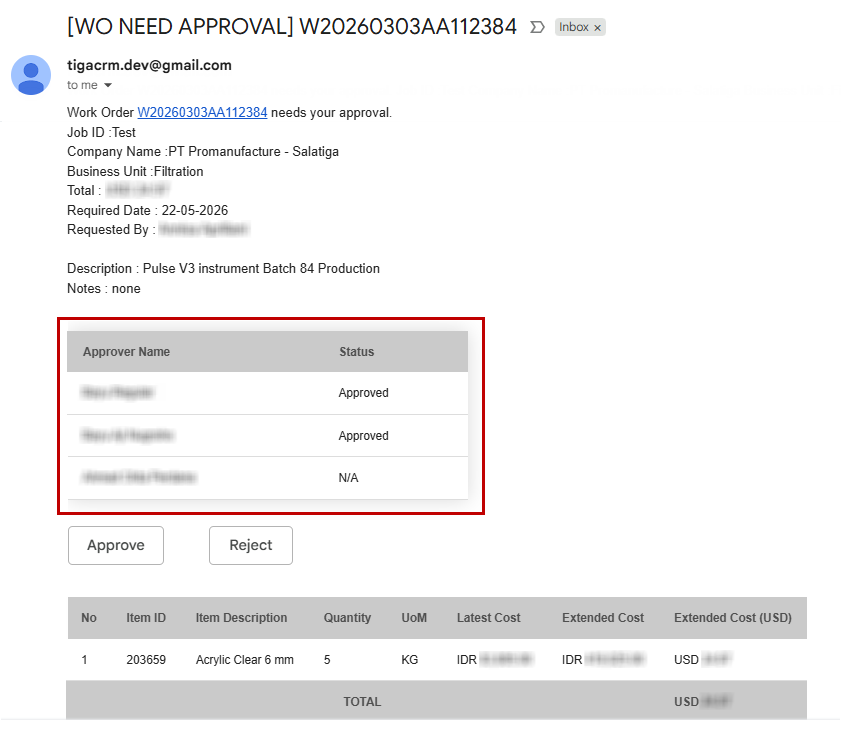
Approver Summary Table
Enhancements & Update
Support
Added the following options to the Create New Version action in the Items table:
No: Not A Service Part
Yes: Manufacturing Discontinued / Safe To Use
Yes: Manufacturing Discontinued / Do Not Use
Sales & Marketing
Added the following related tables to the Publications table in Postgres, ensuring complete data availability for Looker Studio reports:
Product Applications
Publication Keywords
Product Family
Authors
Bonded Zone & Warehouse
Added validations to prevent users from creating, cloning, or linking Shipment records to Service Purchase Orders.
Bug Fixes
Quote
Fixed an issue where the Quote - Product Options (Product) related table was hidden within the Quote - Products table, causing an error when deleting the record.
Sales & Marketing
Fixed an issue where the “Accounts - Where anniversary six month past install” scheduler failed to generate Customer Survey records.
Resolved an issue where a “Currency rates error” email was triggered after successfully creating a Sales Order (SO) record using the Receive PO action for non-USD quotes due to an external currency rate API limitation. Read more about creating sales orders automatically.
Bonded Zone & Warehouse
Fixed layout issues in the “WO NEED APPROVAL” email:
The line items and orders with similar job ID tables were displayed multiple times at each approval level.
The Approve and Reject buttons were misaligned at the bottom of the line items table for Approver 3 when Sending Email Later was enabled and Dynamic email was disabled.
TIGA Cadence 11.2.1
February 27, 2026
Bug Fixes
Bonded Zone & Warehouse
Fixed an issue where the Order Total was not automatically calculated when creating a Purchase Order (PO) Shipment.
TIGA Cadence 11.2
February 21, 2026
What’s New
Purchase Order Types: Goods vs. Service
TIGA introduces Purchase Order Type to clearly differentiate Goods and Service Purchase Orders (POs), ensuring each follows the correct operational flow.
Goods POs follow the standard purchasing process, which includes creating shipments, receiving at the warehouse, and preparing customs documentation when needed.
Service POs are processed without shipment or warehouse receiving steps.
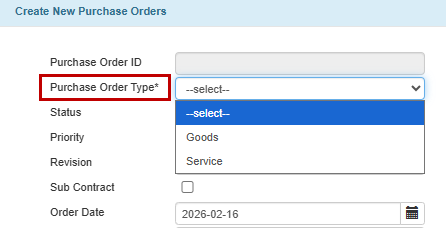
Purchase Order Type Field in the Purchase Orders Table
A newly added Purchase Type field in the Item Categories table ensures that Goods and Service items can only be selected within the appropriate Purchase Order Types.
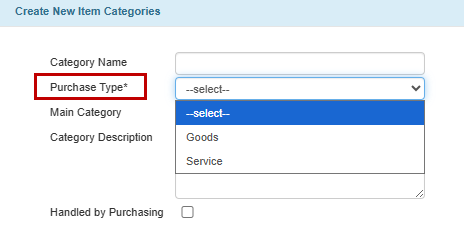
Purchase Type Field in the Item Categories Table
Enhancements & Updates
Support
Removed unnecessary email notifications during Part Replacement record creation when the related Quote - Product record already exists. Read more about logging part replacements.
Updated Google Calendar and Account Visits table integration to dynamically generate calendar entries based on a configurable number of future weeks in the Settings table.
Enhanced the Items table as follows:
Service Part Status field updates now automatically copy the Item Description value to the Base Description field for items with only a single version.
The Previous Version and Next Version fields now automatically synchronize when either is updated, ensuring both linked records remain aligned.
Spare Part PIC field is now automatically copied to a new item version when using the Create New Version action.
Made the following changes to the Account Visits table:
Full access to create, edit, and delete records is restricted to the “Account Visit Managers” group members. Other users can edit existing records, but cannot modify the Type, Account, Start Date, and End Date fields.
Added a validation to ensure product names are included in the Description field for Service and Installation visits. Users can append “(np)” if the visit does not involve any product.
Warning messages now only appear for the following request types when submitting item requests:
Field Service Parts Request
FSE Toolbox Request
Engineering Request
Implemented the following updates in the Cases table:
Expanded the Faulty Child Component field selector to include Installed Product records that are not linked to any Account, in addition to those owned by the selected Account.
The Faulty Child Component field can only be selected for the Hardware category.
Refined the Installation category logic by allowing the Product field to remain empty when the case is Open, and making it mandatory when the status is set to Closed.
Automatically populated the Instrument Name for RockImager products when the Name field is updated and the Instrument Name is empty.
Enhanced the Create New Version tool in the Items table as follows:
Renamed Latest Version to New Version.
Added the Service Part Status dropdown with blank, Yes: Pre-production, and Yes: Actively Manufactured / Safe To Use options.
Added the Spare Part PIC and Version Changes fields.
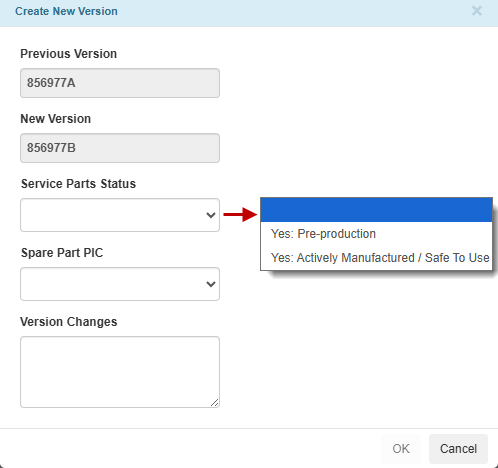
Create New Version Tool
Prevented the Leave Unchanged value from being saved in the Current Severity field of the Cases and Case Entries tables.
Quote
Updated the Request Invoicing action as follows:
Renamed the label from “Request Invoice using” to “Populate Draft Invoice From:”.
Renamed the option from Service Estimate / Purchase Order Data to Service Estimate. Selecting this option automatically populates and displays the draft invoice with Quote Line Items records for user verification before submission.
Sales & Marketing
Improved validation messaging for Demo and Demo (Online) interactions when the required Pipeline ID is missing.
Bonded Zone & Warehouse
Added the following changes to the Purchase Orders table:
Displayed the Order Total field in the list and detail view for quick reference without needing to download the Purchase Order (PO).
Added validation to ensure that Shipping Charges and Other Charges use the same Currency as the PO.
Bug Fixes
Support
Fixed issues related to Google Calendar:
Google Calendar entries were not cleared after the related Account Visit records were deleted in TIGA.
The Rebuild Calendar Entries For This Visit action caused a database error, preventing Google Calendar entries from being recreated.
Resolved an issue where selection lists in certain fields did not appear when creating a Case Entry record.
Fixed an issue where deleting an Item record with linked versions displayed a confusing warning message requiring manual unlinking. The system now automatically clears the related Previous Version and Next Version fields when a record is deleted.
Sales & Marketing
Resolved an error that prevented the system from creating a Sales Order (SO) record when using the Request Invoicing action with the CRM Data option. The issue also affected SO creation via eStore and Credit Invoice creation. Read more about creating a sales order.
Fixed an issue where Contact records could not be created due to a validation restricting email domain extensions to a maximum of six characters.
Bonded Zone & Warehouse
Fixed the following issues when using the Request Part action:
An item with a Main Category of Process was incorrectly included in the request.
The process failed when the related Work Order (WO) record contained special characters in the Job ID field. Read more about requesting parts
Fixed the following issues in the Purchase Orders table:
The Reject Note field appeared truncated in the Quick Approval dialog when the PO had more than nine line items. Read more about approving or rejecting purchase orders.
The Exchange Rate was not updated when the Warehouse recipient was changed to a warehouse with a different currency.
Resolved an issue where Bin names in the generated “Form Request Part” PDF were not displayed in alphabetical order.
General
Fixed an issue where importing records containing combined currency and amount values could unintentionally delete existing data instead of updating it.
TIGA Cadence 11.1.1
January 27, 2026
Enhancements & Updates
Support
Updated a billable case validation to apply only during case creation.
License
Made the Key field read-only when auto-populated from the selected System or Product field. It is editable only when no key is available.
Updated the warning message displayed when generating a Temporary License record without a linked License Feature and sorted the available feature list for better clarity.
Improved error messages in the Temporary License table to inform users that:
The License Feature record is already linked to another Installed Product record.
The License Feature record cannot be edited from the Temporary License table and must be edited from the Installed Products table.
Bonded Zone & Warehouse
Restructured the “Form Request Part” PDF as follows:
Added Total Qty and WO/WOC Job ID columns.
Reverted the page orientation to portrait.
Removed unnecessary header information to provide more space for the table.
Reorganized the table layout to reduce white space and better display additional columns.
Replaced barcodes with QR codes.
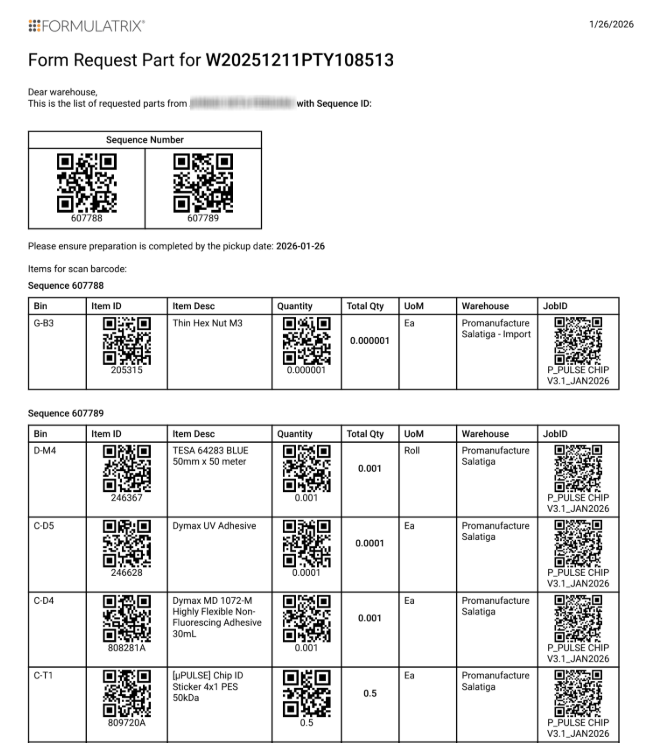
New Form Request Part
Read more about requesting parts.
Bug Fixes
License
Fixed an incorrect validation message when creating a Temporary License record with empty input, ensuring the System field is validated first.
Fixed an issue where the Product value did not appear in the list view after creating a Temporary License record when selecting a System field.
Sales & Marketing
Corrected currency conversion logic to ensure the Line Item CA Total USD value in the Sales Order Line Items table is calculated using the USD Conversion rate from the Sales Orders table.
Bonded Zone & Warehouse
Fixed an error where the Quick Approval action in the Purchase Orders table from succeeding on the first attempt.
Fixed an error preventing users from using the Automate Scan Barcode tool for Shipment Request Out transactions.
Fixed missing and incorrect email recipients when force-closing a Work Order record.
Resolved an issue where the “Form Request Part” PDF displayed incorrect header content and table rows were not rendered properly across multiple pages. Read more about requesting parts
Fixed an issue where the Expected Quantity did not always match the Quantity value for the Issued Out transaction. Read more about creating or editing transaction line items.
Time Tracking
Fixed an issue where the In Office Total time loaded slowly and was incorrectly shown as "0h” after Pakistan employees submitted their working time in the Fill Timesheet wizard.
General
Fixed an issue where the ID field of the User table in the Security application could temporarily become editable. It now remains read-only at all times.
Fixed an issue where submitted Formulatrix website forms were not created in TIGA due to failures in Autotiga email processing.
TIGA Cadence 11.1
January 17, 2026
What’s New
Automatic Update Without Browser Refresh
The system now automatically loads the latest updates after new releases, eliminating the need for manual browser refreshes. This ensures a smoother experience and prevents issues caused by outdated content.
Request Part Supports Multiple Job IDs per Item
The Request Part feature now allows the same item to be requested under different projects or Job ID when using the Import Using CSV option. This enables requesters to split one Item ID into multiple request lines, each associated with a specific WO/WOC Job ID, making cost tracking across multiple projects more accurate and transparent. Read more about requesting parts
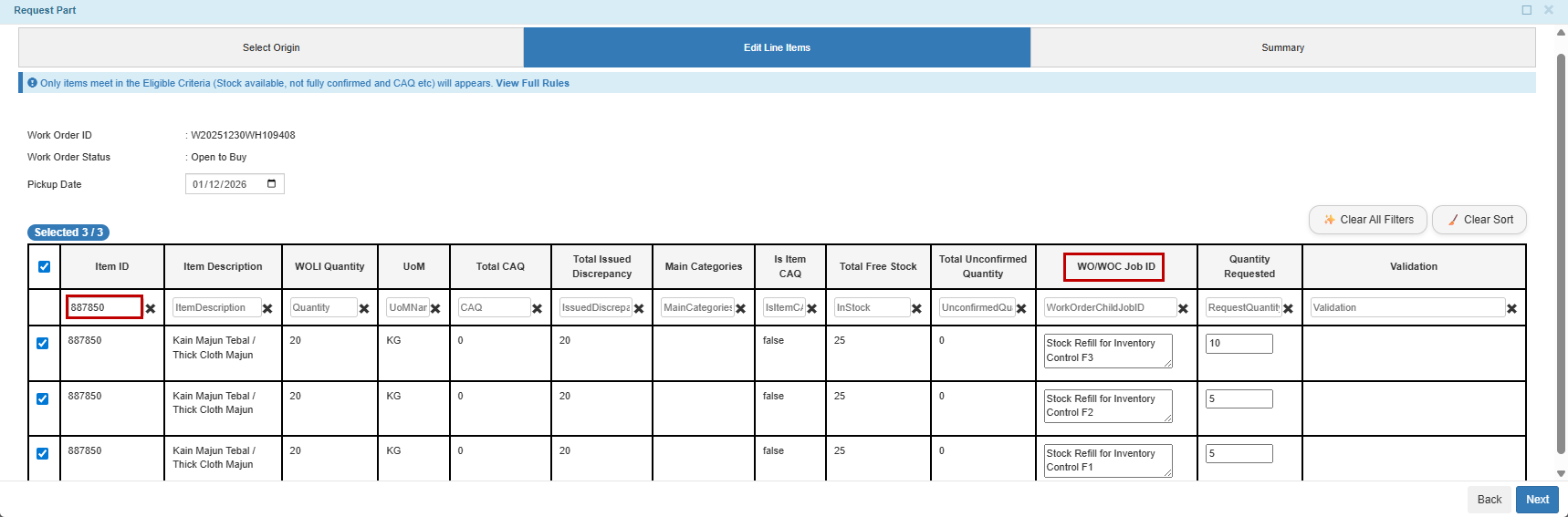
One Item ID with Multiple WO/WOC Job ID
Automated Customer Survey Emails and Feedback Tracking
Implemented automated workflow for “Customer Survey” and “Support Team Visits That Are Missing Feedback” emails to improve efficiency and minimize manual processing. TIGA now automatically selects relevant contacts, sends the survey link directly, and records customer responses directly into the Customer Surveys and Account Visits tables.
Enhancements & Updates
Support
Notification emails that include a “Service Estimates Info” section will have the line items sorted by the Order column from the Quote Line Items table.
Automatically append notes to the Notes field in the Transactions table when Item Requests records are created manually or via the Receive Items action.
Only allowed the “Product Managers” group members to create records in the Retrofits table.
Improved version relationship handling in the Hardware Versions table:
Updating a Prior Version field now automatically updates the corresponding Next Version.
The Next Version field is now read-only.
Added a validation to prevent users from marking an Account Visit record as Visit Completed when the Contact Name field is empty.
Only members of the “FSE Warehouse Managers” group can use the Warehouse Adjustment action for FSE warehouses in the Item Inventories/Related Tables of the Warehouses table.
Updates the Cases table as follows:
Made the Product field mandatory for PM and OQ categories.
Added a Warranty Start Date column to the Product field selector.
Only members of the “Support Managers” group can create certain billable case categories: PM, OQ, Pre-Install, Consumables, Deinstall, Reinstall, Sales, General, Internal/General, and Internal/Support Team.
Added new fields to detail and list views of various tables:
Added a Next Version column to the list view of the Items table.
Added the Country field to the detail and list views in the States table.
Added new Work In Progress - Ignore sections in the Accounts table to display shipping and billing state-related fields.
Moved the ID field to the top and added the Keywords field in the Common Issues table.
License
Moved the Temp License Key field from the Product Family to the Product Type table. As a result:
The Key field in the Temporary License table now correctly populates based on the selected System or Product.
The Product field in the Feature table now refers to the Product Type table, rather than the Product Family.
Added warnings and validations when attempting to:
Generate a license without a linked License Feature record. The warning displays a list of available features based on the selected Product Type, including a CLOSE button to help users complete the license correctly.
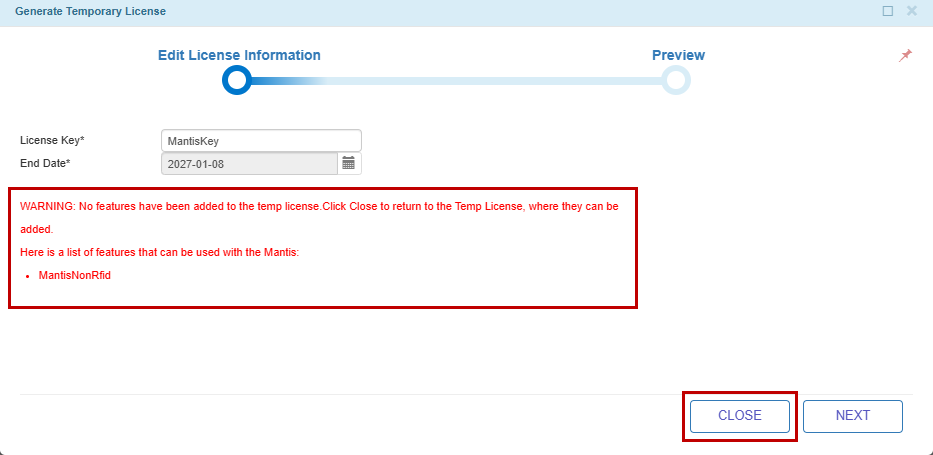
A New Warning Message
Edit License Feature record directly from the Temporary License table or link license features already associated with another Installed Products record.
Quote
Updated the terms in the “Payment” section of Service Contract quotes to reflect the latest Formulatrix standard payment terms.
Sales & Marketing
Improved the logic in the Automatic Origin Calculation table by restricting record creation and deletion, and allowing 6‑digit decimal precision for Override Weight (%) values.
Bonded Zone & Warehouse
Added a confirmation dialog when closing a Work Order (WO) from Open to Buy status to prevent accidental closures. Users must now provide a reason, which is emailed to the Accounting team for review and final decision.
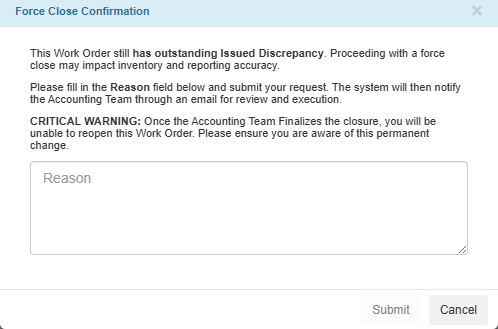
Force Close Confirmation Dialog
Improved the confirmation process of Issued Out transaction using Scan Barcode, Bulk Confirm, or manual update to handle the same Item ID with multiple WO / WOC Job ID.
Set Formulatrix Trading FZCO (DAFZA) as the default Customer Name for auto‑generated customer invoices.
Production
Only members of the “Document Control Member” group can create, update, or delete records in the Document Control table. Read more about Document Control and Revision History.
Time Tracking
Biometric System (Pakistan) has now been integrated in TIGA in the Fill Timesheet wizard. Pakistan Employees can view their Office duration in In Office DAILY TOTAL row.
Bug Fixes
Support
Resolved an error when using Quick View to view records in the Cases/Related Tables of the Common Issues table.
Comments
Fixed an issue where copying and pasting comments containing mentions (@) resulted in incorrect formatting. Read more about Comments.
Sales & Marketing
Fixed the following issues where:
CA Total USD was not calculated correctly in the Sales Order Line Items table.
Looker Studio dashboard links were not directing users to the correct TIGA records.
Attachments processed via Autotiga email interactions were incorrectly linked to a different SC Sales Pipeline record.
Bonded Zone & Warehouse
Fixed an issue where Purchase Order Line Items records could still be edited when opened in a new browser tab after the purchase order status was set to Sent.
Fixed an issue where eligible items with available stock were not displayed in the Request Part wizard for WO from PT Formulatrix Indonesia due to incorrect Committed Available Quantity (CAQ) filtering. Read more about the eligible items for requesting parts.
General
Fixed an issue where the system created duplicate records during CSV import when selecting a Key other than Email in the Contacts table. Read more about importing records.